Contents
show
Power of AI in Decision-Making
AI consulting & automation has become one of the most practical growth levers for U.S. businesses in 2026. The conversation has moved beyond “Should we use AI?” and into a more important question: “Where can AI actually improve decisions, reduce manual work, and create measurable business value without adding unnecessary risk?”
That shift matters because AI adoption is rising, but business results are uneven. McKinsey’s 2025 global AI survey found that 88% of respondents said their organizations regularly use AI in at least one business function, up from 78% the year before, yet most organizations were still in experimenting or pilot stages rather than full-scale transformation. This is exactly where AI consulting & automation becomes valuable: it helps companies move from scattered tool usage to structured workflows, governance, training, and measurable outcomes.
U.S. business adoption is also accelerating, but not evenly. Census Bureau BTOS data from December 2025 to May 2026 showed overall business AI usage hovering between 17% and 20%, while 20% to 23% of businesses expected to use AI in the next six months. Larger firms were ahead: 37% of firms with at least 250 employees reported using AI in business operations. For small and midsize companies, this creates both pressure and opportunity. Competitors may already be using AI for content, customer support, sales, operations, analytics, documentation, and workflow automation.
At the same time, business leaders need to be careful. AI can improve productivity, but it can also create mistakes, privacy risks, compliance gaps, tool sprawl, and “shadow AI” if employees use systems without clear rules. IBM’s 2025 Cost of a Data Breach Report found that 97% of organizations reporting an AI-related security incident lacked proper AI access controls, and 63% lacked AI governance policies to manage AI or prevent shadow AI.
This guide explains how AI consulting & automation works, how it supports better decision-making, which workflows are best suited for automation, how AI-powered virtual assistants fit into implementation, when to hire consultants versus in-house talent, and how growing businesses can build a practical AI roadmap for 2026.
What Is AI Consulting & Automation?

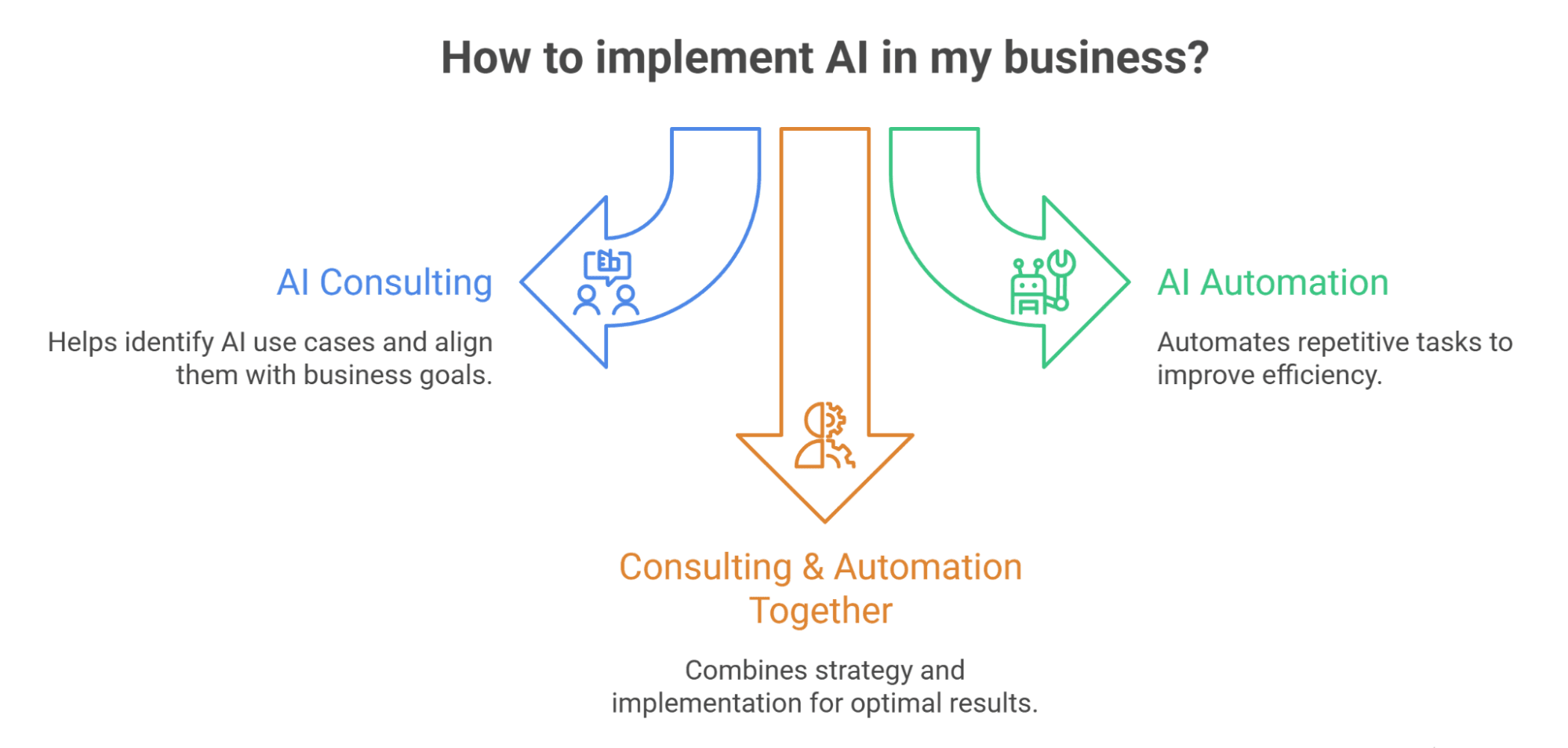
AI consulting & automation is the process of identifying where artificial intelligence can improve business decisions, workflows, productivity, customer experience, and operational efficiency, then designing and implementing systems that make those improvements repeatable. It combines strategy, workflow design, tool selection, automation setup, employee training, and governance.
1. AI Consulting Defined
AI consulting helps businesses understand where AI can create value and where it should not be used. A consultant or AI implementation partner reviews the company’s current processes, tools, data, team structure, bottlenecks, and goals. Then they recommend practical use cases, such as automating customer support drafts, improving sales follow-up, summarizing calls, analyzing reports, generating content briefs, building marketing workflows, or creating internal knowledge assistants.
Good AI consulting is not about recommending the trendiest tool. It is about matching business problems to the right AI-enabled solution. A consultant should ask what the company wants to improve: speed, accuracy, cost, customer response time, lead conversion, reporting quality, decision-making, documentation, or team capacity. Then the consultant should help rank AI projects by business value, feasibility, risk, and urgency.
This is especially important because many businesses experiment with AI tools before they define the workflow. That often leads to scattered usage, duplicated subscriptions, inconsistent outputs, and unclear ROI. Structured consulting helps turn AI from a novelty into an operating system.
2. AI Automation Defined
AI automation uses artificial intelligence to complete, accelerate, or assist business tasks that previously required manual effort. This can include drafting emails, categorizing support tickets, summarizing meetings, extracting data, updating CRM records, analyzing spreadsheets, scoring leads, generating reports, routing requests, creating content outlines, or triggering follow-up workflows.
Traditional automation follows fixed rules: if this happens, do that. AI automation adds judgment-like capabilities, such as classifying text, summarizing context, generating drafts, identifying patterns, and recommending next steps. For example, a traditional automation may send a confirmation email after a form submission. An AI automation may read the inquiry, classify the customer’s need, draft a personalized response, update the CRM, and assign a priority level.
Businesses exploring AI workflow automation should start with repeatable tasks that have clear inputs, clear outputs, and low-to-moderate risk. The best early automations support people rather than fully replacing judgment.
3. Why Consulting and Automation Work Better Together
Consulting and automation should not be separated. Consulting without implementation can become a strategy that never changes daily work. Automation without consulting can create brittle workflows that do not match business priorities. The strongest results happen when a business first defines the right use case, then builds the automation, trains the team, and measures the result.
For example, a company may say it wants to “use AI for sales.” A consultant can translate that vague goal into specific workflows: lead enrichment, CRM cleanup, call summary generation, follow-up email drafting, proposal support, objection tracking, and weekly pipeline reporting. Automation can then turn those workflows into repeatable systems.
This is also where a virtual assistant for AI implementation can be useful. A consultant may design the AI strategy, while a trained VA can help maintain prompts, update workflows, review outputs, document processes, and keep automations running day to day.
Why Businesses Are Investing in AI Consulting & Automation
Businesses are investing in AI consulting & automation because the value of AI depends on execution. Buying tools is easy. Redesigning workflows, protecting data, training staff, and measuring ROI are harder. Companies need a practical path from experimentation to adoption.
1. AI Adoption Is Growing, but Many Teams Still Need Structure
- AI use has expanded quickly, but usage does not always mean maturity because many companies are still experimenting without standardized processes.
- The Federal Reserve’s 2026 note on AI adoption in the U.S. economy reported that Census business survey data showed about 18% of firms had adopted AI by year-end 2025.
- The same Federal Reserve analysis cited a senior-leader survey estimating that 78% of the labor force worked at firms that had adopted AI, showing that adoption can look very different depending on how it is measured.
- For business owners, the takeaway is that AI is already inside the economy, but it is unevenly distributed and unevenly managed.
- Some companies have enterprise AI programs, while others have employees using ChatGPT, Claude, Copilot, Gemini, or automation tools without formal processes.
- AI consulting companies like TaskVirtual help create structure by identifying where AI is already being used, what risks exist, which workflows deserve improvement, which tools should be standardized, and how teams should be trained.
2. Productivity Gains Depend on Workflow Redesign
- AI can save time, but only when workflows are redesigned around it rather than simply adding AI to an inefficient process.
- If a team adds AI on top of a broken workflow, the process may become faster but not necessarily better.
- The real productivity gain comes from deciding which steps should be removed, automated, reviewed by humans, or redesigned around better data.
- Deloitte’s 2026 State of AI in the Enterprise report found that worker access to AI rose by 50% in 2025.
- The same report noted that only 34% of companies were truly reimagining the business, even as AI delivered efficiency and productivity gains.
- This is why AI automation strategy matters: a company may use AI to draft a report faster, but the larger opportunity may be redesigning the entire reporting process from data collection to executive summary delivery.
3. AI Can Improve Decision-Making When Data and Context Are Strong
- The existing pillar article on the power of AI in decision-making can become the foundation for a broader AI consulting & automation hub because decision quality is one of AI’s strongest business use cases.
- AI can help teams identify patterns, summarize large amounts of information, compare scenarios, detect anomalies, and generate options for review.
- AI does not automatically make decisions better because it needs accurate data, clear business rules, relevant context, and human oversight.
- A model can summarize customer feedback, but leadership must decide what to prioritize based on strategy, risk, and business goals.
- A tool can flag sales pipeline risk, but a manager must interpret whether the issue is lead quality, pricing, timing, messaging, or follow-up discipline.
- When businesses combine automated data analysis with human review, they can move faster while still protecting decision quality.
Core AI Consulting Services for Growing Businesses

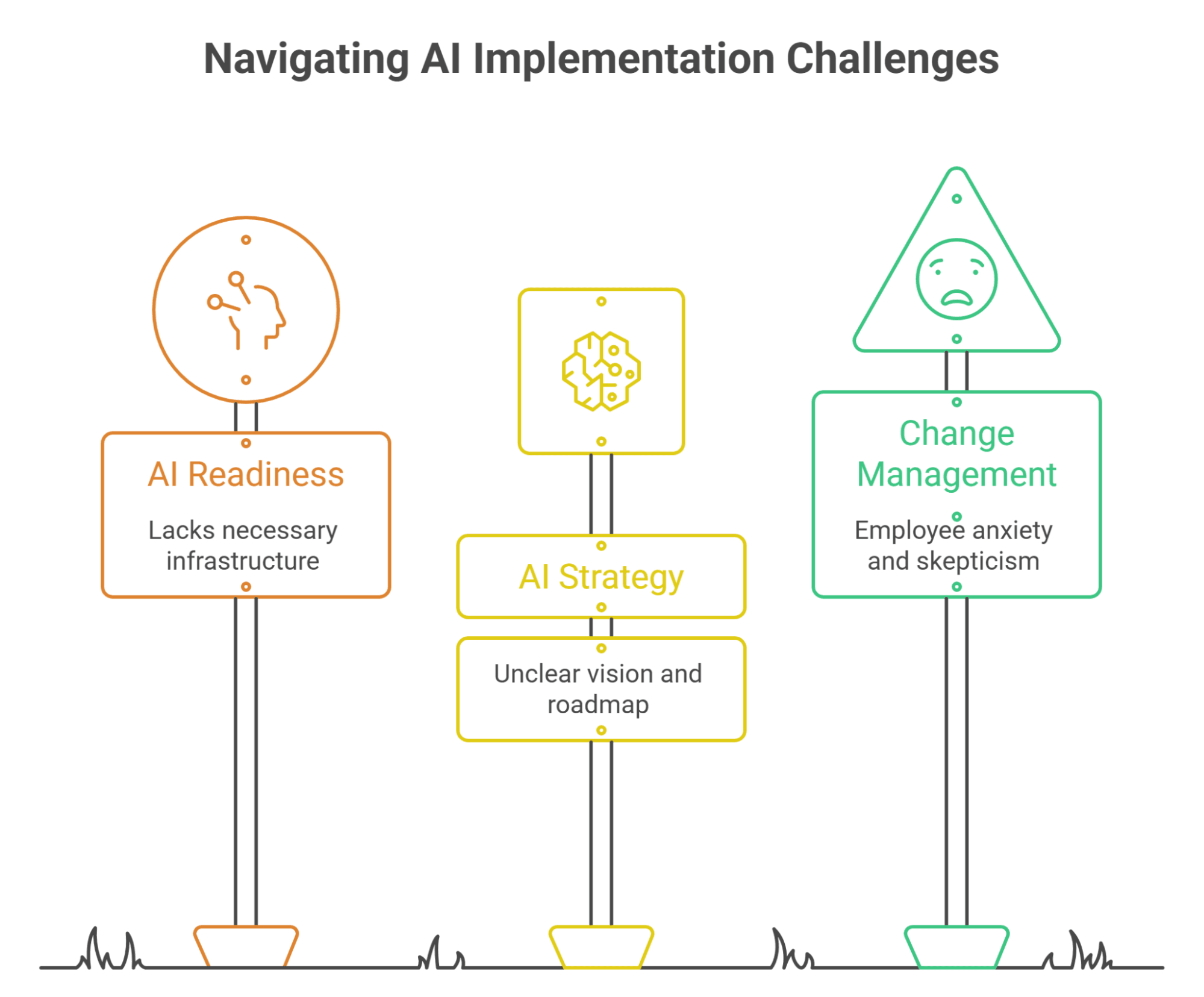
AI consulting services usually fall into a few practical categories: strategy, workflow analysis, tool selection, implementation, governance, training, and measurement. A business may need all of them or only a focused engagement around one function.
1. AI Readiness Assessment
An AI readiness assessment evaluates whether a business is prepared to use AI effectively. It looks at tools, data quality, workflows, team skills, security practices, leadership alignment, and business priorities. The goal is to identify where AI can help now, where groundwork is needed, and where AI should not be used yet.
For example, a company with messy customer data may not be ready for advanced AI-driven personalization, but it may be ready for CRM cleanup, support ticket categorization, and meeting summaries. A company with strong documentation may be ready for an internal knowledge assistant. A company with a strong marketing team may benefit from AI-assisted content workflows and funnel automation.
Readiness assessment prevents random implementation. It gives leaders a realistic view of their starting point and helps avoid overinvesting in advanced tools before the business has clean data, defined workflows, and responsible access controls.
2. AI Strategy and Roadmap Development
An AI strategy defines where the business will use AI, why those areas matter, what success looks like, and how implementation will happen. The roadmap turns that strategy into phases, such as quick wins, workflow pilots, tool standardization, team training, governance, and scaled automation.
A good AI roadmap should prioritize use cases based on impact and feasibility. High-impact, low-complexity projects should usually come first. Examples include meeting note automation, customer inquiry triage, email drafting, proposal support, internal search, content repurposing, and weekly reporting. More complex projects, such as predictive analytics, AI agents, and end-to-end workflow automation, should come after the business has stronger foundations.
A roadmap also helps leaders decide whether they need outside consultants, internal champions, virtual assistants, automation specialists, or in-house AI roles. This makes the comparison between AI consulting vs. hiring in-house more practical.
3. AI Implementation and Change Management
Implementation is where AI consulting becomes operational. This may include setting up tools, building automations, creating prompt libraries, integrating software, training employees, documenting workflows, testing outputs, and creating review rules.
Change management matters because employees may be excited, skeptical, anxious, or confused about AI. Pew Research Center found that 52% of U.S. workers were worried about the future impact of AI in the workplace, while 36% felt hopeful and 33% felt overwhelmed. Businesses need to address those emotions directly. AI implementation should not feel like a vague threat; it should be explained as a structured improvement to specific workflows.
The most successful implementation plans define what AI will do, what people will still own, how quality will be reviewed, what data rules apply, and how success will be measured. This protects trust and adoption.
AI Automation Use Cases by Business Function
AI consulting & automation becomes easier to understand when it is mapped to real business functions. Most companies do not need “AI everywhere.” They need targeted workflows that reduce manual effort and improve output quality.
1. Sales and Lead Management Automation
- Sales teams can use AI automation to enrich leads, summarize discovery calls, draft follow-up emails, update CRM records, score opportunities, categorize objections, and prepare pipeline reports.
- These workflows reduce the amount of time salespeople spend on admin and increase the consistency of follow-up.
- After a sales call, AI can summarize the conversation, identify pain points, draft a follow-up email, recommend next steps, and update deal notes.
- A human should still review and send high-value sales communication, but the preparation time can drop significantly.
- This is especially useful for small teams that do not have dedicated sales operations staff.
- AI can also support lead nurturing by segmenting leads by interest, generating personalized email drafts, identifying inactive opportunities, and flagging high-value prospects.
2. Marketing and Funnel Automation
- Marketing teams can use AI automation for content ideation, email sequences, ad copy drafts, landing page variants, audience segmentation, campaign summaries, lead scoring, and funnel reporting.
- The goal is not to flood channels with generic AI content; it is to speed up research, production, testing, and optimization while protecting brand quality.
- A practical marketing funnel automation setup may connect lead forms, CRM tags, email workflows, retargeting audiences, content downloads, and sales alerts.
- AI can help classify leads, recommend next content, draft follow-up messages, and summarize conversion patterns.
- Businesses that want stronger conversions can use marketing funnel automation to connect campaigns with sales follow-up.
- This is especially valuable when leads come from multiple channels and teams need a consistent process for turning attention into pipeline.
3. Operations, Admin, and Customer Support Automation
- Operations and admin workflows are often ideal for AI automation because they involve repetitive information handling.
- AI can summarize meetings, route internal requests, draft SOPs, classify documents, extract information from forms, update task boards, and generate weekly status reports.
- Customer support teams can use AI to categorize tickets, draft replies, summarize customer history, suggest knowledge base articles, and identify recurring complaints.
- Support automation should be designed carefully so customers are not trapped in poor chatbot experiences or blocked from urgent escalation.
- Sensitive customer cases should be routed to a human quickly, especially when they involve billing, legal concerns, complaints, or account-specific issues.
- An AI-powered virtual assistant can bridge automation and human execution by using AI to draft, organize, summarize, and route work while still applying judgment.
AI Tools for Productivity and Workflow Automation

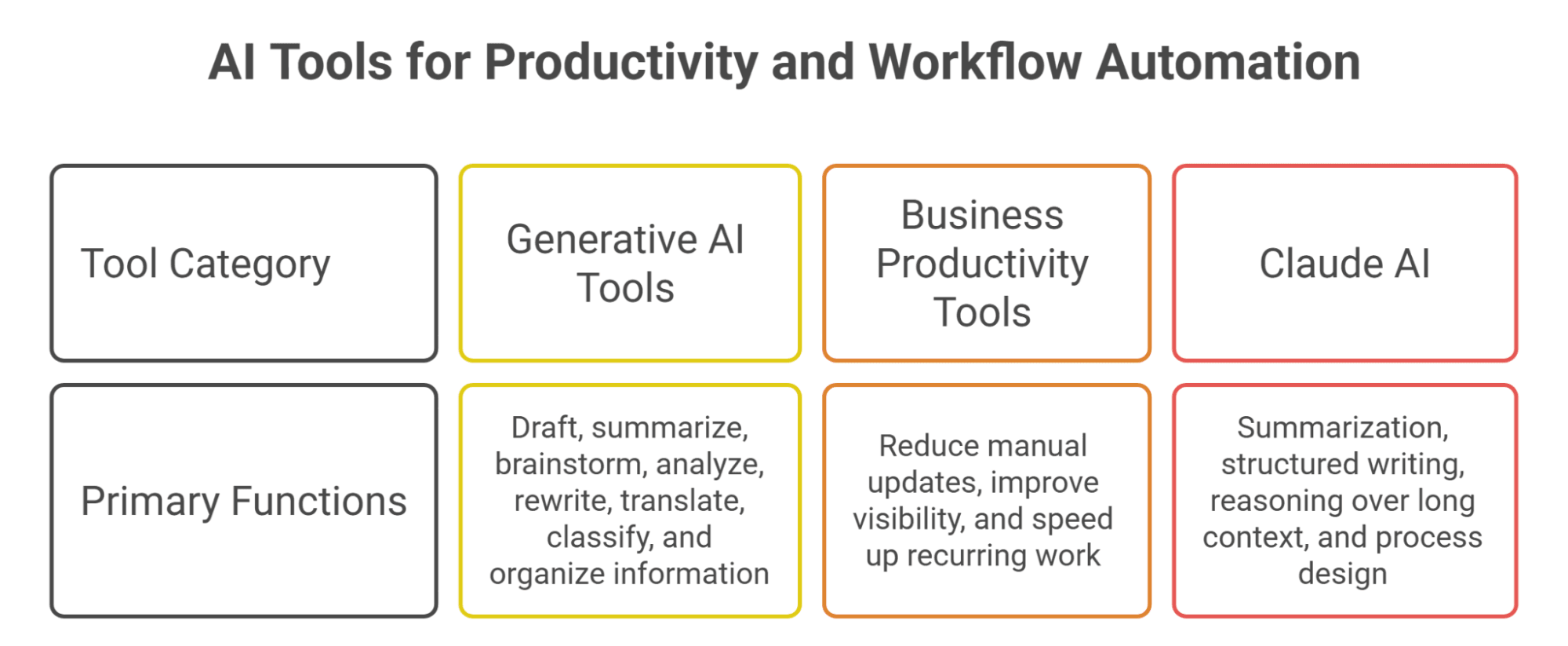
The AI tools landscape is crowded. Businesses need to choose tools based on workflow fit, security, integration, usability, and measurable value rather than hype. The right stack should reduce friction, not create more platforms to manage.
1. Generative AI Tools for Daily Productivity
Generative AI tools help teams draft, summarize, brainstorm, analyze, rewrite, translate, classify, and organize information. Common use cases include drafting emails, summarizing meeting notes, creating content outlines, generating FAQs, analyzing survey responses, preparing reports, and turning rough notes into structured documents.
Pew Research Center reported that 21% of U.S. workers said at least some of their work was done with AI in September 2025, up from 16% roughly a year earlier, while 65% still said they did not use AI much or at all in their job. This suggests a large adoption gap. Many businesses have not yet trained employees to use AI effectively, even when the work could benefit from it.
A practical guide to generative AI tools can help teams compare options, but the tool decision should follow the workflow decision. Start with the task, then choose the tool.
2. AI Tools for Business Productivity
Business productivity tools often combine AI with project management, CRM, document systems, calendars, email, analytics, and collaboration platforms. These tools help teams reduce manual updates, improve visibility, and speed up recurring work.
For example, AI-enabled project management tools can summarize task progress, flag overdue work, and draft status updates. CRM tools can suggest next steps or summarize customer activity. Document tools can create first drafts, extract action items, and organize knowledge. Analytics tools can generate plain-English summaries from dashboards.
A list of AI tools for business productivity can be useful, but businesses should avoid subscribing to too many tools at once. A smaller stack with clear ownership usually performs better than a large stack with no governance.
3. Claude AI and Workflow Automation
Claude and similar large language models can support advanced workflow automation because they are strong at summarization, structured writing, reasoning over long context, and helping teams design processes. Businesses may use Claude to analyze documents, draft SOPs, summarize research, generate content briefs, classify customer feedback, or support internal knowledge workflows.
Claude can also support more specialized use cases, such as SEO workflows and data analysis. For example, a business may use a Claude AI virtual assistant to help automate SEO research, content briefs, metadata drafts, and internal linking recommendations. Another business may use Claude to support data interpretation and reporting.
A practical approach to Claude AI workflow automation is to define the input, output, review step, and escalation rule. AI should not be dropped into a workflow without quality controls.
AI + Virtual Assistants: A Practical Implementation Model
For many growing businesses, the best AI implementation model is not AI alone. It is AI plus trained human support. A virtual assistant can use AI tools to complete tasks faster while still providing review, coordination, and accountability.
1. Why AI and VAs Work Well Together
- AI is strong at drafting, summarizing, classifying, and generating options, while virtual assistants are strong at coordination, judgment, follow-through, communication, and task ownership.
- Together, AI and VAs can create a practical support system for businesses that need efficiency but are not ready to build an internal AI department.
- AI can draft a customer response, while a VA can check tone, confirm context, and escalate sensitive issues.
- AI can summarize a meeting, while a VA can assign action items, update the project board, and follow up with stakeholders.
- AI can generate a content outline, while a VA can format the brief, add internal links, and schedule the work.
- A guide on how to use AI + VA together can help businesses identify where this hybrid model creates the most time savings.
2. What an AI Implementation VA Can Do
- An AI implementation VA can help set up prompt libraries, document workflows, test tools, organize outputs, maintain knowledge bases, update automation checklists, and monitor recurring AI-assisted tasks.
- They can help train teams by turning successful prompts and workflows into reusable SOPs.
- This role is different from a traditional administrative VA because it requires comfort with AI tools, process thinking, documentation, and quality review.
- The VA does not need to be a machine learning engineer, but they should understand how to use AI responsibly and consistently.
- AI implementation VAs can help maintain the day-to-day structure that keeps AI workflows from becoming scattered or inconsistent.
- Task Virtual’s own AI implementation service can be positioned around this practical gap: many businesses want AI outcomes, but they need help turning tools into repeatable, managed workflows.
3. How to Avoid Over-Automation
- AI plus VA support should not mean automating every possible task.
- Over-automation can create impersonal communication, quality problems, and fragile systems.
- The best workflows automate repetitive steps while keeping human review where judgment, customer trust, compliance, or brand voice matters.
- A useful test is to ask what happens if the AI output is wrong.
- If the consequence is minor, automation can be more aggressive; if the consequence affects a customer, contract, legal issue, financial decision, or brand reputation, human review should remain required.
- The strongest AI implementation teams build “human-in-the-loop” workflows where AI accelerates the work but people remain accountable for the result.
AI in Decision-Making: From Data to Better Choices

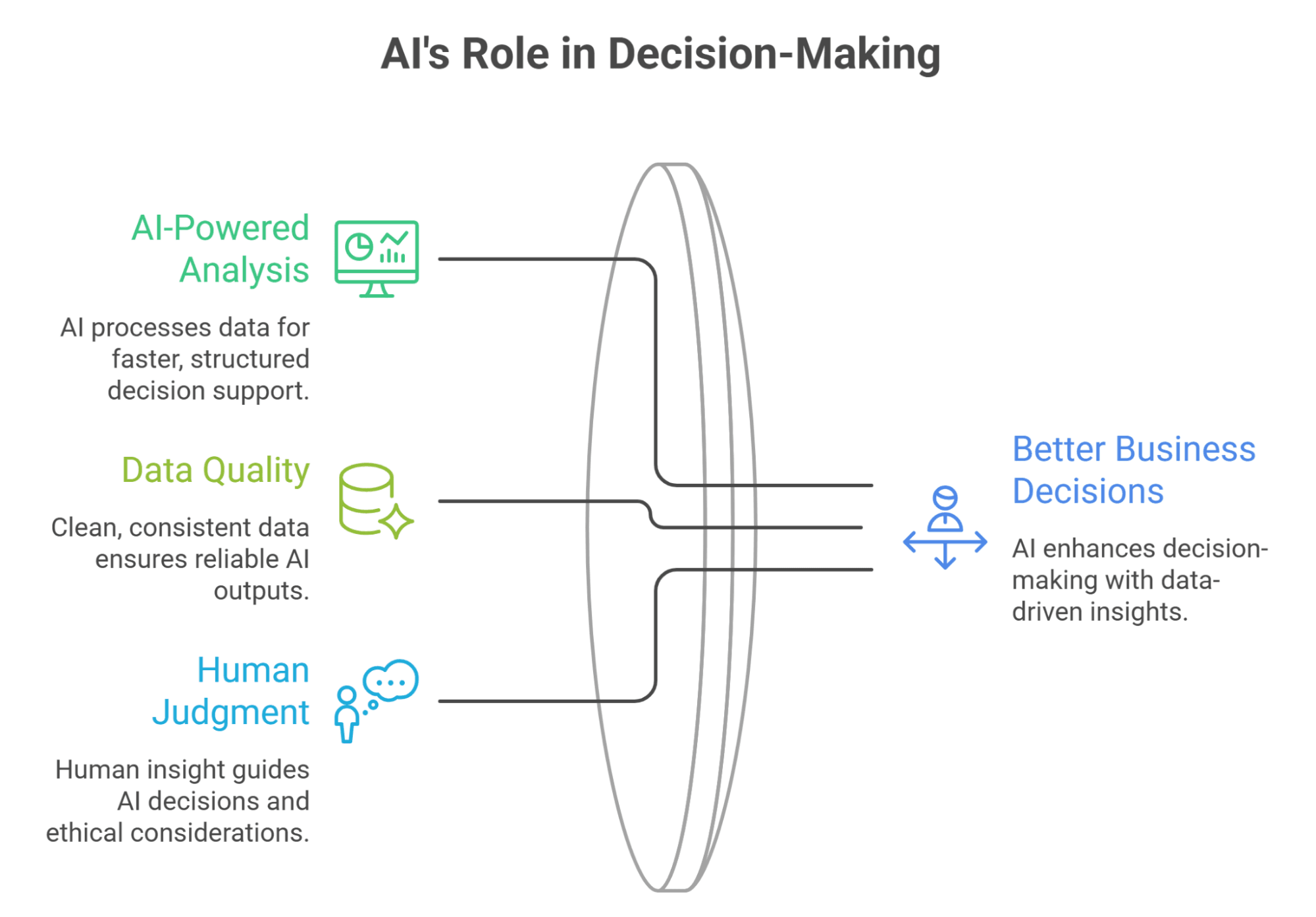
The original article on AI in decision-making is a strong foundation for this pillar page because decision support is one of the most valuable uses of AI consulting & automation. Businesses do not only need faster output; they need clearer choices.
1. How AI Improves Business Decision-Making
AI can support decision-making by processing large amounts of information, identifying patterns, summarizing evidence, comparing scenarios, and flagging anomalies. It can help leaders analyze customer feedback, forecast demand, evaluate marketing performance, review sales pipelines, summarize financial reports, and detect operational bottlenecks.
The value is speed plus structure. Instead of waiting for a manual report, a manager can get a draft summary, key drivers, risk flags, and recommended follow-up questions. This does not remove human judgment. It gives decision-makers a stronger starting point.
However, decision-making AI should be treated as decision support, not decision replacement. AI can suggest, rank, summarize, and analyze. Leaders must still consider context, ethics, risk, customer relationships, and business strategy.
2. Data Quality Still Determines AI Quality
AI systems are only as useful as the data and context they receive. If customer records are incomplete, sales stages are outdated, project notes are inconsistent, or reports are poorly structured, AI outputs may become misleading. Automation can speed up bad data just as easily as good data.
That is why AI consulting often begins with data readiness. Businesses need clean fields, consistent definitions, reliable sources, secure access, and clear ownership. For example, if two departments define “qualified lead” differently, AI-generated sales insights may create confusion rather than clarity.
Strong data practices also reduce risk. Businesses should define which datasets AI can access, which data must remain private, and which outputs require verification. This is especially important when AI is used for financial, legal, HR, medical, or customer-impacting decisions.
3. Human Judgment Remains Essential
AI can make analysis faster, but it cannot take responsibility for business outcomes. Humans must decide what matters, which trade-offs are acceptable, and how to act on AI-generated insight. This is why the best AI consulting frameworks include governance, review, and accountability.
Human judgment is also needed to identify bias, missing context, and unrealistic recommendations. For example, an AI tool may recommend cutting a low-performing customer segment, but a human leader may know that the segment is strategically important for referrals or future market entry.
AI improves decision-making when it expands human capacity rather than replacing leadership. The goal is not “AI decides.” The goal is “AI helps people decide better, faster, and with more evidence.”
Building an AI Workflow Automation Roadmap
An AI automation roadmap helps businesses move from experimentation to structured implementation. Without a roadmap, AI projects often become scattered pilots. With a roadmap, teams can prioritize use cases, reduce risk, and measure results.
1. Start With Workflow Mapping
- Workflow mapping identifies the steps, tools, people, data, and decisions involved in a process.
- Before automating, businesses should document how the work happens today, including inputs, outputs, handoffs, approvals, delays, repeated questions, and common errors.
- A simple workflow map might show that a customer inquiry arrives through a form, gets copied into a spreadsheet, receives a manual reply, gets assigned to sales, and later gets updated in a CRM.
- Once the steps are visible, the company can decide where AI and automation can help.
- Workflow mapping prevents poor automation because an unclear process may only become faster when automated.
- Clear maps make it easier to identify what should be automated, what should be redesigned, and what should stay human-led.
2. Prioritize Use Cases by ROI and Risk
- Not every AI idea should be implemented first.
- Businesses should prioritize use cases based on potential value, implementation difficulty, risk, and readiness.
- A high-value, low-risk workflow should usually come before a high-risk, complex workflow.
- Good first projects often include meeting summaries, email drafts, CRM cleanup, support ticket categorization, internal knowledge search, content repurposing, and weekly reporting.
- More advanced projects may include AI agents, predictive analytics, autonomous workflows, and multi-system integrations.
- McKinsey’s 2025 survey found that 23% of respondents said their organizations were scaling an agentic AI system somewhere in the enterprise, while another 39% had begun experimenting with AI agents, reinforcing the need for governance before advanced rollout.
3. Measure Business Outcomes, Not Tool Usage
- A common AI mistake is measuring usage instead of outcomes.
- A team may use AI every day and still fail to improve customer response time, revenue, cost, accuracy, or employee workload.
- The real question is whether AI changes business performance.
- Useful metrics include hours saved, turnaround time, error rate, customer response speed, content output, lead follow-up completion, support ticket resolution, report preparation time, and employee satisfaction.
- For decision-making workflows, metrics may include forecast accuracy, faster reporting cycles, and better visibility into risks.
- AI consulting should define success before implementation so businesses do not confuse activity with value.
Governance, Security, and Responsible AI Use

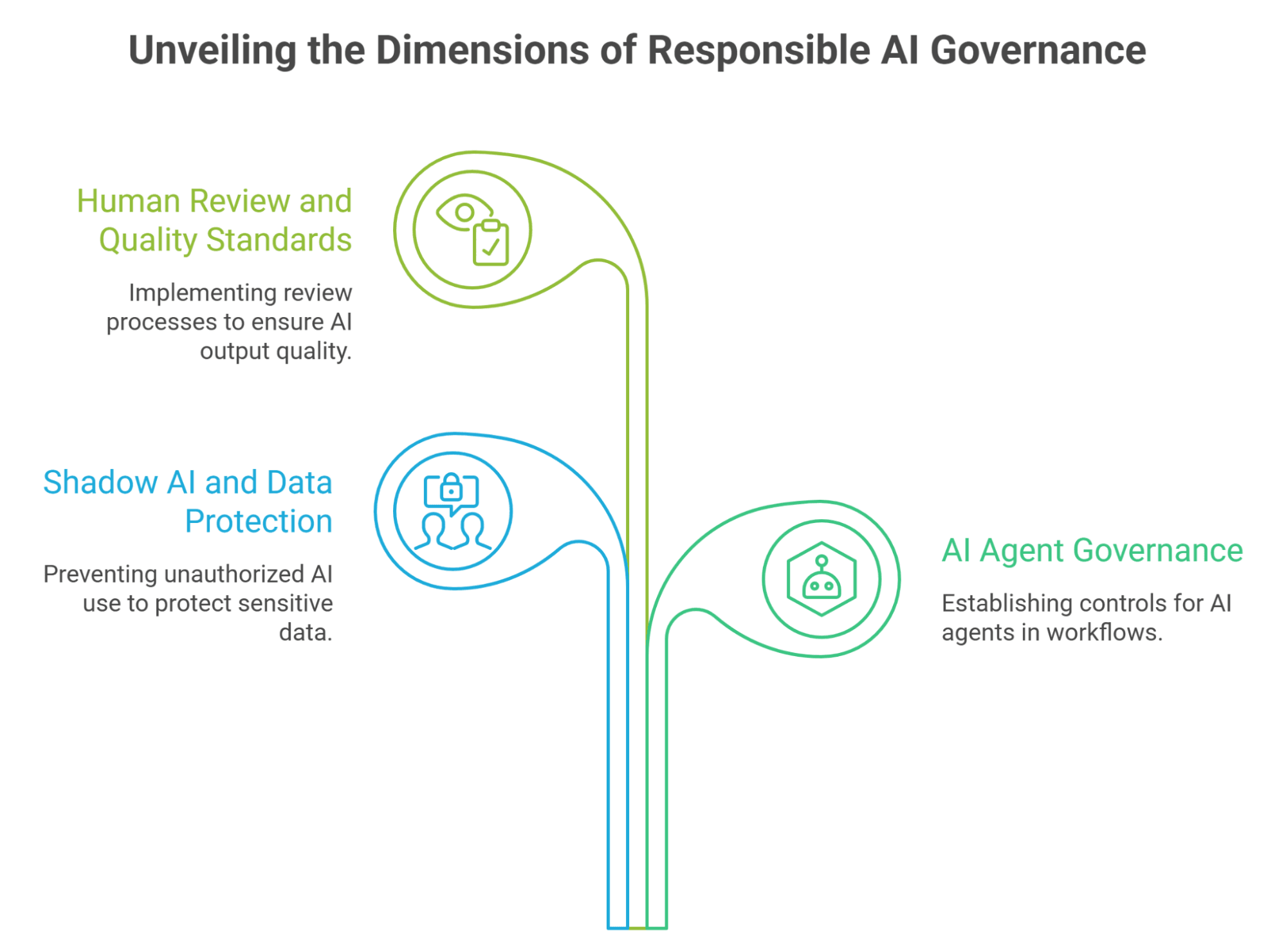
AI consulting & automation must include governance. Without clear rules, employees may upload sensitive data to public tools, rely on inaccurate outputs, or create customer-facing content without review. Responsible AI is not optional; it is part of making AI useful.
1. Shadow AI and Data Protection
Shadow AI happens when employees use AI tools without approval, visibility, or security review. This can expose customer data, confidential documents, intellectual property, financial information, or internal strategy. It can also create inconsistent outputs and compliance risk.
IBM’s 2025 Cost of a Data Breach Report found the global average cost of a data breach was $4.4 million, and it highlighted an AI oversight gap in which ungoverned AI systems were more likely to be breached and more costly when they were. For growing businesses, this is a reminder that AI governance should begin early, not after a problem occurs.
A practical governance plan should define approved tools, prohibited data, access controls, review requirements, storage rules, and escalation paths. Employees should know what they can and cannot put into AI systems.
2. AI Agent Governance
AI agents can plan and execute multi-step workflows, which makes them powerful but riskier than simple chatbots. They may interact with systems, trigger actions, retrieve data, draft messages, or make recommendations. That means they need stronger controls.
Deloitte’s 2026 AI report found that agentic AI use is expected to rise sharply, but only one in five companies has a mature governance model for autonomous AI agents. This gap is important. Businesses should not deploy agents into sensitive workflows without clear permissions, logs, approval gates, and fallback procedures.
Agent governance should answer: What can the agent access? What can it change? What actions require approval? How are outputs logged? Who owns errors? When should the system stop and escalate to a human?
3. Human Review and Quality Standards
Every AI workflow needs a review standard. Some outputs may need light review, such as internal summaries. Others may need strict review, such as legal language, financial analysis, HR decisions, medical content, customer promises, or public marketing claims.
Quality standards should include accuracy, tone, completeness, privacy, compliance, and brand fit. Teams should also track AI errors and update prompts, workflows, or review rules accordingly.
AI governance should be practical, not bureaucratic. The goal is to let teams use AI confidently while reducing avoidable risk.
AI Consulting vs. Hiring In-House
Growing businesses often ask whether they should hire an AI consultant, build an in-house role, or train existing staff. The right answer depends on budget, complexity, urgency, and long-term needs.
1. When AI Consulting Makes More Sense
- AI consulting makes sense when a business needs outside expertise, faster implementation, or help designing the first roadmap.
- Consultants can bring cross-industry experience, tool knowledge, workflow design skills, and governance frameworks.
- This is useful when leaders know AI matters but do not know where to start.
- Consulting is also useful for short-term acceleration, such as a 60- or 90-day implementation sprint.
- A consultant can help identify use cases, build workflows, train staff, and document processes without requiring permanent headcount.
- For many small businesses, consulting is the lower-risk first step because it helps validate what should be built before the company invests in long-term AI hiring.
2. When In-House AI Talent Makes More Sense
- In-house AI talent makes sense when AI becomes central to the company’s product, operations, data infrastructure, or competitive advantage.
- If the business needs continuous model development, deep integrations, proprietary systems, or ongoing technical ownership, internal hiring may be necessary.
- In-house talent can also work well when the company has enough AI work to justify a full-time role.
- These roles may include AI product management, data engineering, automation architecture, analytics, security, or machine learning operations.
- Hiring in-house too early can be expensive if the company has not yet defined its use cases.
- Many businesses should begin with consulting, build early workflows, and then hire once the long-term need becomes clear.
3. Hybrid Model: Consultant + VA + Internal Owner
- A hybrid model often works best for growing businesses that need strategy, execution, and internal accountability.
- A consultant designs the strategy, roadmap, governance model, and initial systems.
- A VA or automation specialist helps maintain workflows, prompt libraries, documentation, quality checks, and recurring AI-assisted processes.
- An internal owner makes decisions, reviews outcomes, approves changes, and keeps AI aligned with business priorities.
- This model works because AI implementation is not only technical; it also requires daily workflow support and team communication.
- A trained VA can provide continuity after the consultant’s initial work is complete, while the internal owner keeps business accountability in place.
How to Implement AI Consulting & Automation Step by Step

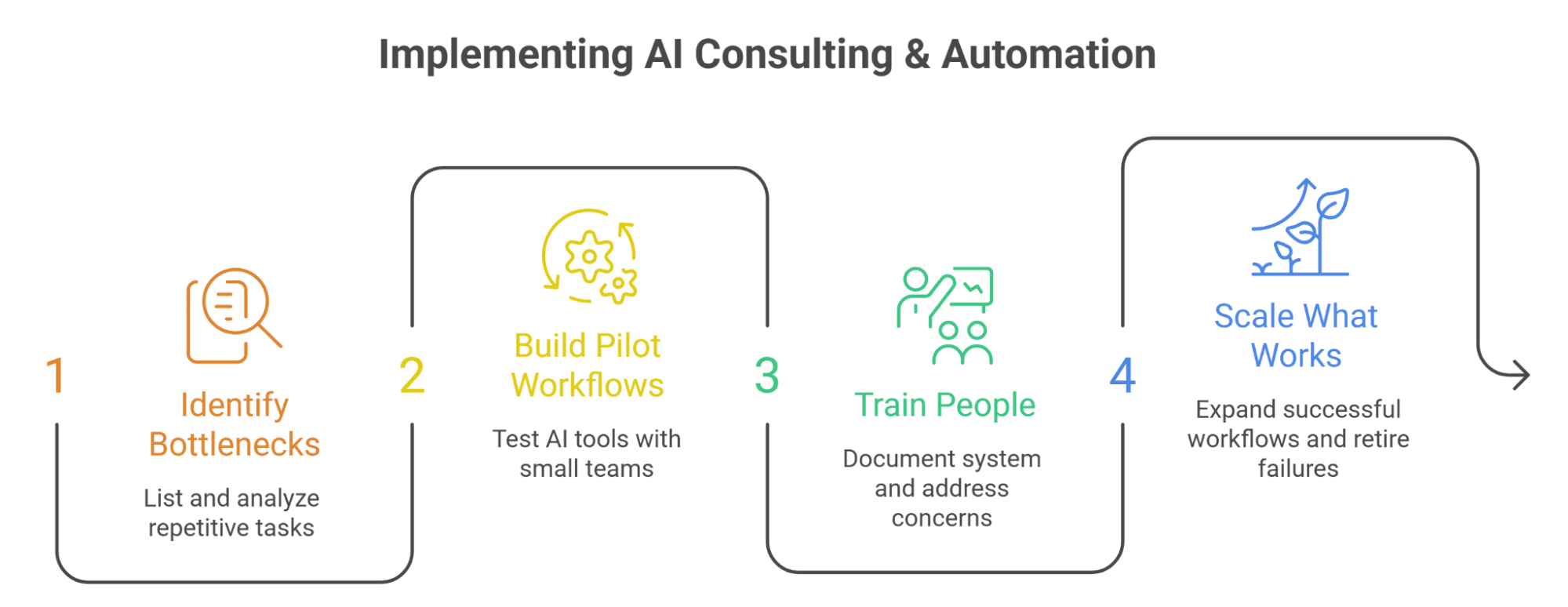
A structured rollout reduces risk and increases adoption. The goal is to start with practical wins, build confidence, and scale only when workflows are proven.
Step 1: Identify Bottlenecks and Repetitive Work
Start by listing the tasks that consume time, create delays, or depend on repetitive information handling. Common examples include inbox triage, meeting notes, customer inquiries, CRM updates, reporting, content creation, document review, proposal drafting, and support ticket routing.
Then group those tasks by function: sales, marketing, operations, customer support, admin, finance, HR, or analytics. For each task, define the current process, time required, error points, business impact, and risk level.
This creates a practical automation backlog. Instead of chasing tools, the business can choose workflows that matter.
Step 2: Choose Tools and Build Pilot Workflows
After identifying use cases, choose tools that fit the workflow. This may include generative AI platforms, automation platforms, CRM tools, project management tools, analytics dashboards, document systems, or customer support software.
Build small pilot workflows before scaling. For example, test AI meeting summaries with one team, AI-assisted customer support drafts with one queue, or AI-generated weekly reports with one department. Define what success looks like and compare results against the manual process.
A strong pilot should include human review, clear ownership, and a feedback loop. If the workflow improves speed and quality, expand it. If it creates errors or confusion, revise it before scaling.
Step 3: Train People and Document the System
AI adoption fails when people do not understand how to use the system. Training should cover tool basics, prompt examples, data rules, review standards, escalation paths, and workflow expectations.
Documentation is equally important. Create SOPs, prompt libraries, examples of good outputs, approval rules, and troubleshooting guides. This makes AI use repeatable and reduces dependence on one person.
Training should also address worker concerns. Employees need to understand that AI is being used to improve workflows, not create unclear surveillance or hidden job threats.
Step 4: Scale What Works and Retire What Does Not
Once pilots are tested, scale the workflows that deliver measurable value. This may mean adding more users, connecting more tools, automating more steps, or assigning a VA to maintain the workflow.
At the same time, retire automations that do not work. Not every AI project deserves to continue. If a workflow does not save time, improve quality, reduce cost, or support better decisions, it should be revised or removed.
AI consulting & automation should become a continuous improvement system. The business should review workflows regularly, update prompts, improve data quality, and measure outcomes.
FAQ
1. What is AI consulting & automation?
AI consulting & automation helps businesses identify where AI can improve workflows, decisions, productivity, customer experience, and operations, then implement tools, automations, training, and governance to make those improvements repeatable.
2. How can AI automation help a small business?
AI automation can help small businesses save time on repetitive tasks such as email drafting, meeting summaries, CRM updates, customer support triage, content repurposing, lead follow-up, reporting, and document organization.
3. What is the difference between AI consulting and AI implementation?
AI consulting defines the strategy, use cases, roadmap, risks, and success metrics. AI implementation builds the actual workflows, tools, automations, training materials, SOPs, and review systems that turn the strategy into daily operations.
4. Should I hire an AI consultant or build an in-house AI team?
Hire an AI consultant if you need strategy, setup, and faster implementation without long-term headcount. Build an in-house AI team if AI is central to your product, infrastructure, data systems, or long-term competitive advantage.
5. Can a virtual assistant help with AI implementation?
Yes. A trained AI implementation VA can maintain prompt libraries, document workflows, test tools, organize AI outputs, update SOPs, monitor recurring automations, and keep AI-assisted workflows running day to day.
6. What risks should businesses manage when using AI?
Businesses should manage data privacy, shadow AI, inaccurate outputs, bias, security access, compliance, customer-facing errors, tool sprawl, and lack of human review. AI governance should define approved tools, data rules, review standards, and accountability.
Conclusion: Build AI Systems That Actually Improve the Business
AI consulting & automation is not about adding another tool to the business. It is about building smarter systems for decisions, workflows, customer experience, marketing, operations, analytics, and team productivity. The companies that benefit most from AI are not the ones that experiment randomly; they are the ones that connect AI to real bottlenecks and measurable outcomes.
The best approach is practical. Start with workflow mapping. Choose a few high-value use cases. Build pilot automations. Train the team. Document the system. Add governance. Measure results. Then scale what works.
For growing businesses, the opportunity is especially strong. AI can help small teams do more without immediately adding full-time headcount. A consultant can design the roadmap, a virtual assistant can help maintain execution, and internal leaders can keep the system aligned with strategy and customer trust.
CTA: Ready to explore AI consulting & automation for your business? Start by listing your most repetitive weekly workflows, then identify which ones could be improved with AI, automation, or AI-assisted virtual assistant support.
Sources List
- McKinsey — 2025 State of AI global survey on organizational AI use, pilot stages, and agentic AI adoption.
- U.S. Census Bureau — 2026 BTOS analysis on U.S. business AI use by firm size and sector.
- Federal Reserve — 2026 FEDS Notes analysis of AI adoption in the U.S. economy.
- Deloitte — 2026 State of AI in the Enterprise report on scaling, AI fluency, and agent governance.
- Pew Research Center — 2025 U.S. worker views on AI in the workplace.
- Pew Research Center — 2025 workplace AI usage among U.S. workers.
- IBM — 2025 Cost of a Data Breach Report on AI governance, security incidents, and data breach cost.
- Stanford HAI — 2026 AI Index Report on generative AI adoption, U.S. private AI investment, and AI company funding.
- Microsoft Work Trend Index — 2026 report on AI users, leadership alignment, and work redesign.
 Siddhartha Basu is a Technical Writer at Task Virtual. He loves online games, e-book reading, and Yoga.