Contents
show
How an Automation Specialist Virtual Assistant Connects Applications
American businesses run on dozens or hundreds of software tools. Sales data lives in one CRM, finance in another system, marketing in a third, and support somewhere else. Information sits in silos, forcing teams into repetitive copy-paste work that wastes hours and invites errors—challenges an automation specialist virtual assistant is uniquely equipped to solve.
An automation specialist virtual assistant closes these gaps. These professionals combine virtual assistant skills with expertise in workflow automation, APIs, and no-code tools. In 2026, with enterprises averaging hundreds of applications and current technology able to automate about 57 % of U.S. work hours, they turn fragmented stacks into connected, efficient operations that free teams for higher-value work.
What an Automation Specialist Virtual Assistant Actually Does
Traditional virtual assistants handle administrative tasks. An automation specialist virtual assistant focuses on systems integration and process optimization. Their core job is to eliminate repetitive manual work by linking the tools your team already uses.
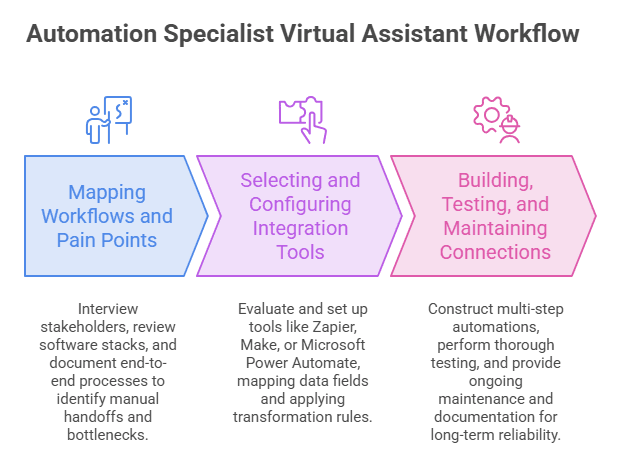
1. Mapping Existing Workflows and Pain Points
The process begins with thorough discovery. The specialist interviews stakeholders across departments, reviews the current software stack, and documents end-to-end processes in detail. They observe how data moves (or fails to move) between systems, noting every manual handoff, approval bottleneck, and spreadsheet workaround that consumes staff time.
This mapping phase surfaces the highest-impact opportunities. Common findings include leads entered twice into CRM and marketing platforms, invoice data retyped into project tools, or support tickets that require agents to dig through multiple systems for customer history. By quantifying the time and error rates associated with each friction point, the specialist prioritizes connections that deliver the fastest return.
2. Selecting and Configuring Integration Tools
Once pain points are clear, the specialist evaluates the right technology for the job. Options range from accessible no-code platforms such as Zapier or Make to Microsoft Power Automate for Microsoft-centric environments and more robust enterprise solutions like MuleSoft when scale or complex governance is required. The decision weighs transaction volume, security needs, existing tech stack, and budget.
Configuration follows selection. The specialist sets up authentication, maps data fields carefully, applies transformation rules so information arrives in the correct format, and builds conditional logic for exceptions. Attention to detail here prevents downstream issues and ensures the connections remain reliable as software vendors release updates.
3. Building, Testing, and Maintaining Connections
With tools chosen and configured, the specialist constructs the actual workflows. Triggers, actions, filters, and error-handling paths are assembled into multi-step automations. Thorough testing follows—covering happy-path scenarios, edge cases, and failure conditions—so problems surface before the system goes live.
Documentation and monitoring complete the work. Clear records of each connection, ownership, and recovery steps make future changes easier. Ongoing maintenance includes watching for broken links after platform updates, refining logic based on real usage, and expanding successful patterns to additional processes. This lifecycle approach keeps the integrated environment healthy over time.
Core Technologies That Enable App Connections
Connecting applications successfully requires a practical mix of proven technologies and the expertise to apply them correctly. With only 27% of apps integrated, an automation specialist virtual assistant selects tools based on each business’s systems, data sensitivity, and volume, ensuring reliable data flow without unnecessary complexity or cost.
1. APIs and Webhooks as the Foundation
- Most modern business applications expose APIs that allow secure, structured exchange of data between systems.
- Specialists handle authentication methods, rate limits, and data formatting so information moves accurately and efficiently.
- Webhooks provide real-time notifications, enabling immediate actions such as creating a task the moment a new lead appears in the CRM.
- Proper API and webhook design forms the reliable backbone for nearly all scalable integrations.
2. No-Code and Low-Code Platforms
- Platforms like Zapier, Make, and n8n offer thousands of pre-built connectors that let specialists create multi-step workflows quickly.
- These tools support conditional logic, data transformation, and error handling without traditional coding.
- They suit the majority of mid-sized U.S. companies that need results in days rather than months.
- When requirements grow more complex, the same platforms often allow custom code modules or can hand off to more advanced solutions.
3. Robotic Process Automation and AI Agents
- RPA tools step in when applications lack APIs by mimicking human clicks and keystrokes on screen.
- AI agents add decision-making capability, such as reading unstructured emails or routing information based on content.
- Specialists combine RPA and AI with traditional integrations for hybrid workflows that handle both structured and unstructured data.
- This layered approach expands what can be automated while keeping humans in control of higher-level judgment.
How Automation Specialist Virtual Assistants Connect Business Apps
An automation specialist virtual assistant turns everyday friction into smooth, reliable processes. By linking the tools companies already use, they remove repetitive work, reduce errors, and create a single source of truth that teams can trust. The following examples illustrate common, high-value connections that deliver measurable results across departments.
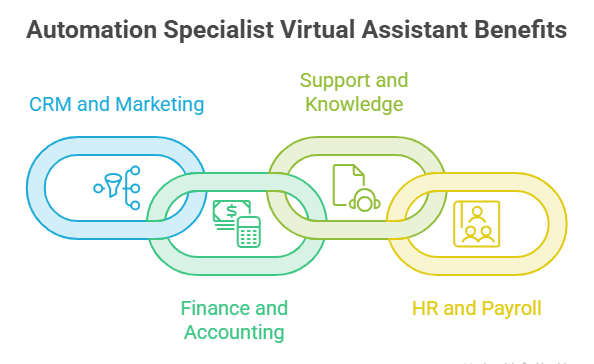
1. CRM and Marketing Automation Linkage
A new website form submission can automatically create or update a contact record in the CRM, enroll the person in the correct nurture sequence, notify the assigned sales representative, and log the activity for future reference. This single connection eliminates double data entry and ensures no lead falls through the cracks. Over time, richer behavioral data flowing back from marketing platforms further refines scoring and prioritization, giving sales teams cleaner, more actionable pipelines.
2. Finance, Accounting, and Project Tools
Invoices generated in accounting software can trigger payment reminders, update project budgets in real time, and notify relevant stakeholders of status changes. Expense reports submitted through mobile apps flow directly into the accounting system with proper coding and multi-level approval routing. The result is faster month-end closes, fewer discrepancies, and project managers who always see current financials without manual reconciliation.
3. Customer Support and Knowledge Base Integration
Support tickets arriving in the helpdesk platform automatically pull customer history from the CRM, surface relevant knowledge-base articles, and escalate based on predefined rules such as priority or sentiment. Resolution data and common issue patterns feed back into product and sales systems, closing the loop between customer experience and business improvement. Agents spend less time searching and more time resolving.
4. HR, Payroll, and Collaboration Platforms
New-hire information entered once in the HR system can provision accounts across email, collaboration tools, project platforms, and the HR information system itself. Time-off requests update shared calendars and notify managers automatically. This reduces onboarding friction, improves compliance, and keeps everyone working from accurate, up-to-date information.
Measurable Benefits for U.S. Businesses
When an automation specialist virtual assistant successfully connects applications, returns include measurable gains and teamwork. Among organizations with integrated experiences, 54% report improved operational visibility. Businesses gain capacity, reduce waste, and make better decisions using data they trust.
1. Time Savings and Productivity Gains
- Employees reclaim hours previously spent on repetitive data movement and status checking.
- Current technology can theoretically automate activities accounting for about 57 percent of U.S. work hours, and even partial capture of that potential creates meaningful capacity.
- Teams redirect that time toward customer-facing work, analysis, and innovation rather than administrative busywork.
2. Cost Reduction and Error Elimination
- Manual processes carry high error rates and costly rework; automated connections sharply reduce those mistakes.
- Many organizations achieve operational cost reductions in the 10–50 percent range after effective process automation.
- Lower error rates also decrease compliance risk and the hidden costs of correcting downstream problems.
3. Better Decision-Making Through Unified Data
- Near-real-time data sharing turns fragmented information into trustworthy dashboards.
- Leaders gain accurate views of pipeline, cash flow, and customer health without waiting for weekly manual reports.
- Consistent data across systems supports faster, more confident strategic choices.
4. Scalability Without Proportional Headcount Growth
- The same automated connections handle rising transaction volumes as the business grows.
- Companies avoid hiring additional administrative staff simply to keep pace with volume.
- Process capacity expands with demand rather than with headcount, improving unit economics.
Choosing and Working With an Automation Specialist Virtual Assistant
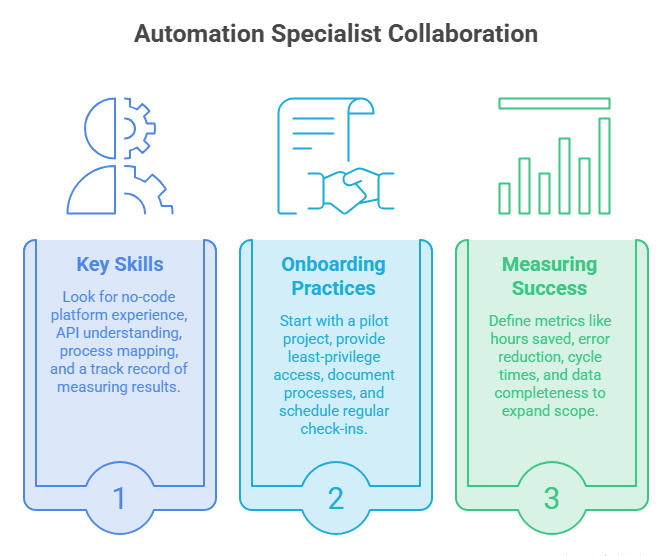
Selecting the right automation specialist virtual assistant and collaborating effectively drives integration value. As 74% define success through timely, on-budget, valuable outcomes, clear expectations, focused scope, and ongoing measurement create strategic advantage.
1. Key Skills and Experience to Look For
Look for demonstrated experience with major no-code platforms, basic understanding of APIs and data structures, process mapping ability, and a track record of measuring results. Experience in your industry or with your specific tech stack is a strong plus. Soft skills matter too—clear communication and the ability to train internal teams on the new workflows.
2. Onboarding and Collaboration Best Practices
Start with a focused pilot project that delivers visible value within a few weeks. Provide system access under least-privilege principles, document existing processes thoroughly, and schedule regular check-ins. Treat the specialist as a temporary extension of your operations or IT team rather than pure administrative support.
3. Measuring Success and Expanding Scope
Define success metrics up front: hours saved per week, reduction in manual errors, faster cycle times, or improved data completeness. Once the pilot proves value, expand to additional departments and more complex multi-app workflows.
Common Challenges and How Specialists Overcome Them
Integration projects encounter predictable obstacles. An experienced automation specialist virtual assistant anticipates these issues and builds solutions that keep systems secure, reliable, and adopted by the people who use them every day.
1. Security, Compliance, and Access Management
- Specialists implement secure authentication methods and limit data exposure to only what each connection requires.
- They work within existing identity and access management frameworks and document controls for audit purposes.
- Attention to U.S. privacy regulations and industry-specific rules is built into the design from the start.
2. Handling Legacy Systems and Edge Cases
- When applications lack modern APIs, specialists use RPA, file-based transfers, or intermediate databases as bridges.
- Robust error handling and alerting ensure exceptions surface quickly rather than failing silently.
- Edge-case logic is tested thoroughly so unusual but legitimate scenarios continue to work.
3. Change Management and Team Adoption
- End users are involved early, so the new workflows feel like natural improvements rather than imposed changes.
- Clear documentation, training, and ongoing support reduce resistance and accelerate adoption.
- Feedback loops allow refinements that increase both technical performance and user satisfaction.
Future of Automation Specialist Virtual Assistants
AI continues to expand what these specialists can achieve. Intelligent agents will handle more decision-making inside workflows. Voice and conversational interfaces will make triggering and monitoring processes even simpler. At the same time, the average number of applications continues to climb— Okta’s Businesses at Work data shows the average company now uses 101 apps—making skilled connectors more valuable, not less.
U.S. Census Bureau data indicates that roughly between 17% and 20% of firms had adopted AI in some business function by the end of 2025, with larger firms adopting at higher rates. Companies that combine human process expertise with these tools through an automation specialist virtual assistant will pull ahead of those still relying on manual workarounds.
TaskVirtual: Your Partner for Automation Specialist Virtual Assistants

Businesses today struggle with disconnected software that forces teams into endless manual data transfers between CRM, accounting, marketing, support, and collaboration tools. Automation specialist virtual assistant services from TaskVirtual design and build the connections that eliminate this friction, turning fragmented applications into streamlined, reliable systems, so your team can focus on growth instead of busywork.
1. Expert Process Mapping and Integration Guidance
TaskVirtual’s automation specialist virtual assistants begin by analyzing your existing workflows and software stack. They identify high-impact connection points, recommend the right mix of no-code platforms, APIs, and intelligent tools, and design solutions that match your security and compliance requirements.
2. Affordable and Flexible Pricing
Hiring a full-time technical resource can be costly, but TaskVirtual makes specialized support accessible. With pricing plans starting from just $3.12/hour to $14.99/hour, their services fit the budgets of growing companies and established enterprises alike.
3. End-to-End Application Connection Solutions
From linking CRM and marketing platforms to connecting finance systems with project tools or automating HR onboarding flows, TaskVirtual covers the full range of business application integrations. Their scalable approach adapts whether you need a single high-ROI workflow or a broader connected ecosystem.
4. Continuous Monitoring and Optimization Support
TaskVirtual does more than launch automations. Their specialists provide ongoing monitoring, rapid troubleshooting after platform updates, and continuous refinement so your connections remain accurate, secure, and effective as your business evolves.
5. Proven Track Record of Excellence
With 364 positive reviews and a 4.7-star rating on trusted VA platforms, TaskVirtual is recognized as a reliable partner for companies seeking automation specialist virtual assistant expertise. Clients trust them to reduce manual work, improve data accuracy, and deliver measurable operational gains.
FAQ Section
1. What is the difference between a regular virtual assistant and an automation specialist virtual assistant?
A regular VA focuses on administrative tasks such as email, scheduling, and research. An automation specialist virtual assistant designs and builds connections between software applications to eliminate repetitive work and improve data flow.
2. Do I need an IT background to work with an automation specialist VA?
No. A good specialist translates technical concepts into business language and handles the implementation. You mainly need to describe your processes and desired outcomes clearly.
3. How long does it take to see results from app connections?
Simple two- or three-app workflows often deliver measurable time savings within one to two weeks. More complex multi-system projects typically show clear ROI within 30–60 days.
4. Are no-code tools secure enough for business data?
Reputable platforms offer enterprise-grade security features, encryption, and compliance certifications. Specialists configure them according to your security policies and can recommend additional controls when needed.
5. Can an automation specialist VA work with our existing software stack?
In most cases, yes. Popular CRMs, accounting systems, project tools, and marketing platforms have extensive connectors. For less common or legacy systems, alternative methods such as RPA or custom API work are available.
6. What is a realistic budget range for this type of support?
Rates vary by experience and location, but many U.S. businesses find value by starting with a part-time specialist focused on high-impact processes rather than a full-time hire. Pilot projects keep initial investment manageable.
Conclusion and Call to Action
Disconnected applications create quiet but costly friction. An automation specialist virtual assistant removes that friction by linking the tools your company already uses, delivering faster processes, cleaner data, and teams free to focus on higher-value work.
If your staff spends too many hours moving information between platforms, start with one or two painful manual processes. Document the current steps and engage an automation specialist virtual assistant to design and implement the connections. Measure the results, then expand. The efficiency gains compound, and the competitive advantage endures.
Sources
- McKinsey Global Institute research on AI and automation potential for U.S. work hours
- Okta Businesses at Work 2025 report on average applications per company
- MuleSoft / Salesforce Connectivity reports on enterprise application counts
- U.S. Census Bureau Business Trends and Outlook Survey data on AI adoption
- Forrester research on integration suite ROI
- Industry analyses of business process automation market growth and outcomes
For more such content, visit our website.
 Siddhartha Basu is a Technical Writer at Task Virtual. He loves online games, e-book reading, and Yoga.