Contents
show
HubSpot CRM Migration: Common Mistakes & Fixes
Migrating to a modern CRM isn’t just a technical upgrade—it’s a strategic reset. As more companies consolidate sales, marketing, and service operations, hubspot crm migration has become a dominant pathway for organizations seeking scalability and automation. Yet, despite its popularity, CRM migration projects frequently fail to meet expectations due to preventable errors.
According to a report by Gartner, nearly 55% of CRM projects fall short of their intended ROI due to poor planning and execution. Meanwhile, data from Statista shows that CRM software revenue is projected to exceed $98 billion globally by 2025, signaling how critical these systems have become. This guide breaks down the most common mistakes in HubSpot migrations—and more importantly, how companies avoid them using structured processes, reliable tools, and expert-backed strategies.
Why HubSpot CRM Migration Fails Without Planning
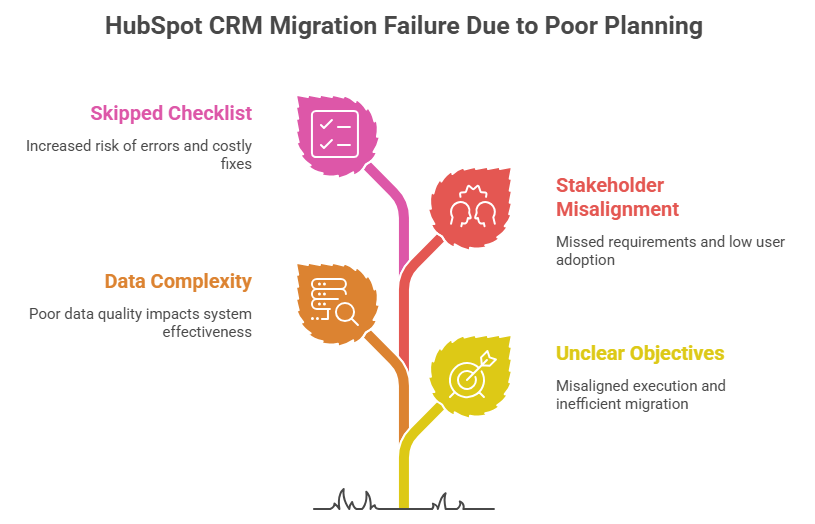
A successful hubspot crm migration depends heavily on structured planning, yet many organizations underestimate this phase. Without a clearly defined roadmap, businesses often encounter data inconsistencies, workflow disruptions, and low user adoption. Strategic preparation ensures that migration aligns with business objectives while minimizing risks and operational downtime.
1. Lack of Clear Migration Objectives
Organizations often begin migration without clearly defining success metrics, leading to confusion and inefficiencies. Whether the goal is improving reporting or streamlining pipelines, unclear objectives result in misaligned execution. A proper HubSpot business planning crm migrations support approach includes setting KPIs for administrative assistants, like conversion rates, sales cycle length, and retention before migration starts.
2. Underestimating Data Complexity
CRM systems contain years of fragmented and inconsistent data that require careful preparation. Without a structured hubspot crm data migration guide, companies risk importing poor-quality data into HubSpot. According to IBM, poor data quality costs organizations an average of $12.9 million annually, making data cleansing essential.
3. Ignoring Stakeholder Alignment
CRM migration involves multiple departments, making alignment critical for success. When teams are not aligned, key requirements can be missed, leading to incomplete workflows or missing data. This often results in low adoption and reduced system effectiveness.
4. Skipping a Migration Checklist
A hubspot crm migration checklist ensures every step of the process is covered. Skipping it increases the risk of errors like incorrect field mapping and broken workflows. Following a checklist helps maintain consistency and avoid costly fixes later.
Data Migration Pitfalls and How to Avoid Them
Data migration errors can significantly impact the success of a hubspot crm migration, with studies showing that 64% of data migration projects fail to meet objectives due to issues like poor data quality and process gaps. These challenges often lead to data loss, inconsistencies, and reduced system performance, making structured planning essential. Addressing these risks with a well-defined approach ensures data accuracy, system reliability, and long-term CRM efficiency.
- Migrating unclean or duplicate data reduces CRM effectiveness and leads to inaccurate reporting and poor decision-making
- Conducting a full data audit, including deduplication and standardization, helps maintain data integrity during migration
- Improper field mapping between legacy systems and HubSpot can result in misplaced or lost data, affecting workflows and reporting
- Failing to migrate historical data, such as emails, notes, and deal stages, disrupts customer relationship continuity and sales processes
- Poor handling of sensitive data can create compliance risks; adopting a secure hubspot crm migration for healthcare strategy with encryption and validation is essential
Technology and Integration Mistakes
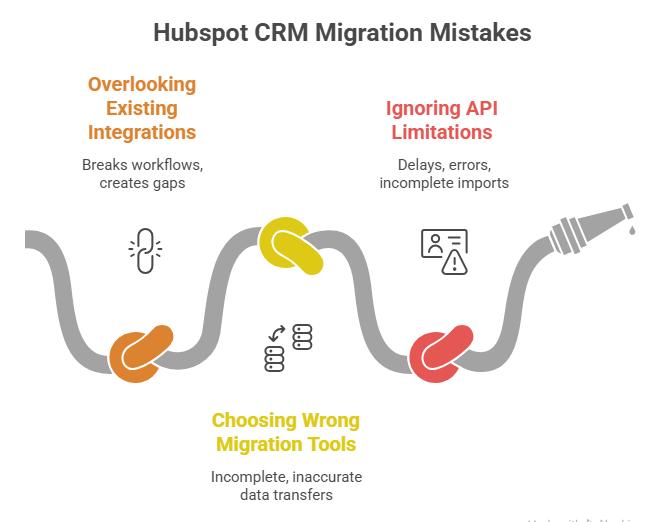
Technology and integrations play a critical role in ensuring a seamless hubspot crm migration. Overlooking technical dependencies or system limitations can disrupt workflows and lead to incomplete data transfers. Addressing these challenges early helps maintain operational continuity and system performance.
1. Overlooking Existing Integrations
Many organizations rely on multiple tools such as ERP systems, marketing platforms, and customer support software. Ignoring these integrations during migration can break workflows and create operational gaps. Conducting a full audit before starting a crm migration service HubSpot project ensures all integrations are accounted for.
2. Choosing the Wrong Migration Tools
Using manual processes or unreliable tools often results in incomplete or inaccurate data transfers. This can lead to inconsistencies that affect reporting and automation. Choosing a trusted hubspot crm migration service provider or certified tools from HubSpot helps ensure a smooth migration.
3. Ignoring API Limitations
Every CRM system handled by a CRM virtual assistant has API constraints that can impact how data is transferred during migration. Ignoring these limits may cause delays, errors, or incomplete imports. Planning the migration in batches and testing API capabilities beforehand helps avoid these issues.
Process and Execution Errors
Execution-related issues can derail even well-planned hubspot crm migration projects if not managed carefully, with research indicating that up to 70% of CRM projects fail primarily due to poor implementation and process management. Without proper processes, testing, and documentation, businesses face increased risks of system disruptions and long-term inefficiencies. A structured execution approach is essential to ensure stability, accuracy, and successful CRM adoption.
- Migrating all data at once increases the risk of downtime, errors, and operational disruption
- Adopting a phased rollout—starting with a pilot group—helps identify issues early and ensures smoother deployment
- Skipping proper testing can result in broken workflows, inaccurate automation, and inconsistent data
- Conducting multiple testing cycles, including user acceptance testing (UAT), ensures system reliability before full launch
- Lack of documentation makes troubleshooting difficult; maintaining clear records of processes, mappings, and configurations improves post-migration management
User Adoption Challenges
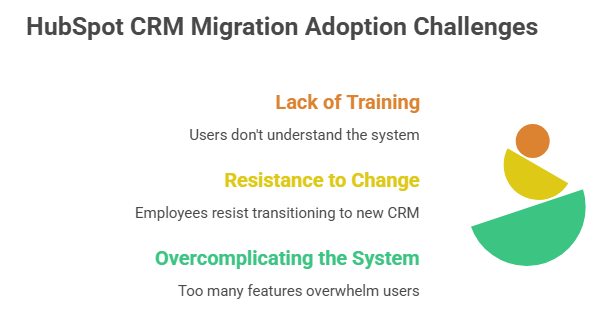
User adoption is one of the most critical success factors in any hubspot crm migration. Even a perfectly executed technical migration can fail if users are unable or unwilling to use the new system effectively. Addressing training, change management, and system simplicity ensures long-term CRM success.
1. Lack of Training
Even the most advanced CRM system will underperform if users don’t understand how to use it properly. Without structured onboarding, teams struggle to adopt new workflows and features. According to the Pew Research Center, 64% of employees say inadequate training impacts their ability to use new technology effectively, making role-based training essential.
2. Resistance to Change
Employees who are familiar with legacy systems often resist transitioning to a new CRM platform for CRM setup services. This resistance can slow adoption and reduce overall productivity. Clearly communicating the benefits and involving users early in the migration process helps ease the transition.
3. Overcomplicating the System
Adding too many workflows, automations, or custom fields can overwhelm users and reduce efficiency. A complex system often leads to confusion and low adoption rates. Starting with a simplified setup and gradually scaling features ensures better usability and engagement.
Strategic Mistakes in CRM Migration

Strategic missteps can significantly impact the long-term success of a hubspot crm migration, even if the technical execution is flawless. Companies that overlook alignment with business goals and ongoing optimization often fail to realize the full value of their CRM investment.
- Treating CRM migration as a one-time technical task rather than an ongoing optimization process leads to missed opportunities for improvement and scalability
- Focusing only on system setup while ignoring broader business objectives results in a CRM that does not support growth or performance goals
- Failing to align CRM capabilities with sales, marketing, and customer service strategies limits overall effectiveness
- Underutilizing HubSpot features such as automation, analytics, and customer segmentation reduces ROI and operational efficiency
- Organizations that have migrated from another crm to HubSpot often overlook advanced tools and integrations that could enhance performance and insights
How Companies Successfully Avoid These Mistakes
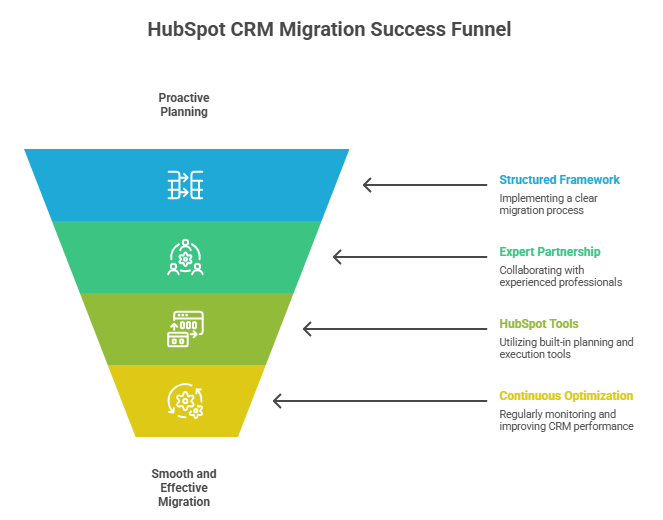
Organizations that succeed in hubspot crm migration take a proactive and structured approach to planning and execution. Instead of reacting to issues, they implement best practices that reduce risks and improve long-term performance. By focusing on strategy, expertise, and continuous improvement, businesses can ensure a smooth and effective migration.
1. Using a Structured Migration Framework
Successful companies rely on a clear migration framework that guides every stage of the process. This typically includes data audit and cleanup, field mapping, testing and validation, and a phased rollout to minimize disruption. Following a structured approach ensures consistency, reduces errors, and improves overall migration outcomes.
2. Partnering with Experts
Working with experienced professionals helps businesses avoid common pitfalls and accelerate migration timelines. A reliable hubspot crm migration service provider brings technical expertise and proven methodologies to the process. This support reduces risks and ensures a more efficient transition.
3. Leveraging HubSpot’s Planning Tools
HubSpot offers built-in tools designed to support migration planning and execution. These tools help teams align their CRM setup with business goals while simplifying workflows and data management. Utilizing the HubSpot business planning feature crm migrations support capabilities ensure a more strategic implementation.
4. Continuous Optimization
Migration is not a one-time task but an ongoing process that requires regular monitoring and improvements. Post-migration optimization ensures workflows, reports, and integrations continue to perform effectively. Continuous evaluation helps businesses adapt and fully leverage their CRM system over time.
Key Statistics That Highlight CRM Migration Importance
- CRM systems can improve sales by up to 29%
- Companies using CRM see 34% higher customer retention
- Poor data quality costs businesses $12.9M annually (IBM)
- CRM adoption increases productivity by up to 44% (Salesforce)
- 91% of companies with 10+ employees use CRM systems
- 70% of CRM projects fail due to user adoption issues
How Virtual Assistants Help with HubSpot CRM Migration

- Assist with data cleansing and preparation by identifying duplicates, standardizing formats, and organizing datasets before migration
- Support the hubspot crm migration checklist execution to ensure no critical steps are missed during planning and implementation
- Help manage and document the hubspot crm migration existing customer data process, including field mapping and validation tracking
- Coordinate between departments (sales, marketing, IT) to improve communication and reduce migration delays
- Conduct pre- and post-migration testing support, ensuring workflows, automation, and integrations function correctly
- Monitor data imports and flag inconsistencies during hubspot crm data migration processes
- Provide administrative support for administrative tasks like setting up pipelines, dashboards, and contact properties in HubSpot
- Assist with integration setup by coordinating with tools like marketing platforms, support systems, and CRMs
- Offer ongoing reporting and performance tracking after migration to ensure optimization
- Reduce operational workload so internal teams can focus on strategy and adoption
TaskVirtual: Your Partner in HubSpot CRM Migration Support

Managing a hubspot crm migration can quickly become overwhelming, especially when dealing with complex data structures, integrations, and team coordination. From auditing legacy systems to ensuring data accuracy and workflow continuity, every step requires precision. TaskVirtual simplifies this process by offering expert VA services for CRM migration that handle projects, help businesses transition to HubSpot efficiently, and without disruption.
1. Expert Consultation and Migration Planning
TaskVirtual’s experienced virtual assistants support businesses with a structured hubspot crm migration checklist, planning, data audits, and system evaluation. They help map out migration strategies, identify risks, and ensure your CRM aligns with business goals before execution begins.
2. Affordable and Flexible Pricing
Hiring in-house CRM specialists can be costly. TaskVirtual offers a cost-effective alternative with pricing plans starting from $3.12/hour to $14.99/hour, making professional hubspot crm migration service support accessible for startups, SMBs, and enterprises alike.
3. Comprehensive Data Migration Support
From handling hubspot crm data migration and cleaning legacy datasets to executing the hubspot crm migration existing customer data process, TaskVirtual ensures your data is accurate, structured, and ready for use. Their services also extend to integration, coordination, and workflow setup.
4. Ongoing Support and Optimization
TaskVirtual doesn’t stop at migration. Their team provides continuous monitoring, reporting assistance, and optimization support to ensure your HubSpot system performs post-migration efficiently.
5. Proven Track Record of Excellence
With 364 positive reviews and a 4.7-star rating, TaskVirtual has built a reputation as a trusted partner for virtual assistance services. Businesses rely on their expertise to streamline CRM transitions and maintain operational continuity.
FAQ Section
1. What is HubSpot CRM migration?
It’s the process of transferring data, workflows, and operations from an existing CRM system into HubSpot.
2. How long does a HubSpot CRM migration take?
It typically ranges from a few weeks to several months, depending on data complexity and integrations.
3. What is included in a HubSpot CRM migration checklist?
Data audit, field mapping, integration setup, testing, user training, and post-migration validation.
4. Can I migrate data from any CRM to HubSpot?
Yes, most platforms support migration, but complexity varies depending on system compatibility.
5. Is professional help necessary for CRM migration?
For complex systems or large datasets, a crm migration service hubspot provider is highly recommended.
6. How do I ensure data accuracy during migration?
By cleaning data beforehand, validating field mapping, and running multiple test migrations.
Conclusion + CTA
A successful hubspot crm migration isn’t about moving data—it’s about building a smarter, more scalable business infrastructure. The difference between failure and success often comes down to preparation, execution discipline, and ongoing optimization. Organizations that avoid common pitfalls—like poor data hygiene, lack of planning, and weak user adoption—position themselves to fully leverage HubSpot’s capabilities.
If you’re planning a migration, now is the time to approach it strategically. Evaluate your current system, define clear objectives, and consider partnering with experts to ensure a seamless transition.
Sources
- Gartner CRM Report – https://www.gartner.com
- Statista CRM Market Data – https://www.statista.com
- IBM Data Quality Study – https://www.ibm.com
- Pew Research Technology Adoption – https://www.pewresearch.org
- Salesforce CRM Statistics – https://www.salesforce.com
- Nucleus Research CRM ROI – https://www.nucleusresearch.com
- SuperOffice CRM Stats – https://www.superoffice.com
- U.S. HHS Compliance Guidelines – https://www.hhs.gov
For more such content, visit our website.
 Siddhartha Basu is a Technical Writer at Task Virtual. He loves online games, e-book reading, and Yoga.