Contents
show
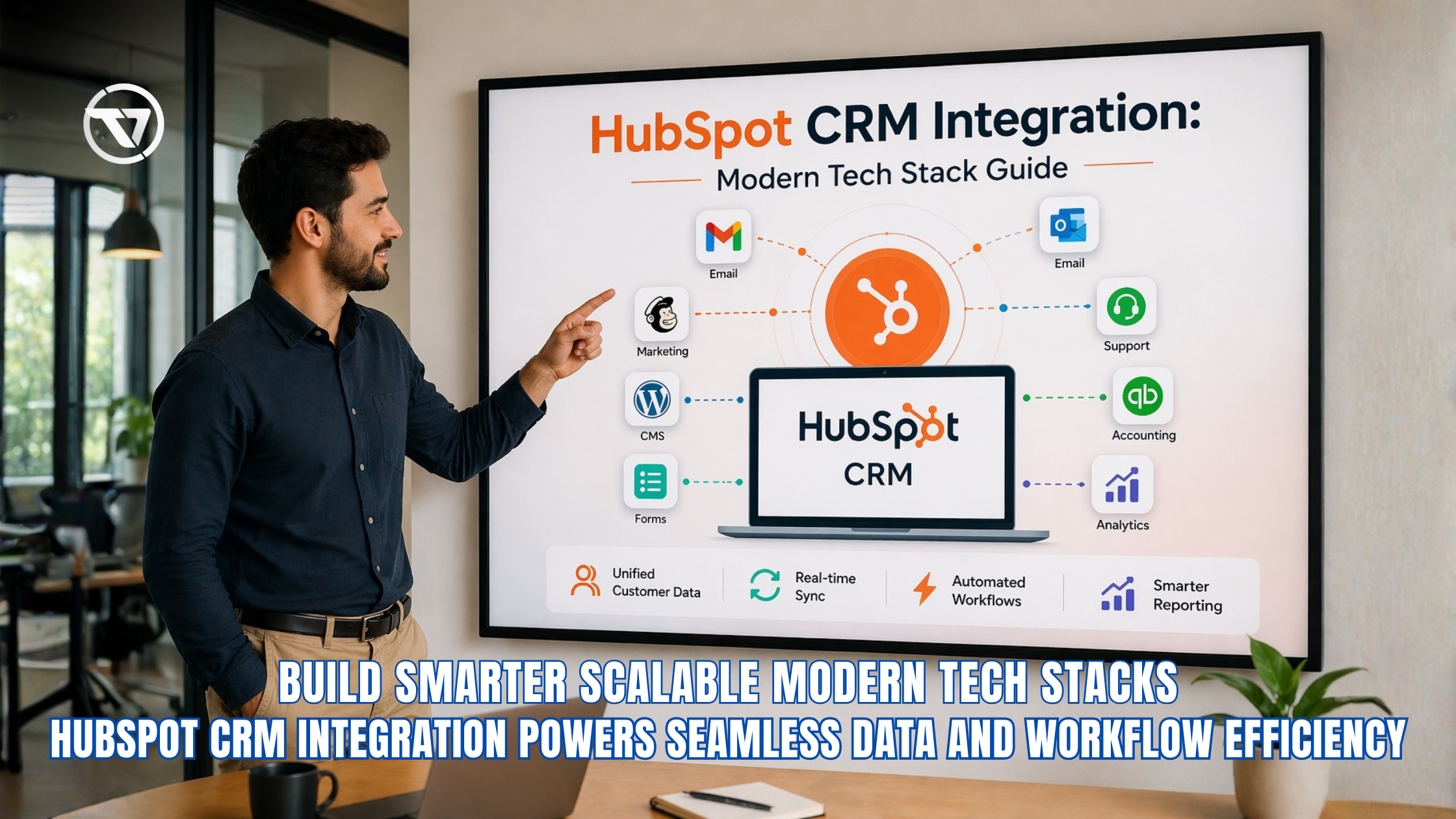
HubSpot CRM Integration: Modern Tech Stack Guide
The era of all-in-one SaaS monoliths is fading. Businesses now demand flexibility, interoperability, and control over their data ecosystems. That’s where Hubspot crm integration becomes mission-critical. Instead of relying on a single platform to do everything (often poorly), modern organizations are assembling composable tech stacks—plugging best-in-class tools into a centralized CRM hub.
With customer experience now a primary differentiator, integrating marketing, sales, support, and finance tools into a unified system is no longer optional. According to Statista, 91% of companies with more than 10 employees use CRM systems to manage customer relationships effectively, highlighting how critical integrated platforms have become. This guide breaks down how HubSpot fits into this shift, how integrations work across key platforms, and how to build a scalable, future-proof stack.
What Is HubSpot CRM Integration?
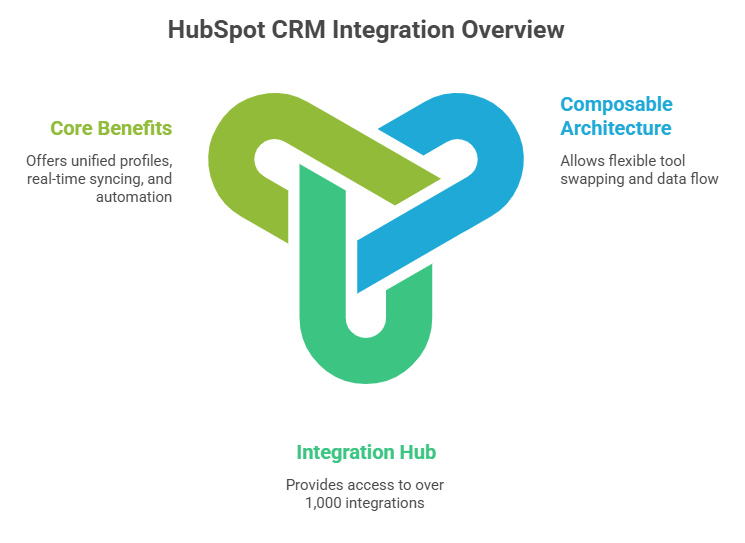
HubSpot CRM integration refers to connecting HubSpot with various external systems, such as marketing platforms, customer support tools, and accounting software, to enable seamless data flow across a business’s tech stack. In a composable architecture, this integration approach allows organizations to remain flexible while ensuring all systems communicate effectively in real time. It ultimately helps businesses create a unified, efficient ecosystem where data drives better decision-making and customer experiences.
1. What Integration Means in a Composable Stack
A composable architecture powered by HubSpot CRM integration allows businesses to swap tools without disrupting workflows, ensuring long-term flexibility as needs evolve. It also centralizes customer data from multiple systems into a single source of truth, improving visibility and collaboration across teams. Additionally, it enables automation of cross-platform actions, reducing manual work and increasing operational efficiency through CRM VA.
2. Why HubSpot Is a Popular Integration Hub
HubSpot stands out as a leading integration hub due to its extensive marketplace of over 1,000 integrations, giving businesses access to a wide range of tools. Its open APIs allow for custom integrations, enabling organizations to tailor their tech stack according to specific operational requirements. Combined with its native marketing, sales, and service tools, HubSpot helps meet growing consumer expectations for fast and personalized experiences.
3. Core Benefits of CRM Integration
HubSpot CRM Email Integration
HubSpot CRM email integration connects your inbox with your CRM to streamline communication, improve tracking, and centralize customer interactions. According to McKinsey & Company, companies that effectively use customer data and personalization can increase marketing efficiency by up to 15%, highlighting the value of integrated communication systems. By integrating email platforms, businesses can enhance productivity while ensuring every conversation is logged and actionable.
Key Capabilities and Best Practices
- Integrates with Gmail and Microsoft Outlook for seamless communication
- Enables email tracking, automatic logging, and meeting scheduling
- Improves productivity by reducing manual data entry and inefficiencies
- Supports two-way sync to keep contacts and conversations updated
- Encourages the use of templates and automated follow-ups for consistency
HubSpot CRM Integration with Marketing Platforms
HubSpot CRM integration with marketing platforms enables businesses to unify campaign data, track customer interactions, and improve overall marketing performance across channels. By connecting tools like email marketing systems, content management platforms, and lead capture forms, companies can create a seamless flow of information throughout the customer journey. This integrated approach helps marketers deliver more personalized experiences while improving ROI through paid online marketing and efficiency.
1. ActiveCampaign HubSpot CRM Integration
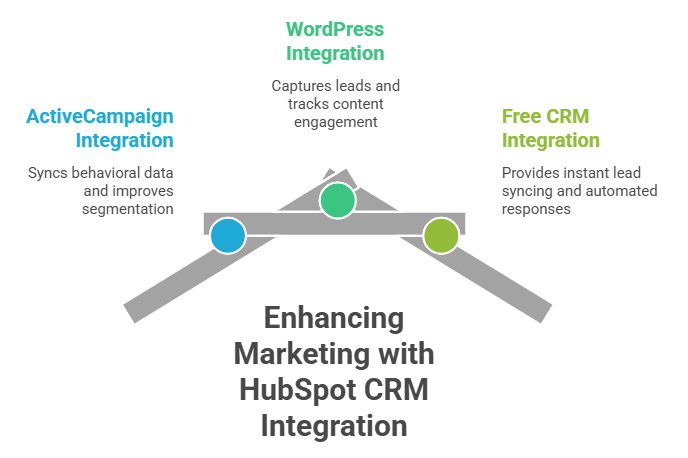
Activecampaign hubspot crm integration helps businesses sync behavioral data between platforms, ensuring customer actions and engagement are accurately reflected in the CRM. It improves segmentation by allowing marketers to create more targeted audience groups based on real-time insights. Additionally, it enhances campaign performance by aligning automation and messaging strategies with up-to-date customer data.
2. WordPress HubSpot CRM Integration
wordpress hubspot crm integration supports lead capture through forms embedded directly on websites, making it easier to collect visitor information. It also enables content engagement tracking, helping businesses understand how users interact with blog posts and landing pages. Furthermore, it provides conver.
3. HubSpot Free CRM Integration with Forms
HubSpot free crm integration with forms allows instant lead syncing, ensuring that captured data is immediately available within the CRM. It supports automated responses, enabling businesses to engage with leads quickly through emails or workflows. In addition, it facilitates CRM-based nurturing by organizing contacts and triggering personalized follow-ups based on user behavior.
Customer Support Integrations

Customer support integrations with HubSpot CRM help unify service and sales data, enabling teams to deliver faster and more personalized customer experiences. By connecting support platforms with CRM systems, businesses gain better visibility into customer interactions and can proactively improve retention.
- Enables ticket syncing and centralized customer support data
- Provides full customer context for better service and communication
- Supports retention-focused workflows to improve long-term value
- Enhances response times, satisfaction, and reduces customer churn
- Recommends defining ownership, avoiding duplication, and using automation rules
Financial and Operations Integrations
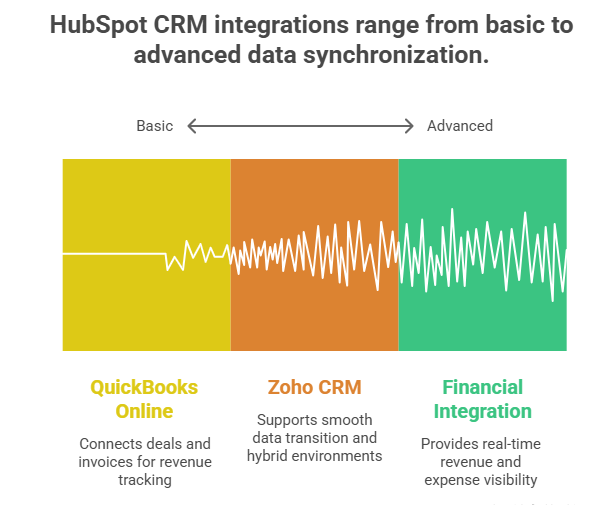
Financial and operations integrations within HubSpot CRM help businesses connect revenue data, streamline accounting processes, and improve overall financial visibility. According to Aberdeen Group, organizations with integrated financial and CRM systems achieve 36% higher customer retention rates, highlighting the impact of unified data on business performance. By integrating CRM systems with accounting and operational tools, organizations can align sales activities with financial outcomes in real time, enabling better decision-making and more efficient business operations.
1. QuickBooks Online HubSpot CRM Integration
QuickBooks online hubspot crm integration connects deals and invoices, allowing sales and finance teams to stay aligned on transactions. It enables accurate revenue tracking by syncing financial data directly with customer records in the CRM. Additionally, it supports billing automation, reducing manual effort and ensuring timely invoicing and payments.
2. Zoho CRM HubSpot CRM Integration
Zoho crm hubspot crm integration supports CRM migration by helping businesses transition data smoothly between platforms. It also enables hybrid environments where teams can operate across both systems without losing data consistency. Furthermore, it ensures reliable data synchronization, keeping records updated and aligned across different tools.
3. Why Financial Integration Matters
Financial integration is critical because it provides real-time visibility into revenue, expenses, and overall business performance. It helps organizations reduce errors, streamline processes, and maintain accurate financial records across systems. According to the U.S. Small Business Administration, poor cash flow is a top failure factor, making integrated financial systems essential for long-term stability.
Data Management and Automation
Data management and automation in HubSpot CRM integration ensure that information remains accurate, consistent, and actionable across all connected systems. By leveraging automation tools and structured data practices, businesses can reduce errors, improve reporting, and create a reliable foundation for decision-making.
- Uses Operations Hub automation, data sync tools, and tier-based pricing models
- Implements deduplication, field normalization, and real-time validation
- Reduces data errors and improves overall data quality across systems
- Supports accurate analytics, forecasting, and a consistent customer experience
- Helps minimize revenue loss linked to poor data quality
HubSpot CRM Integration Solutions in 2026
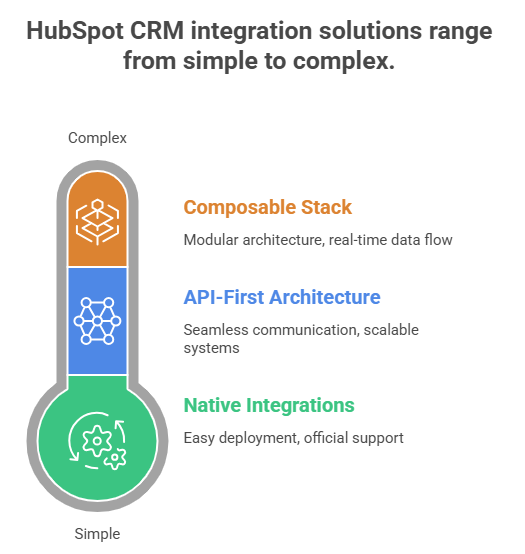
HubSpot CRM integration solutions in 2026 are centered around flexibility, scalability, and the ability to connect diverse tools within a composable tech stack. Businesses are increasingly adopting integration strategies that combine native capabilities with third-party tools to meet evolving operational needs. This approach enables organizations to innovate faster while maintaining control over their systems and data.
1. Native vs Third-Party Integration Tools
Hubspot crm integration solutions include both native and third-party options, giving businesses flexibility in how they build their tech stack. Native integrations offer easier deployment and official support, making them ideal for quick and reliable implementation. On the other hand, third-party tools such as Zapier, Make, and APIs provide extended functionality and customization for more complex integration requirements.
2. API-First Architecture
API-first architecture enables flexible integration by allowing different systems to communicate seamlessly through standardized interfaces. It supports scalable systems that can grow alongside business needs without requiring major infrastructure changes. Additionally, it allows for custom workflows, giving organizations the ability to tailor processes to their specific operational goals.
3. Composable Stack Design Principles
Composable stack design principles focus on modular architecture, enabling businesses to build systems using interchangeable components. They rely on event-driven systems to ensure real-time data flow and responsiveness across integrated tools. With a strong emphasis on interoperability, these principles allow organizations to connect diverse platforms efficiently, and according to Gartner, composable businesses outperform peers by 80% in innovation speed.
Common Challenges and How to Solve Them
Common challenges in HubSpot CRM integration often arise from managing multiple tools, maintaining data consistency, and ensuring security across systems. Addressing these issues with structured processes and best practices helps businesses maintain a stable, efficient, and secure composable tech stack.
- Resolves data silos with centralized syncing and regular audits
- Reduces tool sprawl by prioritizing and rationalizing integrations
- Mitigates data risks through access control and compliance measures
- Improves system reliability by standardizing integration practices
- Addresses security concerns linked to misconfigured integrations
How Virtual Assistants Help with HubSpot CRM Integration

Virtual assistants (VAs) play a crucial role in deploying hubspot crm integration across a composable stack by handling setup, configuration, and system connectivity. They assist with tools like hubspot crm email integration, wordpress hubspot crm integration, and zendesk hubspot crm integration, ensuring seamless data flow and reducing the burden on internal teams. In addition, VAs manage data synchronization, resolve duplicate records, and implement structured workflows aligned with HubSpot data hub pricing, CRM integrations, and automated data cleanup practices to maintain a clean, reliable database.
Beyond setup and data management, VAs support automation and workflow optimization across integrated systems. They help design processes such as lead capture through HubSpot free CRM integration with forms and financial syncing via quickbooks online hubspot crm integration, continuously refining workflows for efficiency and performance. VAs also provide ongoing monitoring and troubleshooting, identifying sync errors or API issues, and ensuring smooth operations across tools like activecampaign hubspot crm integration, and zoho crm hubspot crm integration.
TaskVirtual: Your Partner in HubSpot CRM Integration Support

Managing a modern composable tech stack with multiple integrations—email platforms, marketing tools, support systems, and financial software—can quickly become complex and time-consuming. From configuring hubspot crm integration workflows to maintaining clean, synchronized data across systems, businesses often struggle to keep operations efficient. TaskVirtual provides expert virtual Hubspot crm integration assistance tailored to help organizations implement, manage, and optimize CRM integrations seamlessly.
1. Expert Consultation and Review
TaskVirtual’s experienced virtual assistants help evaluate your current tech stack and recommend the best hubspot crm integration solutions for your business. They assist with setting up integrations such as hubspot crm email integration, zendesk hubspot crm integration, and quickbooks online hubspot crm integration, ensuring smooth data flow and optimized workflows.
2. Affordable and Flexible Pricing
Hiring in-house CRM specialists can be costly, but TaskVirtual offers a cost-effective alternative. With pricing plans starting from just $3.12/hour to $14.99/hour, businesses of all sizes can access professional support without exceeding their budgets.
3. Comprehensive CRM Integration Support Solutions
From configuring wordpress hubspot crm integration and activecampaign hubspot crm integration to managing HubSpot free crm integration with forms, TaskVirtual covers every aspect of CRM connectivity. Their services also include automated data cleanup, deduplication, and ongoing system optimization aligned with HubSpot data hub pricing crm integrations automated data cleanup strategies.
4. Ongoing Support and Quality Assurance
TaskVirtual ensures your integrations continue to perform efficiently by monitoring workflows, fixing sync errors, and optimizing business automation processes. Their proactive approach minimizes downtime and ensures your CRM remains a reliable single source of truth.
5. Proven Track Record of Excellence
With 364 positive reviews and a 4.7-star rating on trusted VA platforms, TaskVirtual has built a reputation for reliability and expertise. Businesses worldwide trust their team to streamline CRM operations and enhance productivity through efficient integration management.
FAQ Section
1. What is HubSpot CRM integration?
Connecting HubSpot with other tools to sync data and automate workflows.
2. Is HubSpot free CRM integration worth it?
Yes, especially for startups needing basic automation and lead capture.
3. Can HubSpot integrate with Outlook?
Yes, it enables tracking, syncing, and automation.
4. How does HubSpot integrate with QuickBooks?
By syncing invoices, deals, and financial data.
5. What are the best HubSpot CRM integration tools?
Native apps, Zapier, Make, and APIs.
6. Is HubSpot good for a composable tech stack?
Yes, due to its flexibility and ecosystem.
Conclusion + CTA
The shift toward composable architecture is redefining how businesses operate—and hubspot crm integration is at the center of that transformation. By connecting marketing, sales, support, and finance tools into a unified ecosystem, companies can deliver faster, smarter, and more personalized customer experiences. The key isn’t just adding integrations—it’s designing a system where data flows cleanly, automation drives efficiency, and every tool serves a strategic purpose.
If you’re building or optimizing your stack, start by auditing your current tools and identifying where integration gaps exist. Then prioritize high-impact connections like email, support, and financial systems.
Sources
- Statista – CRM market size: https://www.statista.com/statistics/1450000/crm-market-size-worldwide/
- Pew Research – Consumer expectations: https://www.pewresearch.org/internet/2023/consumer-expectations-digital-experience/
- U.S. Bureau of Labor Statistics – Productivity: https://www.bls.gov/productivity/
- U.S. Census Bureau – Customer retention: https://www.census.gov/business/customer-retention-impact
- U.S. Small Business Administration – Cash flow: https://www.sba.gov/business-guide/manage-your-business/manage-cash-flow
- NIST – Data quality impact: https://www.nist.gov/data-quality-impact
- Gartner – Composable business: https://www.gartner.com/en/articles/composable-business
- CISA – Integration security: https://www.cisa.gov/integration-security
For more such content, visit our website.
 Siddhartha Basu is a Technical Writer at Task Virtual. He loves online games, e-book reading, and Yoga.