

Contents
show
HubSpot CRM Features You’re Not Using But Should Try in 2026
Marketing automation is essential for scaling in today’s US market, and HubSpot CRM offers advanced hubspot crm marketing automation features that drive personalization and higher conversions—especially important as nearly 76% of companies use marketing automation to improve performance.
With the rise of AI-powered CRM systems, autonomous workflows, and integrated marketing automation, HubSpot has evolved into a comprehensive growth platform. According to Statista, the global CRM market is projected to exceed $145 billion by 2029, highlighting the increasing importance of CRM optimization. This guide explores underused hubspot crm features—from email marketing and API integrations to AI-driven automation—helping US-based businesses unlock real ROI.
AI-Powered HubSpot CRM Features Changing the Game
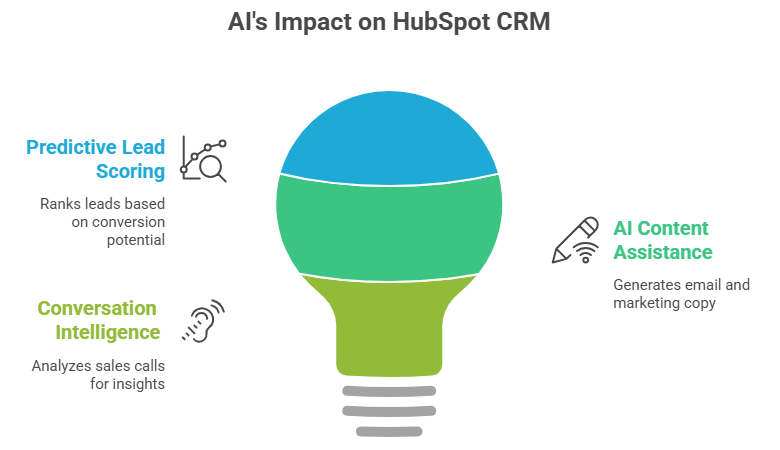
Artificial intelligence is redefining how businesses use CRM platforms, and HubSpot CRM is becoming AI powered grouth engine of this transformation. Instead of relying on manual processes, US businesses can now leverage AI to analyze customer behavior, predict outcomes, and automate decision-making. These hubspot ai-powered crm features not only improve efficiency but also help sales and marketing teams focus on high-impact activities that drive revenue growth.
1. Predictive Lead Scoring with AI
One of the most overlooked hubspot ai-powered crm features is predictive lead scoring. HubSpot CRM uses machine learning to analyze past data and automatically rank leads based on conversion potential. This helps sales teams focus on high-quality prospects and improve close rates. According to McKinsey & Company, AI in sales can increase leads by up to 50%.
2. AI Content Assistance for Emails & Campaigns
HubSpot includes AI tools that generate email subject lines, blog drafts, and marketing copy, making content creation faster and more efficient. This enhances hubspot crm email marketing features by helping teams launch campaigns quickly while maintaining quality. Pew Research Center reports that 27% of US workers already use AI tools regularly.
3. Conversation Intelligence for Sales Calls
HubSpot’s AI tools can transcribe and analyze sales calls to identify buyer intent, objections, and effective communication patterns. This allows sales teams to refine their approach using real data. As a result, they can improve conversations and increase conversion rates more effectively.
HubSpot CRM Marketing Automation Features You Might Be Missing
Marketing automation is critical for scaling in the US market, and HubSpot CRM offers advanced hubspot crm marketing automation features that drive personalized journeys, better engagement, and higher conversions—especially as 80% of marketing automation users see an increase in leads.
HubSpot CRM Email Marketing Features That Drive ROI
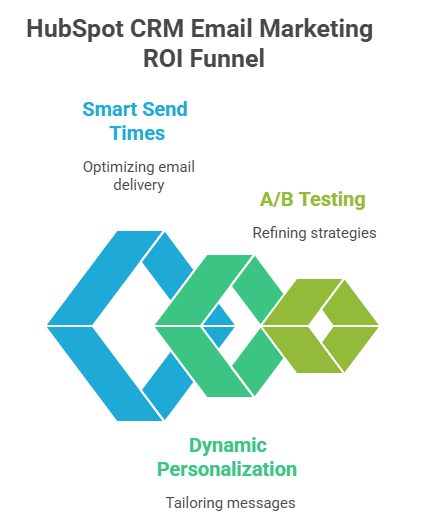
Email marketing continues to be one of the highest ROI channels, especially for US businesses targeting both B2B and B2C audiences. HubSpot’s email tools are designed to go beyond traditional campaigns by incorporating personalization, automation, and performance analytics. These hubspot crm email marketing features enable businesses to deliver highly relevant messages at the right time, improving engagement and customer retention.
1. Smart Send Times
HubSpot CRM analyzes user behavior to determine the best time to send emails, increasing the likelihood of opens and engagement. This feature helps businesses maximize the effectiveness of their campaigns without manual guesswork. According to Litmus, email marketing delivers an average ROI of $36 for every $1 spent.
2. Dynamic Personalization Tokens
HubSpot allows businesses to go beyond basic personalization by inserting detailed customer data, customizing offers, and tailoring messaging for each recipient. This makes emails feel more relevant and engaging, improving overall campaign performance. As a result, brands can build stronger connections with their audience and drive better conversion rates.
3. A/B Testing at Scale
HubSpot enables large-scale A/B testing across subject lines, email content, and calls-to-action to identify what performs best. This allows businesses to make data-driven decisions and continuously refine their marketing strategies. For US companies, this ensures consistent optimization and improved results over time.
HubSpot CRM API Features for Scalable Growth

As businesses grow, seamless integration becomes essential, and HubSpot CRM provides hubspot crm api features that connect tools, streamline data flow, and improve efficiency for US companies—especially as 41% of organizations report integration challenges as a major barrier to digital transformation.
- HubSpot CRM API features enable integrations with ERP systems, payment platforms, and custom apps, supporting connected workflows.
- These integrations are essential for businesses managing multiple software systems efficiently.
- APIs ensure real-time data sync, unified customer profiles, and reduced data silos across platforms.
- IBM estimates poor data quality costs US businesses $3.1 trillion annually.
- Webhooks trigger instant actions, enabling faster workflows, real-time engagement, and scalable automation.
HubSpot CRM Features for B2B Companies
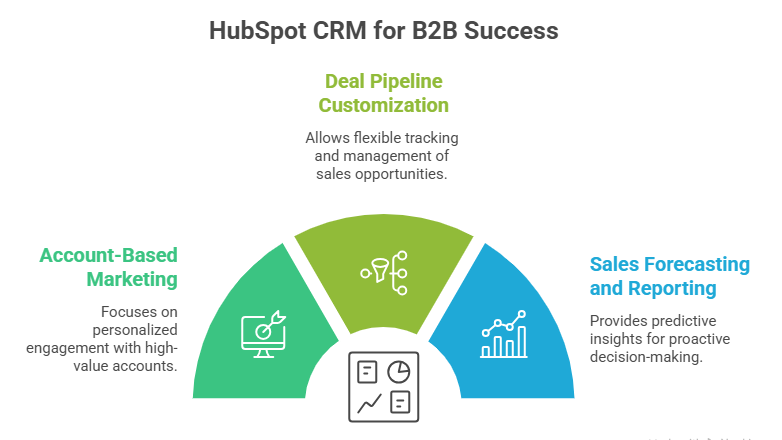
B2B companies often deal with longer sales cycles, multiple stakeholders, and more complex decision-making processes. HubSpot addresses these challenges with features specifically designed to support account-based strategies and pipeline management. These hubspot crm features for b2b companies help align sales and marketing teams, improve visibility, and drive more predictable revenue outcomes.
1. Account-Based Marketing (ABM)
HubSpot CRM supports account-based marketing by tracking company-level interactions and aligning sales and marketing teams around shared goals. This approach helps businesses focus on high-value accounts and deliver more personalized engagement. It is especially valuable for organizations leveraging hubspot crm features for b2b online marketing to drive targeted growth.
2. Deal Pipeline Customization
B2B sales cycles are often complex and require flexibility in tracking deals. HubSpot allows businesses to create multiple pipelines, define custom stages, and use forecasting tools to manage opportunities effectively. This level of customization helps sales teams maintain clarity and control throughout the entire sales process.
3. Sales Forecasting and Reporting
HubSpot provides predictive insights into revenue trends, pipeline health, and overall sales performance, enabling better decision-making. These insights help businesses anticipate outcomes and adjust strategies proactively. According to the U.S. Bureau of Labor Statistics, data-driven decision-making significantly improves business productivity.
HubSpot CRM for Sales Teams Features That Boost Productivity
Sales teams in the US must close deals faster while maintaining strong relationships, and HubSpot CRM delivers hubspot crm for sales teams features that streamline tasks and reduce manual work, allowing professionals to focus more on selling.
- HubSpot CRM provides email tracking and notifications, alerting sales reps when emails are opened or links are clicked.
- These real-time alerts enable timely and more effective follow-ups with prospects.
- HubSpot simplifies scheduling by sharing booking links and syncing calendars, eliminating back-and-forth emails.
- Task automation handles follow-ups, deal updates, and reminders within sales pipelines.
- This improves overall efficiency and productivity for US sales teams.
HubSpot Autonomous CRM Features (The Future of CRM)
The concept of autonomous CRM is rapidly gaining traction as businesses look for smarter, self-operating systems. HubSpot is integrating AI and automation to create a more independent CRM experience that requires minimal manual input. These HubSpot autonomous crm features represent the future of customer relationship management, where systems can predict, adapt, and act in real time.
1. Self-Updating Customer Records
HubSpot CRM automatically updates contact details and engagement history, reducing the need for manual data entry. This ensures that customer records remain accurate and up to date without constant input from teams. As a result, businesses can maintain reliable data while saving time and minimizing errors.
2. AI-Driven Workflow Optimization
HubSpot’s system analyzes user activity and suggests better automation paths and improved sequences to enhance performance. These recommendations help businesses refine workflows and increase efficiency without extensive manual adjustments. This capability aligns with the growing adoption of HubSpot autonomous crm features in modern CRM strategies.
3. Predictive Customer Insights
HubSpot uses data analysis to anticipate customer behavior, including churn risk and potential upsell opportunities. This allows businesses to take proactive steps to retain customers and maximize revenue. By acting on these insights early, companies can improve customer relationships and long-term growth.
HubSpot CRM Cloud Computing Software Features

Cloud computing supports modern business flexibility, and HubSpot CRM delivers hubspot crm cloud computing software features that enable anywhere access, real-time updates, and seamless collaboration for US teams.
- HubSpot CRM provides centralized data access, allowing teams to work from anywhere and collaborate in real time.
- This cloud-based access improves flexibility for remote and hybrid US teams.
- HubSpot scales easily by adding users, expanding features, and integrating tools as businesses grow.
- It complies with standards like GDPR and SOC 2, ensuring strong data security.
- These features are critical for US businesses handling sensitive customer information.
HubSpot CRM Features and Benefits (Why It Matters)
Understanding the full range of features is only part of the equation—what truly matters is the value they deliver. HubSpot combines powerful tools with an intuitive interface, making it accessible for businesses of all sizes. These hubspot crm features and benefits help organizations streamline operations, improve customer relationships, and achieve measurable growth.
1. All-in-One Platform
HubSpot CRM combines sales, marketing, and customer service strategy tools into a single platform, eliminating the need for multiple disconnected systems. This integration reduces tool fragmentation and improves data consistency across teams. As a result, businesses can streamline operations and manage the entire customer journey more efficiently.
2. User-Friendly Interface
Unlike many complex CRM systems, HubSpot offers an intuitive and easy-to-use interface that simplifies adoption for teams. This is especially important for small and mid-sized businesses that need quick onboarding without extensive training. A user-friendly experience helps teams stay productive and fully utilize CRM capabilities.
3. Strong ROI Potential
HubSpot delivers measurable value by helping businesses improve efficiency and increase revenue through better customer management. Companies using CRM systems can see sales increases of up to 29%, according to Salesforce. This makes investing in CRM features a strategic decision for long-term growth.
HubSpot CRM Features Comparison (2026 Perspective)
With many CRM options available, HubSpot CRM stands out for its balance of functionality, ease of use, and integration, making a hubspot crm features comparison essential for US businesses choosing the right platform in 2026.
- HubSpot CRM is known for its user-friendly and integrated platform, while Salesforce offers deeper customization but comes with greater complexity.
- Compared to Zoho CRM, HubSpot delivers stronger automation capabilities and a more intuitive user interface, whereas Zoho is often chosen for its lower cost.
- A key advantage lies in HubSpot’s seamless integration of tools across sales, marketing, and service functions.
- Its built-in AI capabilities enhance decision-making and workflow automation.
- Ease of use, combined with powerful marketing automation features, gives HubSpot a competitive edge in 2026.
How Virtual Assistants Boost Productivity Using HubSpot CRM Features
Virtual assistants help businesses turn HubSpot CRM features into organized, time-saving daily workflows. They manage automation, data, reporting, and follow-ups so sales and marketing teams can focus on higher-value work.
- Virtual assistants set up pipelines, tasks, and workflows through the CRM setup services.
- They manage email sequences, follow-ups, and reminders to reduce manual work.
- They clean contact data, update records, and segment leads for better targeting.
- They track deals, activity, and dashboards to keep sales teams fully informed.
- They connect HubSpot with apps and tools using integrations and API support.
- They monitor reports and optimize CRM workflows to improve team productivity.
TaskVirtual: Your Partner in CRM Management & Automation Services

Managing a modern CRM like HubSpot CRM can quickly become overwhelming—especially when trying to leverage advanced features like automation workflows, AI tools, email marketing, and API integrations. Many US businesses struggle to fully utilize these capabilities while balancing day-to-day operations. TaskVirtual simplifies CRM management by providing expert HubSpot CRM virtual assistant services that help businesses maximize the full potential of HubSpot.
1. Expert CRM Setup and Optimization
TaskVirtual’s experienced virtual assistants help configure and optimize your HubSpot CRM environment—from setting up pipelines and workflows to implementing advanced hubspot crm marketing automation features. They ensure your CRM is aligned with your business goals, enabling better lead tracking and conversion.
2. Affordable and Flexible Pricing
Hiring in-house CRM specialists can be costly. TaskVirtual offers cost-effective solutions with pricing plans starting from just $3.12/hour to $14.99/hour, making it accessible for startups, SMBs, and growing enterprises across the US.
3. Comprehensive CRM Support Solutions
From managing hubspot crm email marketing features and campaign automation to handling integrations using hubspot crm api features, TaskVirtual delivers end-to-end CRM support. Whether you need help with lead nurturing, reporting, or automation workflows, their services scale with your business needs.
4. Ongoing Support and Performance Monitoring
TaskVirtual doesn’t just set up your CRM—they continuously monitor performance, optimize workflows, and provide actionable insights. Their proactive support ensures your CRM remains efficient, updated, and aligned with evolving business strategies.
5. Proven Track Record of Excellence
With 364 positive reviews and a 4.7-star rating on trusted VA platforms, TaskVirtual has built a strong reputation as a reliable virtual assistant provider. Businesses trust their expertise to streamline CRM operations and improve overall productivity.
FAQ Section
1. What are the most important HubSpot CRM features in 2026?
AI automation, predictive analytics, and marketing workflows are the most impactful features.
2. Is HubSpot CRM good for small businesses in the US?
Yes, its free plan and scalability make it ideal for SMBs.
3. How do HubSpot CRM email marketing features improve ROI?
They enable personalization, automation, and data-driven optimization, increasing engagement and conversions.
4. What are HubSpot CRM API features used for?
They connect HubSpot with other tools, enabling integrations and automation.
5. What are HubSpot’s autonomous CRM features?
These include AI-driven workflows, predictive insights, and self-updating data systems.
6. How does HubSpot compare to other CRM platforms?
HubSpot is more user-friendly and integrated, while competitors may offer deeper customization.
Conclusion + CTA
Most businesses using HubSpot CRM are barely tapping into its full potential. From AI-powered insights and automation to advanced email marketing and API integrations, these underused features can dramatically improve efficiency and revenue. For US companies competing in a fast-moving digital landscape, leveraging these tools isn’t optional—it’s strategic.
If you want to maximize your CRM ROI, start by auditing your current HubSpot setup and activating at least 3–5 of the features covered in this guide. Or partner with experts like TaskVirtual to fully unlock the power of HubSpot and accelerate your business growth.
Sources
- Statista – CRM market size: https://www.statista.com/statistics/1087369/crm-market-size-worldwide/
- McKinsey – AI in sales: https://www.mckinsey.com/capabilities/growth-marketing-and-sales/our-insights/the-value-of-getting-personalization-right-or-wrong-is-multiplying
- Pew Research – AI workplace adoption: https://www.pewresearch.org/short-reads/2024/02/22/how-americans-view-ai-in-the-workplace/
- Salesforce – Automation stats: https://www.salesforce.com/resources/articles/marketing-automation-statistics/
- Epsilon – Personalization study: https://us.epsilon.com/insights/resources/research-reports/the-power-of-me
- Litmus – Email ROI: https://www.litmus.com/blog/email-marketing-roi/
- IBM – Data quality cost: https://www.ibm.com/insights/data-quality
- BLS – Productivity insights: https://www.bls.gov/opub/mlr/
- Salesforce – CRM impact: https://www.salesforce.com/crm/what-is-crm/
For such content, visit our website.
 Siddhartha Basu is a Technical Writer at Task Virtual. He loves online games, e-book reading, and Yoga.