Contents
show
How To Onboard A Virtual Assistant: Step-By-Step Guide
In today’s fast-paced business environment, American entrepreneurs and small business owners are increasingly turning to virtual assistants to reclaim their time and scale operations without the overhead of full-time hires. Knowing how to onboard a virtual assistant is the difference between a frustrating experience and a game-changing partnership. The virtual assistant market continues to grow rapidly, with U.S. businesses leading adoption due to remote work trends.
This comprehensive guide covers everything from preparation to long‑term success, incorporating onboard a virtual assistant best practices tailored for U.S. audiences. You’ll learn realistic timelines (typically 3‑14 days for initial productivity, with full efficiency in 2‑4 weeks), tools, communication strategies, and how to avoid common pitfalls, noting that businesses using virtual assistants report a 28% boost in team productivity on average, according to recent data. By following these steps, you’ll set your VA up for success while focusing on high‑value growth activities.
Why Effective Onboarding Matters for Your Business
Effective onboarding transforms a new virtual assistant from an added expense into a highly productive team member who delivers real ROI. A structured process builds trust, aligns expectations, and accelerates the time it takes for your VA to contribute meaningfully to your business goals. In the competitive 2026 landscape, businesses that master how to onboard a new virtual assistant gain a significant edge through better retention and faster results.
1. The Cost of Poor Onboarding vs. Strategic Integration
Rushed or incomplete onboarding leads to miscommunication, duplicated efforts, and underutilised talent. In contrast, a structured process accelerates time-to-value. Research shows businesses that invest in thoughtful onboarding see higher retention and faster productivity ramps. For small businesses, which employ nearly half of the U.S. private sector workforce, optimising support roles like VAs is critical for competitiveness.
2. Key Benefits Backed by Data
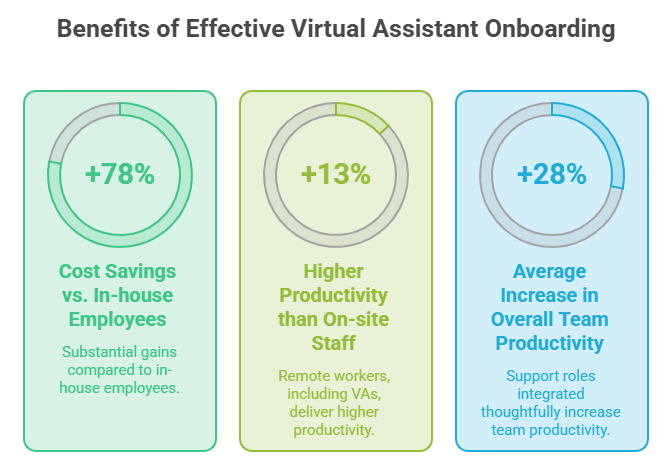
Businesses that properly onboard virtual assistants report substantial gains, including up to 78% cost savings compared to in-house employees and an average of 32 hours saved per week for owners. Remote workers, including VAs, often deliver 13% higher productivity than on-site staff. Additionally, many companies experience a 28% average increase in overall team productivity when support roles are integrated thoughtfully.
3. Aligning Onboarding with Business Goals
Effective onboarding ties directly to your objectives—whether reducing admin burden, expanding marketing reach, or improving customer service. A tailored approach ensures the VA contributes meaningfully from day one, supporting the broader trend where 70%+ of businesses outsource functions for efficiency.
Preparing Before You Hire: Setting the Foundation
Proper preparation before hiring sets the stage for a smooth onboarding experience and long-term success with your virtual assistant. Taking time to define needs and document processes prevents common frustrations and helps you select the right candidate from the start.
- Document tasks, priorities, and metrics, and create a detailed job description.
- Develop SOPs using Google Docs, Notion, or Loom videos for recurring tasks.
- Evaluate platforms like Upwork or VA agencies for cultural and time zone fit.
- Prepare contracts covering scope, payment, confidentiality, and data security.
- Set up legal templates and tools, such as HelloSign, for compliant agreements.
- Review workflows to identify delegable tasks and business alignment.
Step-by-Step Onboarding Process
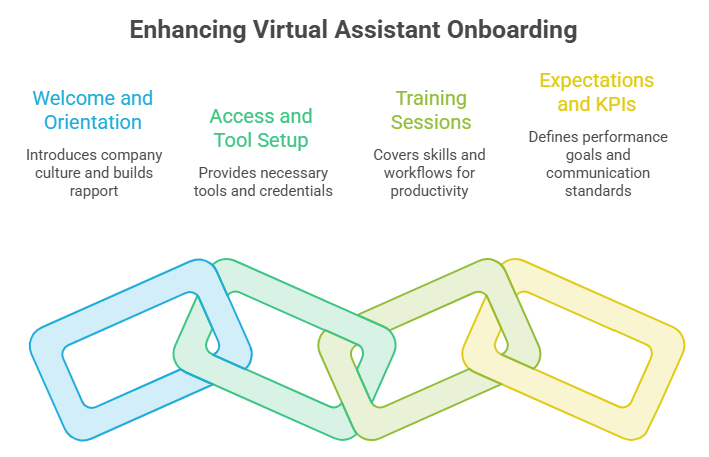
A well-executed step-by-step onboarding process helps your new virtual executive assistant become productive quickly and feel like a valued part of the team. Following a structured timeline reduces confusion and builds confidence from day one. This approach typically leads to initial productivity within 3-14 days and full efficiency in 2-4 weeks when done right.
Step 1: Welcome and Initial Orientation
Send a comprehensive welcome packet that includes your company overview, core values, organisational chart, and key contact information. Schedule an initial video call to build personal rapport, discuss communication preferences, and address any time zone considerations upfront. This warm start helps the VA feel connected and sets a positive tone for the entire working relationship.
Step 2: Granting Access and Tool Setup
Provide secure, role-based access to all necessary tools, including email, project management software, CRM systems, and shared drives. Use password managers and document every login detail clearly while testing access together during the first session. Immediate troubleshooting prevents delays and demonstrates your commitment to a smooth integration process.
Step 3: Comprehensive Training Sessions
Break training into focused, manageable sessions covering company overview, core tools, specific task workflows, and plenty of room for questions. Record all sessions for future reference and incorporate shadowing opportunities before transitioning to independent work. Progressive training with regular feedback helps the VA gain confidence and efficiently master responsibilities.
Step 4: Setting Expectations and KPIs
Clearly define key performance indicators such as task completion rates, response times, quality standards, and communication protocols. Use collaborative tools to track goals and schedule regular check-ins, especially during the first 30 days. Mutual understanding of expectations creates accountability while giving the VA a clear roadmap for success.
Essential Tools and Technology for Seamless Collaboration
Choosing the right tools is essential for effective remote collaboration when you onboard a virtual assistant. The proper technology stack minimises friction and maximises productivity from the very beginning. Investing in reliable platforms pays dividends through smoother workflows and better team alignment.
- Use Slack or Microsoft Teams for real-time communication.
- Implement Asana, Trello, or Monday.com for task management.
- Track time with Toggl, Clockify, or Harvest.
- Share documents via Google Workspace, Microsoft 365, or Notion.
- Secure access with VPNs and two-factor authentication.
- Ensure compliance with GDPR or HIPAA as needed.
Training, Communication, and Building Team Culture Remotely
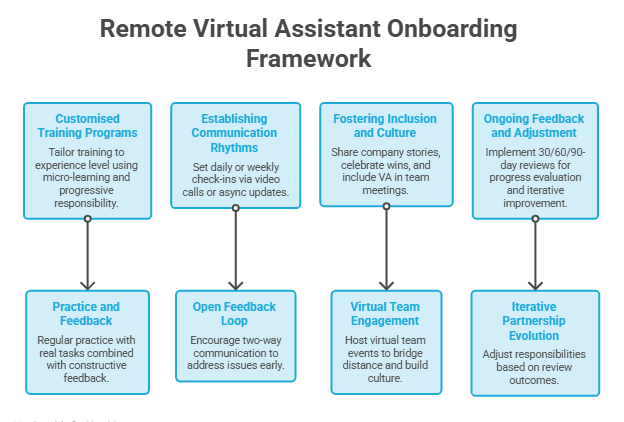
Successful remote onboarding goes beyond tasks to include strong communication through a business email writing service and a sense of belonging for your virtual assistant. Building these elements early creates a foundation for long-term collaboration and high performance. Thoughtful training combined with consistent interaction helps remote team members thrive.
1. Customised Training Programs
Tailor training programs to match the VA’s existing experience level while incorporating micro-learning modules and progressive responsibility. Certified or specialised virtual assistants often ramp up significantly faster when training is personalised. Regular practice with real tasks, combined with constructive feedback, accelerates mastery and builds lasting confidence.
2. Establishing Communication Rhythms
Set clear daily or weekly check-in schedules using video calls or async updates to maintain alignment. Encourage open feedback in both directions to address issues before they grow. Consistent communication rhythms strengthen the working relationship and correlate strongly with higher VA retention and satisfaction.
3. Fostering Inclusion and Culture
Share company stories, celebrate wins together, and include the VA in relevant team meetings and discussions. Making remote team members feel valued leads to higher engagement and job satisfaction. Small gestures like virtual team events help bridge the distance and create a cohesive work culture.
4. Ongoing Feedback and Adjustment
Implement structured 30/60/90-day reviews to evaluate progress and adjust responsibilities as needed. Use these check-ins as opportunities for two-way feedback and continuous improvement. This iterative approach minimises turnover risks and allows the partnership to evolve naturally over time.
Measuring Success and Optimising Performance

Tracking the right metrics helps you evaluate the effectiveness of your virtual assistant onboarding process and make data-driven improvements through quantitative market research services. Regular assessment ensures the relationship continues delivering strong value to your business. With clear measurement, you can confidently scale support as your needs grow.
- Monitor KPIs like task volume, error rates, and response times.
- Collect qualitative feedback from clients and team members.
- Track ROI through time saved and cost efficiencies.
- Conduct 30/60/90-day performance reviews.
- Expand the VA’s role after proving core competencies.
- Resolve challenges through open dialogue and adjustments.
Common Mistakes to Avoid When Onboarding a Virtual Assistant
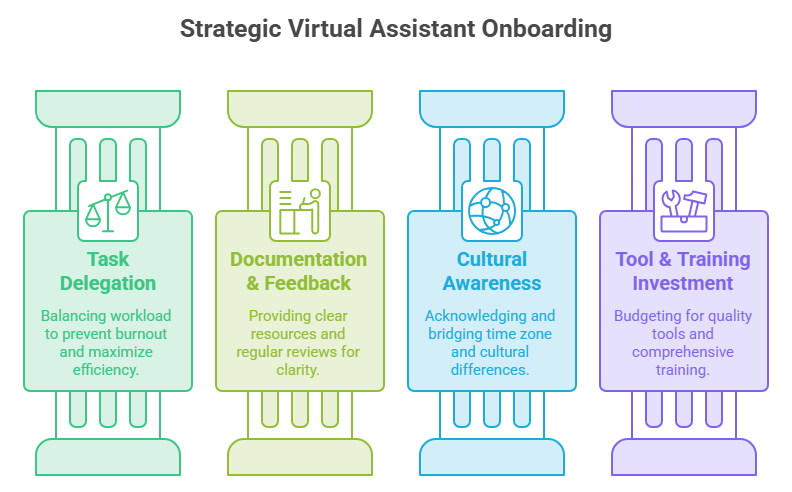
Avoiding common pitfalls during the onboarding process can save significant time, money, and frustration when bringing on a new virtual assistant. Many business owners unintentionally create barriers that slow integration and reduce effectiveness. Being aware of these issues allows you to implement proactive solutions from the start.
1. Overloading or Under-Delegating
Dumping too many tasks at once overwhelms a new VA and leads to mistakes or burnout. On the other hand, hoarding work and failing to delegate properly prevent you from realising the full benefits of hiring support. Gradual delegation paired with adequate support and training produces the best long-term results.
2. Neglecting Documentation and Feedback
Skipping detailed SOPs or consistent feedback sessions creates confusion and repeated questions. Without proper documentation, even experienced VAs struggle to work independently. Investing time upfront in clear resources and regular reviews leads to greater efficiency and smoother collaboration.
3. Ignoring Cultural or Time Zone Differences
Failing to acknowledge time zone mismatches or cultural nuances can cause scheduling conflicts and miscommunication. Without established protocols, small differences can grow into larger frustrations. Tools like World Time Buddy and clear guidelines help bridge gaps effectively.
4. Failing to Invest in Tools or Training
Using cheap or inadequate tools often results in technical issues and lost productivity. Similarly, insufficient training leaves the VA underprepared for success. Budgeting appropriately for quality platforms and thorough training delivers much stronger returns over time.
Best Practices for Long-Term VA Success
Building a successful long-term relationship with your virtual assistant requires ongoing attention and a commitment to continuous improvement. Trust grows when you shift from close oversight to greater autonomy as the VA demonstrates competence. Regular recognition and professional development opportunities keep motivation high.
Encouraging upskilling and sharing new resources helps your VA stay current with industry trends and tools. Many virtual assistants using modern AI capabilities report substantial productivity gains. Celebrating achievements and providing incentives like bonuses further strengthens loyalty and performance.
How Onboarding Virtual Assistant Helps Businesses

Properly onboarding virtual assistants delivers measurable advantages that strengthen your operations and support sustainable growth through IT virtual assistant services. When integrated effectively, VAs become reliable extensions of your team, helping you achieve more with less overhead in today’s competitive environment.
- Reduces operational costs by 40-78% versus traditional employees.
- Saves business owners an average of 32 hours per week.
- Increases overall team productivity by up to 28%.
- Enables faster business scaling without added office space.
- Improves focus on high-value strategic work.
- Enhances work-life balance for entrepreneurs and leaders.
TaskVirtual: Your Partner in Virtual Assistant Onboarding

Hiring and successfully onboarding a virtual assistant can feel complex, especially when juggling business priorities and the need for quick integration. From crafting detailed SOPs and setting up secure tools to establishing clear communication rhythms, the process requires expertise to avoid common setbacks. TaskVirtual offers professional virtual assistant services that handle these challenges, making it easier for U.S. business owners to bring on reliable support and achieve seamless productivity.
1. Expert Onboarding Guidance
TaskVirtual’s experienced virtual assistants guide you through every stage of the process, from role definition and SOP creation to personalised training sessions and KPI setup. They ensure your new VA receives structured support tailored to your business needs, accelerating the path to full efficiency.
2. Affordable and Flexible Pricing
Hiring a full-time personal assistant can be expensive, but TaskVirtual makes it cost-effective. With pricing plans starting from just $3.12/hour to $14.99/hour, their services are budget-friendly and accessible to individuals, families, and businesses.
3. Comprehensive VA Support Solutions
TaskVirtual provides end-to-end assistance with tool configuration, communication protocols, cultural alignment, and ongoing performance optimisation. Their virtual assistant services scale to match your requirements to support business efficiency, whether you need help with initial onboarding or long-term VA management and expansion.
4. Ongoing Support and Quality Assurance
TaskVirtual delivers continuous check-ins, feedback loops, and proactive adjustments throughout the onboarding journey and beyond. Their dedicated support helps resolve issues quickly and ensures your virtual assistant becomes a fully integrated, high-performing team member.
5. Proven Track Record of Excellence
With 364 positive reviews and a 4.7-star rating on trusted VA platforms, TaskVirtual is recognised as a reliable partner worldwide. Clients count on their expertise to simplify virtual assistant onboarding and drive sustainable business growth.
FAQ Section
1. How long does it take to onboard a virtual assistant?
Typically 3-14 days for basic productivity, with full efficiency in 2-4 weeks depending on task complexity and preparation.
2. What are the best practices for onboarding a new virtual assistant?
Clear documentation, structured training, regular check-ins, tool access, and defined KPIs. Focus on communication and gradual responsibility increase.
3. How do I onboard a virtual assistant client as a VA?
(Related to client-side processes) While this guide focuses on hiring, VAs should mirror elements: discovery calls, contracts, welcome packets, and shared access for smooth client integration.
4. What tools are essential for virtual assistant onboarding?
Project management (Asana), communication (Slack), docs (Google Workspace), and time tracking (Toggl).
5. How much can I save by hiring and onboarding a VA properly?
Businesses often save 40-78% on costs versus full-time employees, plus significant time.
6. What if the VA isn’t working out after onboarding?
Use probationary periods, provide feedback, and have clear contract terms. Most issues resolve with communication; otherwise, transition smoothly.
Conclusion
Mastering how to onboard a virtual assistant transforms it from a simple hire into a strategic advantage. By investing in preparation, structured steps, clear communication, and ongoing optimisation, U.S. business owners can unlock productivity gains, cost savings, and scalability in 2026 and beyond.
Don’t wait—start by auditing your current processes and drafting that first SOP today. Ready to bring on support? Explore reputable VA platforms or agencies, or reach out for a consultation to customise this framework for your needs. Your future self (and bottom line) will thank you.
Before starting the onboarding process, make sure you understand whether your business is ready to hire a virtual assistant.
CTA: Subscribe for more small business growth tips, or download our free VA Onboarding Checklist template.
Sources
- Statista and market reports on the VA industry growth.
- Remote Coworker and VA Institute statistics.
- Stanford research on remote productivity.
- U.S. Small Business Administration and related data.
- Various expert guides on VA processes (Prialto, Boldly, etc.).
For more such content, visit our website.
 Siddhartha Basu is a Technical Writer at Task Virtual. He loves online games, e-book reading, and Yoga.