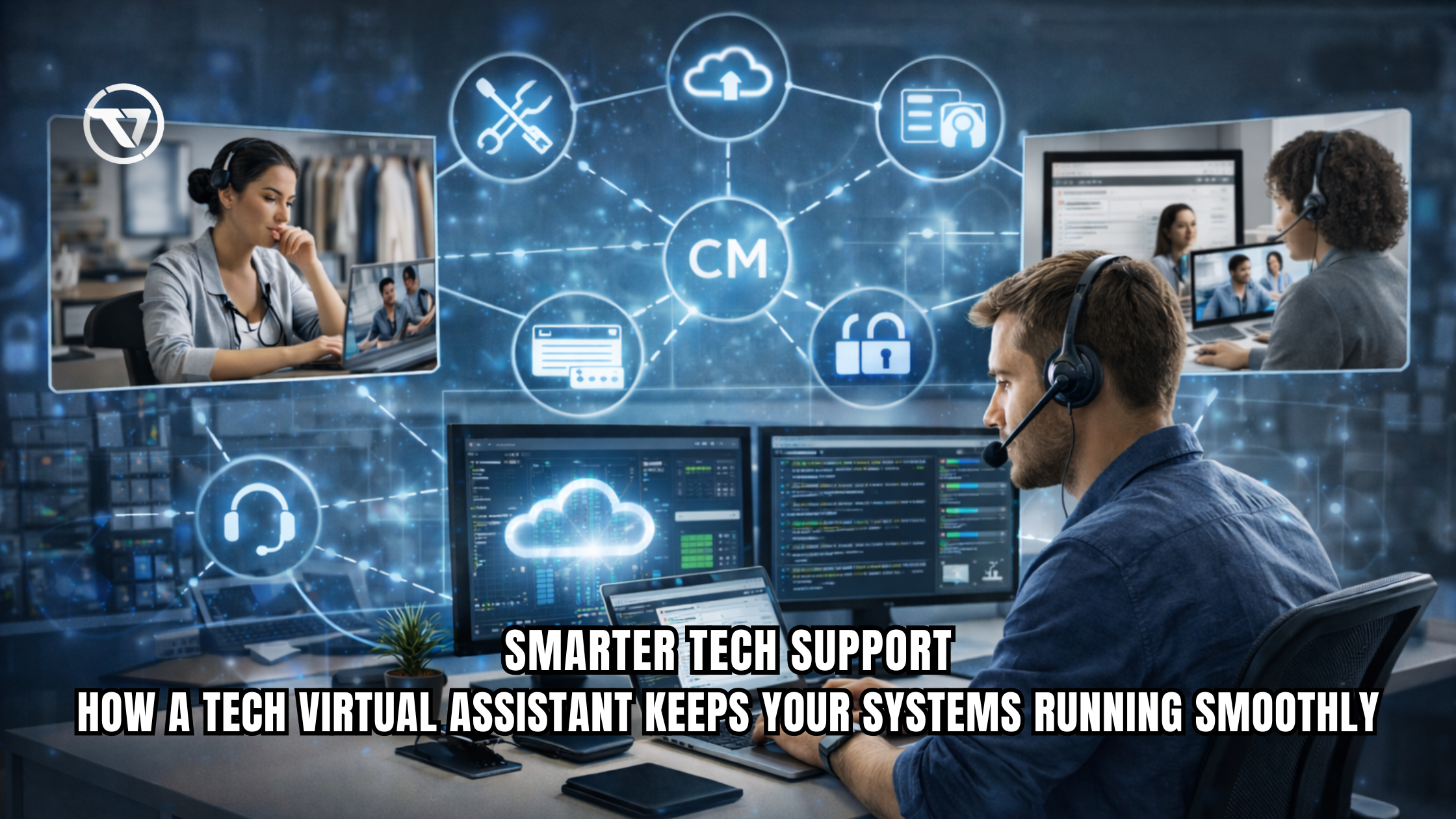
A tech virtual assistant is an isolated professional who handles technical tasks such as IT support, software troubleshooting, website management, and system maintenance. Businesses use them to manage day-to-day technical operations without hiring full-time in-house staff.
Many small businesses and startups depend heavily on digital tools—websites, CRMs, SaaS platforms, and internal systems. However, maintaining these systems requires ongoing technical support, which is often expensive and difficult to scale. In fact, over 37% of small businesses already outsource at least one business process, including IT support, to stay competitive. Hiring a full-time IT team is not always viable. As a result, businesses increasingly turn to a remote tech virtual assistant to manage technical workloads efficiently while controlling costs.
What This Means for Businesses
A Tech Virtual Assistant acts as an extension of your operations team by handling the maintenance and support of your digital infrastructure. In addition, they manage systems, resolve technical issues, and ensure your tools and platforms function efficiently. As a result, businesses maintain stable operations without relying entirely on in-house IT resources.
For businesses, this means:
- Reduced reliance on in-house IT staff minimizes the need for internal technical support. This helps lower overhead while maintaining smooth operations.
- Faster resolution of technical issues reduces downtime and disruptions. This helps maintain smooth and efficient operations.
- Continuous system monitoring and maintenance ensure systems run smoothly and reliably. This helps detect issues early and prevent disruptions.
- Access to specialized expertise without long-term contracts provides flexibility in resource allocation. This helps meet specific needs without ongoing commitments.
A tech virtual assistant for small businesses or startups often handles both reactive (troubleshooting) and proactive (system optimization) tasks.
Why Companies Outsource This Task
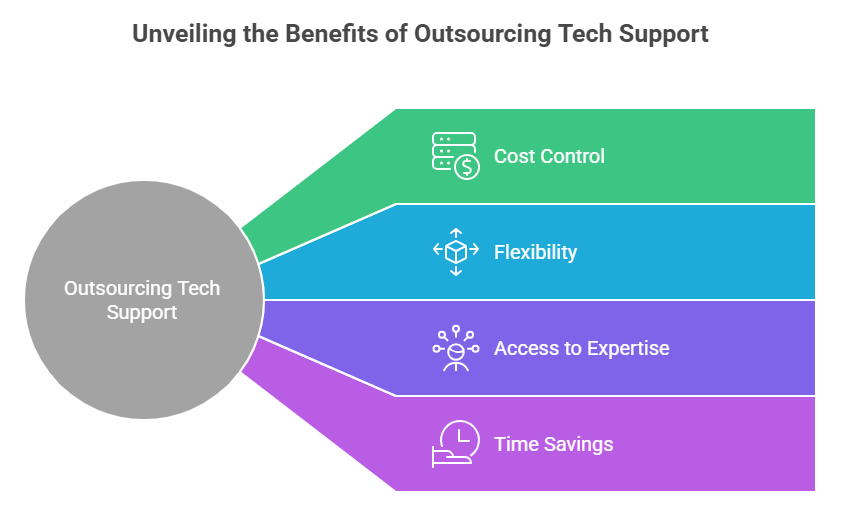
Businesses outsource to a virtual assistant for tech support to handle operational constraints more efficiently. In addition, managing technical systems in-house can be costly and difficult to scale, which is why 59% of businesses outsource to reduce costs and improve efficiency. As a result, outsourcing allows companies to maintain reliable support while focusing on core business tasks.
Key reasons include:
- Hiring a full-time IT employee in the US or UK is significantly more expensive than working with a remote IT virtual assistant. This makes it a more cost-effective option for managing technical support and related tasks.
- Support can be scaled up or down based on workload, allowing for better alignment with business needs. This flexibility helps in managing resources efficiently without unnecessary costs.
- Specialized skills can be accessed without the need for extensive recruitment processes. This reduces overhead while ensuring the required expertise is available when needed.
- Time is saved as internal teams can focus on core business functions. This improves overall productivity and operational efficiency.
For startups, a tech virtual assistant for startups can act as a fractional IT team during early growth stages.
Tasks Virtual Assistants Perform
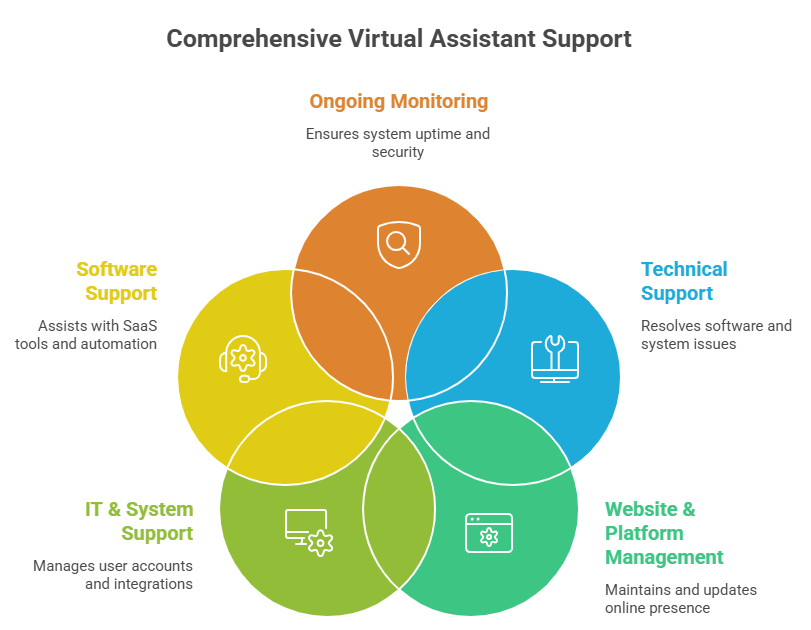
A tech support virtual assistant manages support, maintenance, and optimization tasks for business systems. In addition, they help resolve issues and keep platforms running efficiently. As a result, this ensures smooth and reliable day-to-day operations.
1. Technical Support
A virtual assistant troubleshoots software and system issues to ensure smooth operations. In addition, they respond to customer technical queries and manage helpdesk tickets efficiently. As a result, this helps maintain consistent and reliable support services. Furthermore, they also diagnose login, access, and performance problems to maintain system reliability.
2. Website & Platform Management
They handle website updates and ongoing maintenance to keep platforms current and functional. In addition, they manage CMS platforms such as WordPress, Webflow, and Shopify while updating plugins and themes. Moreover, they also monitor performance to ensure optimal website speed and stability.
3. IT & System Support
Virtual assistants set up user accounts and manage access control to maintain security. In addition, they configure email systems and domains while supporting CRM and SaaS integrations. Furthermore, they also handle backups and manage data to ensure system continuity and reliability.
4. Software Support
They assist users in navigating and using SaaS tools effectively. In addition, they debug workflow automation issues to ensure systems operate as intended. Moreover, they also manage integrations such as Zapier and APIs to maintain seamless connectivity between platforms.
5. Ongoing Monitoring
Virtual assistants monitor system uptime to ensure uninterrupted operations. In addition, they perform regular security checks and updates to protect systems from vulnerabilities. Furthermore, they also identify inefficiencies in workflows and recommend improvements.
Tools Professional Virtual Assistants Use

A dedicated tech virtual assistant uses a structured set of tools to manage tasks efficiently. In addition, these tools streamline workflows, improve accuracy, and reduce manual effort, with studies showing that automation can increase productivity by up to 30%. As a result, this ensures consistent and reliable technical support.
1. Helpdesk & Support Tools
Virtual assistants use tools like Zendesk, Freshdesk, and Help Scout to manage support requests efficiently. In addition, these platforms help organize incoming queries and streamline ticket management. As a result, they track resolution times to ensure timely issue handling.
2. Communication & Collaboration
They use Slack, Microsoft Teams, and Zoom for real-time communication and coordination. In addition, these tools enable quick resolution of technical issues through team collaboration. As a result, they facilitate seamless communication between internal teams and stakeholders.
3. System Monitoring
Tools such as UptimeRobot, Pingdom, and Datadog help virtual assistants monitor system performance continuously. These platforms detect issues early before they escalate into major problems. They ensure systems remain stable and operational at all times.
4. Website & Development Tools
Virtual assistants use WordPress and Webflow dashboards to manage website content and functionality. In addition, they rely on GitHub for version control and collaboration on development tasks. As a result, they use cPanel and hosting dashboards to manage server-level configurations efficiently.
5. Automation & Integration
They use tools like Zapier and Make (Integromat) to automate workflows across platforms. In addition, these tools reduce manual intervention by connecting different systems seamlessly. As a result, they improve efficiency by streamlining repetitive technical tasks.
These enable workflow automation, reducing manual intervention.
Step-by-Step Workflow Used by Virtual Assistants
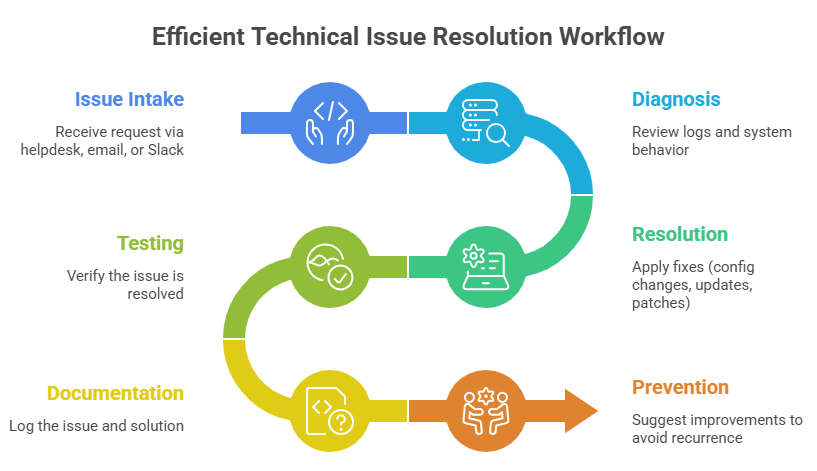
A virtual assistant for troubleshooting support follows a structured process to resolve technical issues efficiently. This approach ensures problems are diagnosed accurately and fixed quickly. It also helps maintain consistency across different systems and tasks.
This workflow ensures consistency, especially for a virtual assistant for IT support managing multiple systems.
Common Challenges Businesses Face

Without proper technical support, businesses often face ongoing operational challenges. Systems may become unreliable, issues take longer to resolve, and internal teams get stretched thin. This leads to inefficiencies that can impact overall business performance.
- Recurring technical issues can arise due to a lack of proper documentation. This makes it difficult to identify and resolve problems efficiently.
- Delayed response times can negatively affect the customer experience. This may lead to dissatisfaction and impact overall service perception.
- Internal teams can become overloaded when handling non-core tasks. This reduces their efficiency and diverts focus from primary responsibilities.
- Outdated systems create security vulnerabilities and increase breach risks; therefore, a tech virtual assistant helps address them early.
- Inefficient workflows can result from poor system integration across tools and processes. This can lead to delays and reduced overall productivity.
A tech virtual assistant services provider helps address these systematically. As a result, businesses improve operational efficiency and maintain more consistent system management.
Benefits of Outsourcing to Virtual Assistants
| Factor | In-House IT Staff | Tech Virtual Assistant |
|---|---|---|
| Cost | High (salary + benefits) | Flexible, lower cost |
| Availability | Fixed hours | Can offer extended coverage |
| Scalability | Limited | Easily scalable |
| Expertise | Generalized | Specialized skills available |
| Setup Time | Long hiring process | Quick onboarding |
Key Benefits
- An affordable tech virtual assistant improves cost efficiency by reducing overall expenses. This helps manage technical support at a lower cost.
- Reduced downtime improves operational continuity; therefore, it ensures smoother and more consistent business operations.
- Specialized support provides access to niche tools and systems. This enables more effective handling of specific technical requirements.
- Improved customer experience comes from faster issue resolution. This leads to higher satisfaction and better service quality.
For US-based companies, a US-based tech virtual assistant may be preferred for time zone alignment and compliance needs. As a result, businesses improve coordination and ensure smoother adherence to regulatory requirements.
How a Virtual Assistant Company Helps Businesses
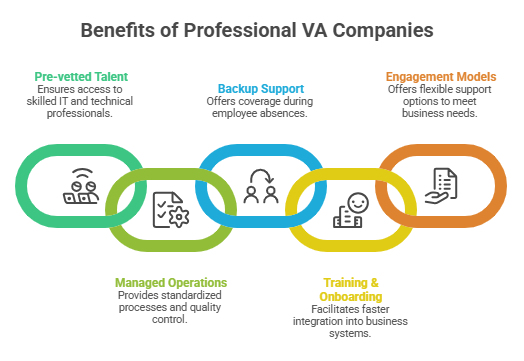
A professional VA company offers structured support that goes beyond individual freelancers. In addition, it ensures consistent service delivery through standardized processes and team-based support. As a result, this provides businesses with more reliability and scalability
1. Key Advantages
- Pre-vetted talent ensures access to professionals skilled in IT and technical workflows. This helps maintain quality and efficiency in handling tasks.
- Managed operations ensure standardized processes and consistent quality control. This helps maintain efficiency and reliability in day-to-day activities.
- Backup support provides coverage during absences, ensuring work continues without interruption. This helps maintain consistency and prevents disruptions in operations.
- Training and onboarding enable faster integration into your systems. This helps new resources become productive more quickly.
2. Typical Engagement Models
- Hourly support provides assistance based on actual time requirements. This allows for flexible usage without long-term commitments.
- Monthly retainers provide ongoing support for a fixed fee. This ensures consistent availability and predictable costs.
- A dedicated full-time assistant provides consistent, focused support for daily operations. This ensures better continuity and reliability in handling tasks.
TaskVirtual: Your Partner in Tech Virtual Assistant Services

Managing technical systems, troubleshooting issues, and maintaining digital infrastructure can quickly overwhelm growing businesses. In addition, handling software errors, ensuring website uptime, and managing integrations require consistent attention and technical expertise. As a result, these responsibilities place increasing operational strain on internal teams. TaskVirtual provides structured tech virtual assistant services that help businesses maintain smooth operations without the complexity of building an in-house IT team.
1. Expert Technical Support and Consultation
TaskVirtual’s experienced virtual assistants provide hands-on support for troubleshooting software issues, managing helpdesk tickets, and maintaining system performance. In addition, they assist with diagnosing recurring problems, optimizing workflows, and ensuring your business tools function reliably across daily operations. As a result, this improves efficiency and maintains consistent system performance.
2. Affordable and Flexible Pricing
Hiring full-time IT staff can significantly increase operational costs. TaskVirtual offers a cost-effective alternative, with pricing plans starting from just $3.12/hour to $14.99/hour. This allows businesses to access professional remote tech virtual assistant support while maintaining budget control.
3. Comprehensive Tech Support Solutions
From website management and SaaS tool support to CRM integrations and system monitoring, TaskVirtual covers a wide range of technical needs. Whether you require a virtual assistant for software support, website updates, or ongoing IT maintenance, their services are designed to scale with your business requirements.
4. Ongoing Monitoring and Support
TaskVirtual ensures continuous system oversight through proactive monitoring, regular updates, and timely issue resolution. In addition, their assistants help prevent downtime by identifying potential risks early and maintaining system stability across platforms. As a result, this strengthens reliability and minimizes operational disruptions.
5. Proven Track Record of Reliability
With 364 positive reviews and a 4.7-star rating on trusted VA platforms, TaskVirtual has established a reputation for delivering dependable technical support services. In addition, businesses rely on their structured processes and consistent performance to manage critical systems efficiently. As a result, this reinforces trust and ensures reliable system management.
Conclusion
A tech virtual assistant provides a practical solution for businesses that rely on digital systems but lack the resources for a full in-house IT team. Moreover, by outsourcing technical support to a Tech Virtual Assistant, companies can maintain system stability, improve response times, and focus internal efforts on growth and strategy. Whether for troubleshooting, system maintenance, or website management, a structured VA workflow delivers measurable operational value.
Key Takeaways
- Tech virtual assistants handle IT support, troubleshooting, and system management remotely. This ensures efficient technical assistance without the need for on-site presence.
- Businesses outsource to reduce costs and improve operational efficiency. This allows them to focus resources on core activities and strategic growth.
- Structured workflows ensure consistent issue resolution across tasks and processes. This improves reliability and reduces the chances of errors.
- Professional tools enable scalable and reliable support across operations. This allows systems and services to handle increasing demands efficiently.
- VA companies provide managed, low-risk outsourcing solutions for business operations. This helps ensure reliability while minimizing potential risks.
FAQ Section
1. What does a tech virtual assistant do?
They manage technical tasks such as troubleshooting, IT support, website maintenance, and system monitoring.
2. How much does a tech virtual assistant cost?
Costs vary by expertise and location, but they are typically lower than hiring full-time IT staff.
3. Can a virtual assistant handle software support?
4. Is a US-based tech virtual assistant necessary?
Not always. However, businesses may prefer US-based assistants for compliance, communication, or time zone alignment.
5. What businesses benefit most from tech virtual assistants?
Small businesses, startups, agencies, and entrepreneurs with ongoing technical needs but limited internal resources.
For more queries, visit our website.
 Siddhartha Basu is a Technical Writer at Task Virtual. He loves online games, e-book reading, and Yoga.