Contents
show
What customer support outsourcing actually covers
In short: Customer support outsourcing hands routine questions to someone working from your written playbook. You keep refunds, exceptions and upset customers, and you check a sample of replies every week.
Nobody decides to outsource support on a quiet Tuesday. It happens when the inbox has grown faster than the team, and the owner is answering “where is my order?” late at night, again. If you want to see what 20 or 160 hours a month costs in practice, Task Virtual lists its plans with hourly rates on its pricing page. The rest of this guide is about the work itself: what to hand over, who can take it, and how to tell whether it’s going well.
The phrase covers more than people expect. The U.S. Bureau of Labor Statistics describes the job like this: customer service representatives interact with customers to handle complaints, process orders, and answer questions. Pull that sentence apart and you get three different kinds of work. Answering is one. Processing is another. Handling complaints is a third, and it’s the one that needs the most judgement.
In a small business, outsourced support usually means some mix of these:
- Replying to emails and web-form messages: order status, shipping, how-to questions, account changes.
- Answering live chat during the hours you choose.
- Tagging and sorting tickets so the urgent ones reach you first.
- Processing returns and exchanges that follow a written rule.
- Updating the customer’s record in your CRM or helpdesk after each contact.
- Keeping a shared list of questions that keep coming up, so you can fix the cause.
None of that needs you to be the one typing. Some of it does need you to be the one deciding. The whole skill of outsourcing support is knowing which is which.
What to hand over, and what to keep
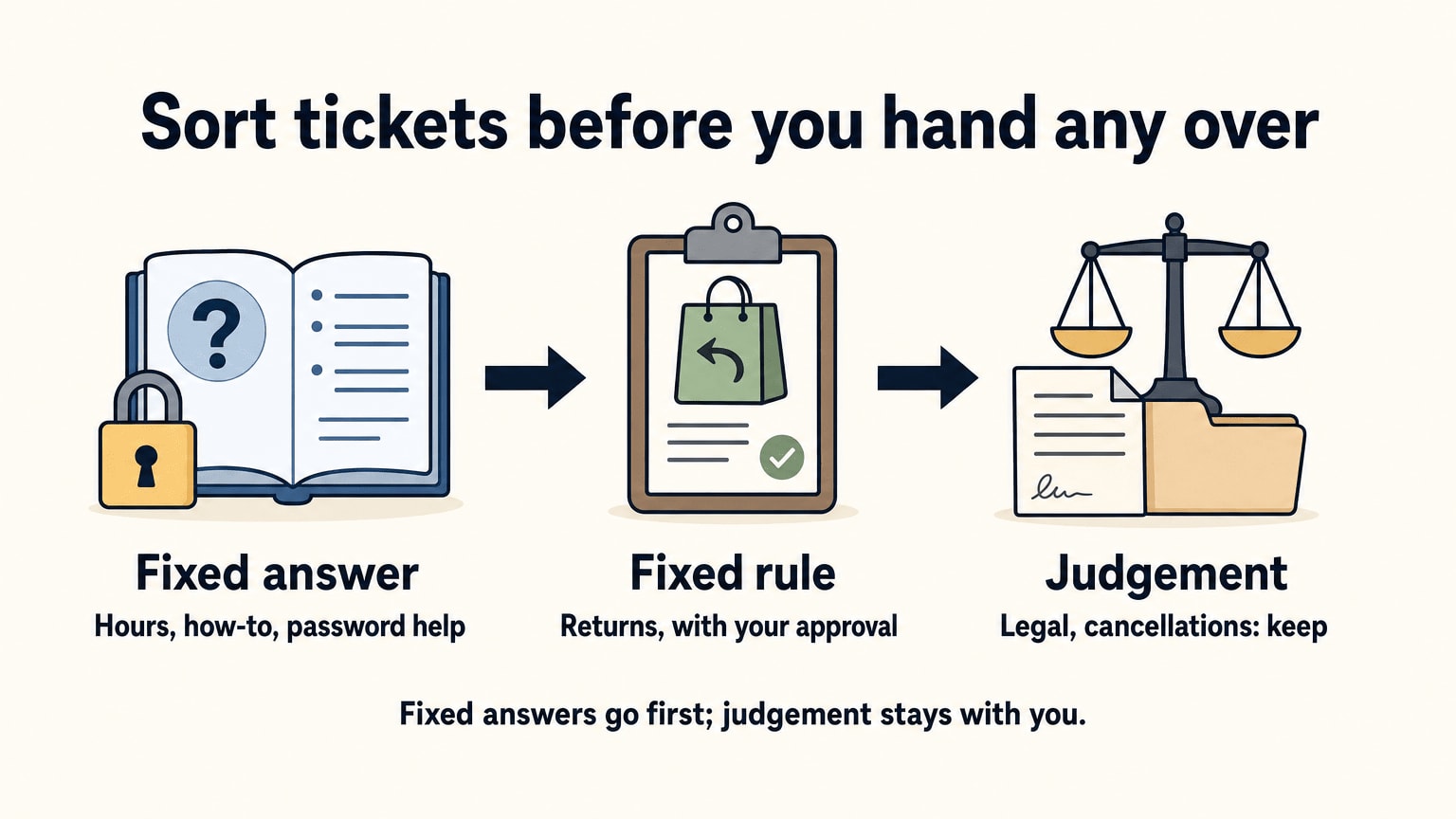
Not every ticket should leave your desk. A simple test sorts them. For each type of ticket, ask two questions: can I write the answer down, and what does it cost me if the answer is wrong?
Questions with a fixed answer and a small downside go first. “What are your opening hours?” “How do I reset my password?” If a reply is slightly off, you send a follow-up and nobody leaves.
Questions with a fixed rule and a bigger downside can go too, with a check built in. Returns are the usual case. The rule might be “refund in full inside the returns window, with proof of purchase”. The assistant applies it, and you approve anything outside it. That’s the same habit we describe in our post on bookkeeping services: the person who prepares isn’t the person who approves.
Judgement stays with you. A customer who says they’re leaving and why. A complaint that mentions a lawyer. A strange request that no rule covers. Those look like support tickets, but they’re really decisions about your business that happen to arrive in an inbox.
A quick way to sort your tickets
| Ticket type | Example | Hand over? |
|---|---|---|
| Fixed answer, low risk | Opening hours, how-to questions | Yes, first |
| Fixed rule, money involved | Refunds, exchanges, billing corrections | Yes, with your approval beyond the rule |
| Needs judgement | Cancellation threats, legal language, VIP accounts | Keep, or review every reply |
| Sensitive data you don’t need to share | Full card numbers, health details | Keep, or remove before handing over |
The last row deserves a second look. The cheapest way to protect customer data is not to send it. A reply to “where is my parcel?” needs a name and an order number. It doesn’t need a card number sitting in the same thread.
A note on automation
The BLS projects that employment of customer service representatives will decline 5 percent from 2025 to 2035, and it points to self-service tools as a reason. That fits what small teams see. The simplest questions are the ones a help page, an order-tracking link or a chatbot can take. So before you hand a ticket type to a person, ask whether a better help page would make it disappear. What’s left for people is the messier, more human part. That’s the part where your instructions matter most.
Who can do it: five ways to cover support
You have five realistic options. They differ less on price than on how much of the managing lands on you.
Support options side by side
| Option | Best when | Watch out for |
|---|---|---|
| You, with a helpdesk tool | Low volume, you like talking to customers | Replies slip whenever you get busy |
| A new in-house hire | Steady volume and a budget for salary and training | Holidays, sick days, and a long wait to fill the role |
| A freelancer from a marketplace | A short spike or a one-off clean-up | You hire, brief and check each time |
| A BPO or call-centre firm | Large, continuous volume across many channels | Contracts, minimums and scope built for bigger buyers |
| A dedicated virtual assistant | Steady support mixed with other admin | You must write the rules and check a sample |
Doing it yourself with a helpdesk is the right start. Nothing teaches you your own customers’ questions like answering them for a while. It stops working when answering becomes a second job.
A hire is the traditional fix. It’s also the slowest and the most expensive way to find out whether support was really the problem. If you’ve never handed support to anyone, you may not know yet what you’d ask a full-time person to do.
Freelancers suit a burst. Trouble starts when the work repeats. Each new person needs the same briefing, and the quality you got last time doesn’t come with them. That’s the retraining problem, and it’s why some owners move to one provider with one dedicated person.
A BPO is built for volume: many agents, many channels, formal reporting. For a business with a few hours of support work a day, the contract is often bigger than the problem.
The fifth option is where we come in. Task Virtual is a virtual assistant company headquartered in Kolkata, India. Customer support sits alongside data entry, research, admin and other tasks, and the work is done by a dedicated assistant rather than a rotating pool. The assistant learns your products and your tone, which a pool can’t. It also means you have to say clearly what you want, and I’ll show you how below.
One limit is worth stating plainly. Our assistants handle tasks in English only. If your customers write in another language, we’re not the right fit, and it’s better to know now than after you’ve signed up.

Write the playbook before the first ticket
Most support outsourcing goes wrong at the brief, not at the keyboard. “Handle my support emails” is a sentence in your head. The assistant can’t see your head.
Write one document, once. Call it the playbook. It should hold:
- Who your customers are and what they usually write in about. Five lines is plenty.
- The tone. Formal or friendly? First names or surnames? Do you apologise first, or fix first? Add two sample replies you’re proud of.
- The rules for money: when a refund can be given without asking, up to what amount, and when a replacement ships instead.
- The facts that don’t change, such as shipping times, returns windows, warranty terms and product sizes. Put them in one place.
- Saved replies, sometimes called macros. These are ready-made answers for the 10 questions that make up most of your inbox. Write them yourself first, and let the assistant improve them.
- What to do when unsure. The answer is “flag it and wait”. Never “guess”.
- Who to ask, and how. One channel, one person.
Add three or four real tickets from your own inbox, including one ugly one. A worked example beats a page of rules.
Keep the playbook alive. When the same question comes up twice, add the answer. It’s also your insurance. If the person changes, the playbook stays, and nobody starts from nothing. We wrote about the same habit in our guide to data entry outsourcing: say where the work comes from, where it goes and what counts as done.
Escalation is the part customers notice
A customer will forgive a slow reply. They rarely forgive being bounced between people, or being told “I’ll check” and then hearing nothing.
So decide in advance what gets passed to you, and how. A short list is enough: anything about a legal threat, a safety issue, a chargeback, a press enquiry, a refund over your limit, a customer who has written three times about the same thing. Ask the assistant to pass it on with a two-line summary: what happened, what the customer wants, what’s already been said. Then you reply, or you tell the assistant what to say. The customer sees one voice and one thread.
This is also where you stay in control. Outsourcing support doesn’t mean giving up the relationship. You step in only where you’re needed.
Channels, hours and who is awake
Before you hand anything over, decide which channels the assistant covers. Email is the easy one: a customer writes, someone replies when they can, and a delay of a few hours rarely hurts. Live chat is harder, because the customer is waiting right now. Voice calls are harder again, and our post on the phone answering service explains how that kind of work differs. Don’t assume a provider covers all three. Ask for each channel by name, and get a yes or a no.
Then decide the hours. A provider working from Kolkata isn’t sitting in your time zone, so say when customer messages arrive and when you want them answered. Our FAQ covers whether an assistant can work during your hours, and it’s worth reading before you commit. If most of your tickets land overnight in the US, the gap may suit you, as long as you’ve agreed the hours in advance. If your customers expect a live answer in the middle of your afternoon, check that first.
Pick your own reply-time target and write it into the playbook. Don’t borrow a number from a vendor page. A target you chose, and can measure from your own inbox, is the only one that means anything.
Try support handover on a small scale first
Start with the free 3-hour trial, valid for 2 days, or tell us what you need and ask for a quote.
Start a free trialRequest a quote
Measure it yourself, with a sample
Every provider will tell you their quality is high. I couldn’t find a neutral, current benchmark for the quality of outsourced replies that I’d trust enough to quote, and I’d doubt any page that offered one without showing how it was counted. So measure your own. It’s not hard.
Take a sample of finished tickets each week. For 200 tickets, pull 20 at random. Read each reply as if you were the customer, and mark it against four questions:
- Was the answer correct?
- Did it follow the playbook, on tone and on money rules?
- Did it answer the whole question, or only the first line?
- Should it have been passed to me?
Count how many pass all four. That’s your quality rate for the week, in a number you made yourself.
A few habits keep it honest:
- Pick the sample yourself, so it isn’t the 20 cleanest.
- Sort the misses into types: wrong fact, wrong tone, missed question, should have escalated. The types tell you what to fix in the playbook. A bare count doesn’t.
- Look at what customers write back. A reply that gets “thanks” is a good sign. A reply that gets the same question again wasn’t an answer.
- Repeat next week. A rate that rises is a good sign. A rate that stays flat means the brief is unclear.
Be fair about what you’re measuring, too. If a customer’s message is vague, a vague reply may be a reasonable one. Fix the playbook, not just the person.
Giving access without giving everything
Support means seeing customer data: names, addresses, order history, sometimes payment details. That’s the point, and it’s also the risk. Here’s a plain way to think about it.
Give the least access that does the job. The FTC’s guide for business puts it simply: each employee should have access only to those resources needed to do their particular job. If someone answers tickets, they don’t need your accounting login. If they process returns, they may not need to see revenue. Our data entry outsourcing guide goes through the same idea for spreadsheets and records.
Use their own login, never yours. A separate user lets you see what changed and switch it off the day the work ends.
Share passwords through a password manager. Not in an email, not in a chat window. We cover this in more detail in our post on sharing credentials with virtual assistants.
Keep refund approval with you at first. Let the assistant prepare the refund and you release it. After a month of clean work, raise the limit.
Get confidentiality in writing. Task Virtual’s assistants sign an NDA before client work starts. Our FAQ explains that, along with how assistant changes and refunds work, if you want the details before trying anyone. Whoever you use, ask for the terms.
Check what the provider does. The same FTC guide says that before outsourcing you should investigate the company’s data security practices and compare its standards to yours. It also says to insist that service providers notify you of any security incidents they experience. That’s good advice for a small business as much as a large one.
We don’t claim any compliance certification, and nobody should assume one from a friendly website. If your support involves patient or financial records, ask direct questions and keep that data out of the handover until you have good answers.
What it costs, counted in hours
Pages on customer support outsourcing love to say “save up to” some percentage. I’d skip that. The real cost depends on your volume, and you can’t check a percentage. Hours you can check.
For a rough US reference point, the BLS lists a median wage of $21.53 an hour for customer service representatives in May 2025. That’s a wage paid to an employee. It leaves out benefits, a desk, software, training and the time you spend managing, so it isn’t a like-for-like comparison with any outsourced rate. It tells you what an hour of this work is worth on a US payroll, and nothing more.
Now work out your own hours. This is an illustration, not a benchmark. Say your shop gets 300 tickets a month, and the average one takes 4 minutes to read, answer and log. That’s 1,200 minutes, or 20 hours. If your tickets are longer, or you want live chat covered, it’s more. If you have 100 tickets, it’s less. Change the numbers to suit yourself: the method matters more than my example.
- List each kind of ticket you get.
- Guess the time per ticket.
- Multiply by how many you get in a month.
- Add a margin for questions, escalations and fixing the playbook, because there will be some.
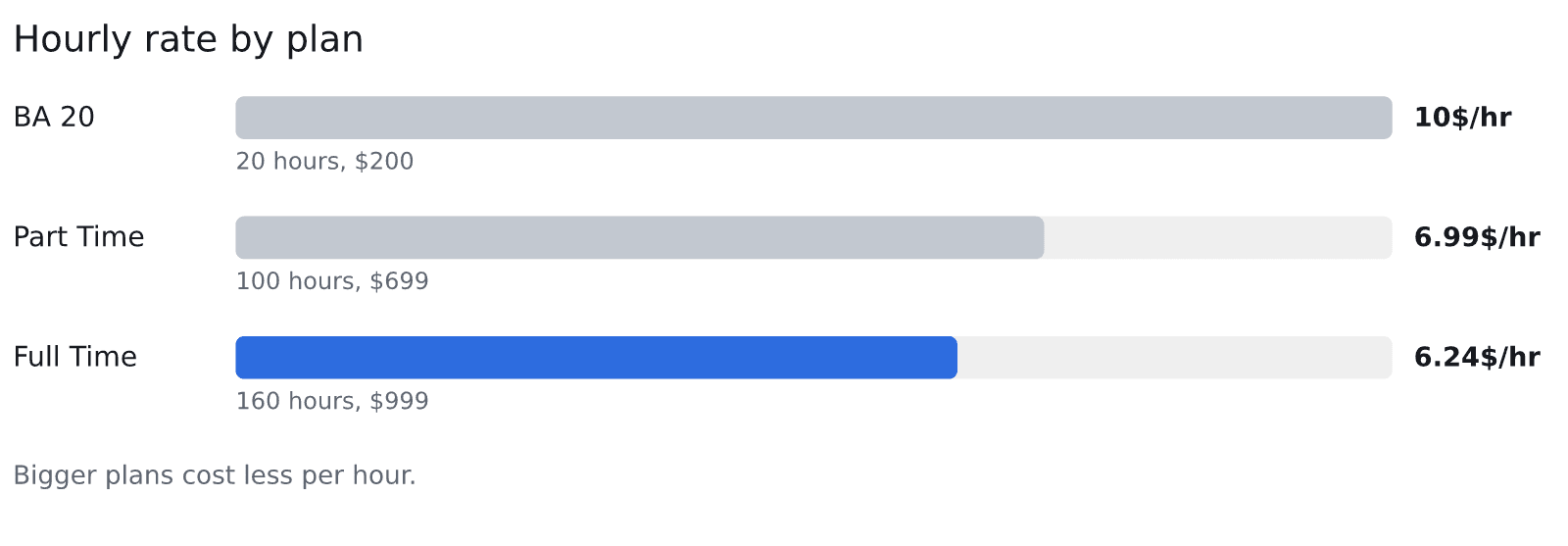
Then match the total to a plan. These are the figures from the pricing page:
Task Virtual plans by hours and hourly rate
| Plan | Hours | Price | Hourly rate |
|---|---|---|---|
| BA 20 (monthly block) | 20 | $200 | $10/hr |
| Part Time (dedicated assistant) | 100 | $699 a month | $6.99 |
| Full Time (dedicated assistant) | 160 | $999 a month | $6.24 |
Source: Task Virtual, plans and pricing page.
So 20 hours of replies a month fits the BA 20 block. A business whose support is a daily job, mixed with order admin and CRM updates, points to a dedicated assistant. Plans are monthly with no long-term commitment, and the hour blocks are valid for one month, so you can move up or down as the workload changes. The pricing page lists the other blocks too.
Is the cheaper hour the cheaper job?
Not always. A low rate on a slow or error-prone job costs more than a higher rate done right the first time. You pay for the second pass, and so does your customer. That’s why the first month matters more than the rate, and why the weekly sample is the real price control.
Don’t read these numbers as a promise of savings, either. Our own pricing page compares against the cost of a US hire and calls its monthly difference illustrative. Treat every cost comparison that way, ours included.
How to choose a provider
Whichever route you take, the same questions sort the good from the vague.
What exactly is included? “Customer support” is a loose phrase. Ask for the list: which channels, which hours, which tools, whether ticket tagging and CRM updates are in, and whether voice calls are in or out. If a provider can’t say what’s covered, you’ll find out on the first bad day.
Who will actually answer my customers? A named, dedicated person who learns your product is different from a pool of agents who see your account for the first time each shift. Ask which one you’re buying.
What happens when it isn’t working? Ask about replacing the person, ending the plan and getting money back. Read the equivalent terms from anyone else you consider.
How do they handle a message they can’t answer? Good answers sound like “we flag it to you with a summary”. Bad ones sound like “we’ll do our best”.
Will they reply when you need them to? Responsiveness is the quiet killer. We read 375 public reviews and forum posts of virtual assistant services on the App Store, Google Maps, Hacker News, Google Play and Trustpilot (2023–2026). Of the 151 one-star reviews we read, 18% (27) are about unresponsive support. We read more one-star and five-star reviews than their real share, on purpose, so that figure isn’t a rate for all customers. It does tell you what angry people mention. So ask any provider, us included, how you reach someone and how a question gets answered.
Your first month
Here’s a sequence that keeps risk low and tells you quickly whether it’s working.
Week one. Write the playbook. Pick one ticket type, such as order-status questions. Hand over the playbook and ten or so example tickets. Ask for replies to be drafted for your approval, not sent. Check all of them.
Week two. Take your first sample of 20. Sort the misses by type. Fix the playbook, not the person. Let the assistant send the straightforward ones directly, and keep approving the rest.
Weeks three and four. If the rate is rising, add a second ticket type, perhaps returns within your rule. Keep access narrow and keep approving refunds. If it isn’t rising, you’ve lost little, and you know before you’ve built a process on it.
One more habit helps: ask for a short note at the end of each day listing anything the assistant wasn’t sure about. Questions are a good sign. Silence on a messy inbox usually means guessing. Our post on why the first month with a VA is crucial goes further on this.

Common mistakes
A few errors come up often enough to name.
Handing over the angriest customers first. They’re the hardest tickets, and a new person has no context yet. Start with the easy ones and earn the trust.
Hiding the product problems. Support sees what’s broken before anyone else. If you ask for a weekly list of the top five questions, you’ll learn which help page, product label or shipping message is causing them. That list is worth more than the replies.
Changing the tone every week. Customers notice when a business sounds like three different people. Settle the tone in the playbook and add to it, don’t rewrite it.
Never reading the replies. If you don’t read what goes out in your name, nobody does. The sample takes half an hour a week. Keep it.
Expecting a stranger to know your policies. If a refund rule lives in your head, the assistant will either guess or ask every time. Both cost you.
When customer support outsourcing is the wrong move
It isn’t always right. If your product is confusing and half your tickets come from the same confusion, fix that first. A handover on top of a mess just passes the mess along.
If you get a handful of tickets a week, a good help page and a quiet half hour may be all you need. If your support depends on deep technical knowledge that takes months to learn, a generalist won’t have it on day one. If your customers write in a language other than English, our assistants aren’t the answer. And if you need a formal contract with service-level commitments and round-the-clock call-centre coverage across several languages, you’re looking for a large BPO, not a virtual assistant.
You’ll still care about your customers. You’ll still read a sample every week. What changes is that you’re no longer the only person answering them, and the evenings come back.
Frequently asked questions
What is customer support outsourcing?
It means paying an outside person or firm to answer customer questions for you: emails, chat messages, returns and account changes. You write the rules and check a sample of the replies. The provider handles the routine tickets and passes the tricky ones back to you.
What support tasks can I outsource?
Rule-based tasks come first: order status, how-to questions, password help, returns that follow a written rule, ticket sorting and CRM updates. Tasks that need judgement, such as cancellation threats or legal language, are better kept or reviewed on every reply.
Is outsourcing customer support a good idea for a small business?
It can be, when support has grown into a second job and most tickets repeat. It’s a poor fit when volume is tiny, when the product is so complex that months of training are needed, or when customers write in languages the provider doesn’t handle.
How much does customer support outsourcing cost?
It depends on volume and provider. For a reference point, the BLS lists a median of $21.53 an hour for US customer service representatives in May 2025, before benefits and management time. Task Virtual’s plans run from $10/hr on the BA 20 block to $6.24/hr on Full Time, as listed on its pricing page.
Can a virtual assistant handle customer support?
Yes. Customer support is one of the tasks Task Virtual’s assistants take on, alongside data entry, research and other admin. Write the playbook, limit access and check a sample every week for the first month.
How do I keep customer data safe when I outsource support?
Limit access to what the job needs, use separate logins, share passwords through a password manager and keep refund approval to yourself at first. The FTC also advises checking a provider’s data security practices and insisting they tell you about any security incident.
How do I know the outsourced replies are good?
Pull 20 tickets from every 200, read each as the customer would, and mark them on accuracy, tone, completeness and whether they should have been escalated. Sort the misses by type and fix the playbook. A rising pass rate is the sign it’s working.