Contents
show
What data entry outsourcing actually covers
In short: Data entry outsourcing hands repetitive typing, copying and record updates to someone else, with you checking a sample. It works best when the rules are written down and access is kept narrow.
Nobody decides to outsource data entry on a good week. It happens after the third evening in a row spent copying order details into a spreadsheet, or after a CRM goes stale because nobody had 10 minutes to update it. If you want to see what 20 or 160 hours a month costs in practice, Task Virtual lists its plans with hourly rates on its pricing page. The rest of this guide is about the work itself: what to hand over, who can do it, and how to check it.
The phrase sounds narrower than it is. The U.S. Bureau of Labor Statistics defines the job of a data entry keyer as operating a data entry device, with duties that may include verifying data. Two things in that sentence matter. Someone types the data in. Someone checks it. Both halves are the job, and a provider who only does the first is selling you half.
In a small business, the work usually looks like this:
- Typing details from invoices, receipts or order forms into a spreadsheet or accounting tool.
- Updating the CRM after calls: new contacts, notes, deal stages.
- Moving product details into a store catalogue, or fixing the ones already there.
- Copying leads from web forms or emails into one list.
- Cleaning a messy file: duplicates, mixed date formats, names in capitals.
- Moving records from an old system to a new one.
None of it needs judgement about your strategy. All of it needs care, and care is the thing that disappears when you’re tired and the real work is waiting.
What to hand over, and what to keep
Not every record task should leave your desk. A simple test sorts them. Ask two questions about each task: does it follow a rule I can write down, and what happens if one entry is wrong?
Rule-based and low risk goes first. Copying contact details from business cards into a CRM is a good example. A typo costs you a bounced email.
Rule-based and high risk can still go, but with a check built in. Entering invoice amounts is the usual case. A wrong digit means a wrong payment. We covered this side of the job in our post on bookkeeping services, and the same habit applies: the person who enters is not the person who approves.
Judgement-based work stays with you or someone you trust. Deciding which lead is worth a call, or how to categorise a strange expense, is not data entry. It only looks like it because it happens inside a spreadsheet.
A quick way to sort your tasks
| Task type | Example | Hand over? |
|---|---|---|
| Rule-based, low risk | Business cards into the CRM | Yes, first |
| Rule-based, high risk | Invoice amounts, payment details | Yes, with a sample check and your approval |
| Needs judgement | Scoring leads, unusual expenses | Keep, or review closely |
| Sensitive data you don’t need to share | Full card numbers, health records | Keep, or remove before handing over |
The last row deserves a second look. The FTC’s guide to protecting personal information says: “If you don’t have a legitimate business need for sensitive personally identifying information, don’t keep it.” The cheapest way to protect data is to not send it. If a task works with a customer’s name and order number, nobody needs the card number in the same file.
Who can do it: five ways to get data entry done
You have five realistic options. They differ less on price than on how much of the managing lands on you.
Data entry options side by side
| Option | Best when | Watch out for |
|---|---|---|
| You, with software | Few records, steady flow | Slips whenever you get busy |
| Automation and OCR tools | Clean, uniform documents | Odd layouts and handwriting need a person |
| A freelancer from a marketplace | A one-off batch | You do the hiring, briefing and checking each time |
| An agency or BPO firm | Large, continuous volumes | Fixed scope and contracts built for bigger buyers |
| A dedicated virtual assistant | Steady, mixed admin work | You must define the jobs and check a sample |
Software is the right first answer for anything uniform. If every invoice arrives as the same kind of PDF, a tool can often read it and you only need a person to review the exceptions. People are better where the input is messy: a photo of a receipt, a note typed in a hurry, a form filled in four different ways.
Freelancers are fine for a batch. The trouble starts when the work repeats. Each new freelancer needs the same briefing, and the quality you got last time doesn’t come with them. That’s the retraining problem, and it’s the reason some owners move to one provider with one dedicated person.
Agencies suit big volumes. For a small business with a few hours of entry a week, the minimums and contract terms are often built for someone larger.
The fifth option is where we come in. Task Virtual is a virtual assistant company headquartered in Kolkata, India. Data entry sits alongside research, customer support and other admin, and the work is done by a dedicated assistant rather than a pool. That means the assistant learns your files, but it also means you have to say clearly what you want. We’ll get to how.
Write the rules before you hand over a single record
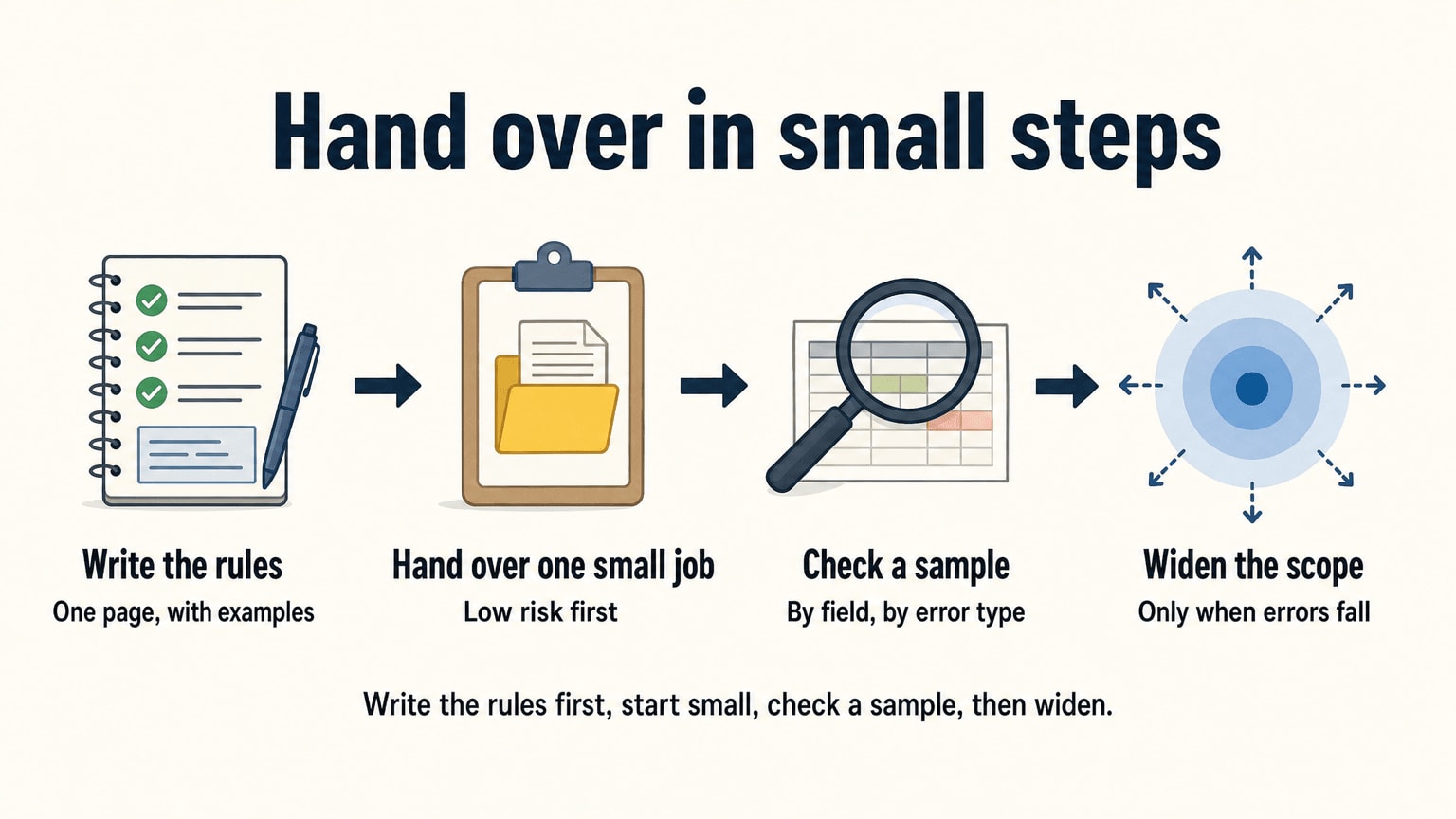
Most data entry goes wrong at the brief, not at the keyboard. “Update the CRM” is a sentence in your head. The assistant can’t see your head.
Write one page, once. It should say:
- Where the data comes from, and where it goes.
- The format for each field. Dates as month, day, year or the other way round? Phone numbers with or without spaces? Company names as written or as registered?
- What to do with a missing field: leave it blank, flag it, or ask.
- What counts as a duplicate, and which record wins.
- Which entries need your approval before they go in.
- Who to ask, and how, when something looks wrong.
Add two or three real examples, including one ugly one. A worked example beats a paragraph of rules.
Keep that page up to date. When the same question comes up twice, add the answer. It is also your insurance. If the person changes, the process stays, and nobody has to start from nothing.
Request a quote for your data entry work
Tell us what you want handed over and roughly how many hours it takes. We will come back with a quote for a plan that fits.
Measure accuracy yourself, with a sample
Every provider will tell you they’re accurate. I couldn’t find a neutral, current benchmark for manual entry error rates to quote you, and I’d distrust any page that offered one without showing its working. So measure your own. It’s not hard.
Take a sample of the finished work. For a batch of 200 records, pull 20 at random. Put them next to the source documents and tick each field right or wrong. Count the wrong ones. That’s your error rate for the batch, in a number you made yourself.
A few habits make this honest:
- Pick the sample yourself, so it isn’t the 20 cleanest.
- Count by field, not by record. One record with three wrong fields is worse than three records with one each.
- Sort errors into types: typos, wrong format, missing data, wrong rule. Types tell you what to fix in the brief. A count alone doesn’t.
- Repeat on the second batch. A rate that falls is a good sign. A rate that stays the same means the brief is unclear.
The BLS description counts verifying as part of the job, so ask any provider how they verify. Is there a second pass? Does the assistant re-read their own work, or does someone else? “We are careful” is not an answer.
Be fair about what you’re measuring, too. If the source is a blurry photo of a handwritten note, an error might be a reasonable guess. Fix the source, not just the person.
Giving access without giving everything
Data entry means seeing your data. That’s the point, and also the risk. Here is a plain way to think about it.
Give the least access that does the job. The FTC calls this the principle of least privilege: each person gets access only to the resources needed to do their particular job. If someone updates the CRM, they don’t need your accounting login. If they enter orders, they don’t need to see payroll.
Use their own login, never yours. A separate user lets you see what changed, and lets you switch it off the day the work ends.
Share passwords through a password manager. Not in an email, not in a chat window.
Remove what they don’t need. Before you send a spreadsheet, delete the columns that aren’t part of the task. It takes a minute.
Get confidentiality in writing. Task Virtual’s assistants sign an NDA before client work starts. Our FAQ explains that, along with how assistant changes and refunds work, if you want the details before trying anyone. Whoever you use, ask for the terms.
Check what the provider does. The same FTC guide says that before outsourcing a function you should investigate the provider’s data security practices, put your expectations into the contract, and not rely solely on their word. It also says to require providers to report security incidents, even those that didn’t lead to an actual compromise of your data. That’s good advice for a small business as much as a large one.
We don’t claim any compliance certification, and nobody should assume one from a friendly website. If your data is subject to rules, such as patient or financial records, ask direct questions and keep that data out of the handover until you have good answers.
What it costs, counted in hours
Pages on data entry outsourcing love to say “save up to” some percentage. I’d skip that, because the real cost depends on your volume, and you can’t check a percentage. Hours you can check.
For a rough US reference point, the BLS lists a median wage of $18.17 an hour for data entry keyers in May 2023. That’s a wage paid to an employee. It leaves out benefits, desks, software and the time you spend managing, so it isn’t a like-for-like comparison with any outsourced rate. It just tells you what an hour of this work is worth on the US payroll.
Now work out your own hours. Here is an illustration, not a benchmark. Say your business handles 200 orders a month, and each one needs entering in two places. If that takes 5 minutes an order, you’re at about 1,000 minutes. If it takes 10 minutes, it’s double. Change the numbers to suit yourself: the method matters more than my example.
- List each repeating data job.
- Guess the time per item.
- Multiply by how many items there are.
- Add a margin for corrections and questions, because there will be some.
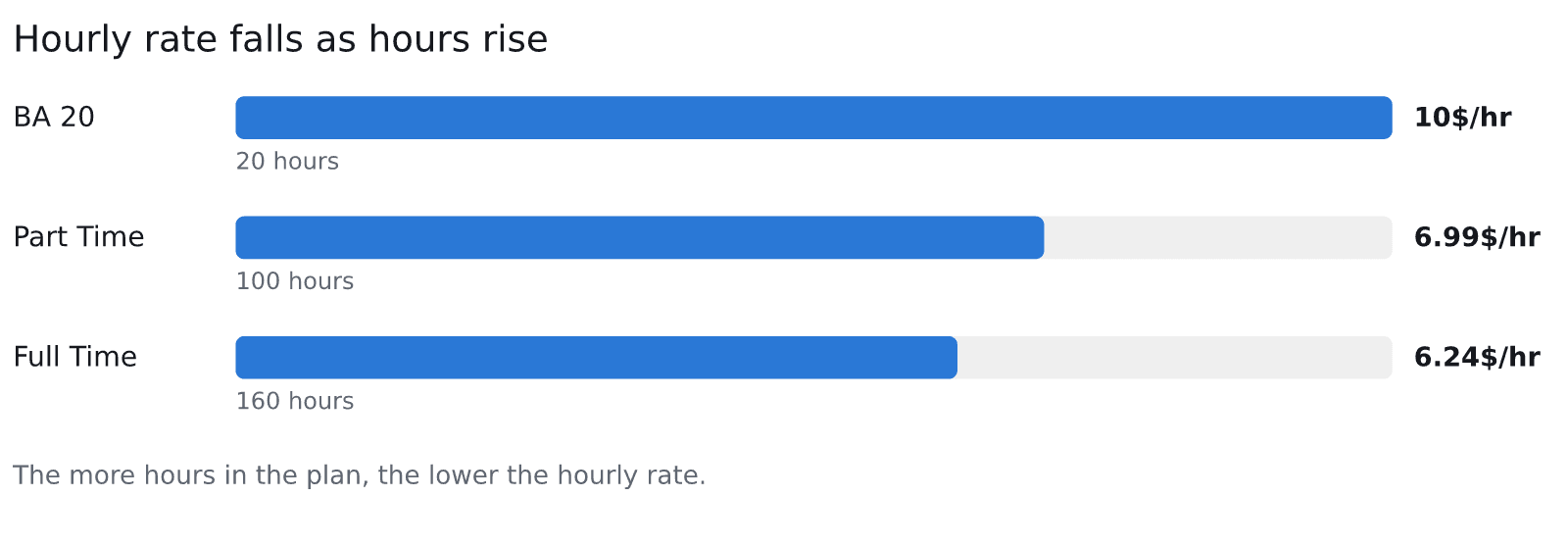
Then match the total to a plan. These are the figures from the pricing page:
Task Virtual plans by hours and hourly rate
| Plan | Hours | Price | Hourly rate |
|---|---|---|---|
| BA 20 (monthly block) | 20 | $200 | $10/hr |
| Part Time (dedicated assistant) | 100 | $699 a month | $6.99 |
| Full Time (dedicated assistant) | 160 | $999 a month | $6.24 |
Source: Task Virtual, plans and pricing page.
A few hours of CRM upkeep a month fits a small block. A steady stream of orders, entries and cleanups across the week points to a dedicated assistant. Plans are monthly with no long-term commitment, and the hour blocks are valid for one month, so you can move up or down as the workload changes. The pricing page lists the other blocks too.
Is the cheaper hour the cheaper job?
Not always. A low rate on a slow or error-prone job costs more than a higher rate done right the first time. You pay for the second pass. That’s why the first month matters more than the rate, and why the sample check above is the real price control.
Don’t read the numbers here as a promise of savings, either. Our own pricing page compares against the cost of a US hire and calls its monthly difference illustrative. Treat every cost comparison that way, ours included.
Your first month
Here’s a sequence that keeps the risk low and tells you quickly whether it works.
Week one. Pick one small, rule-based job. Hand over the written page and ten or so example records. Ask for the first batch back quickly, small enough that you can check all of it.
Week two. Take your first sample. Sort the errors by type. Fix the brief, not the person. Send the corrected page back and run another batch.
Weeks three and four. If the error rate is falling, add a second job, perhaps the CRM updates. Keep access narrow. If it isn’t falling, you’ve lost little, and you know before you’ve built a process on it.
One more habit helps: ask for a short note with each batch listing anything the assistant wasn’t sure about. Questions are a good sign. Silence on a messy file usually means guessing.
If you want to test an assistant before you commit, Task Virtual’s free trial is 3 hours, valid for 2 days. That is enough to hand over one small batch and see how it comes back, though it won’t tell you about volume.

When data entry outsourcing is the wrong move
It isn’t always right. If your data is a tangle nobody understands, fix that first. A handover on top of a mess just passes the mess along. Ask for a cleanup (Task Virtual has a page on data handling) as its own bounded task, done or not done, and then move to the routine.
If the work is a few records a week, software and a quiet half hour may be all you need. If the data is highly sensitive and you can’t strip it down, keep it in-house or ask hard questions first. And if you need the work done in a language other than English, we’re not the right fit: our assistants handle tasks in English only.
A last thing worth saying. The goal isn’t to stop caring about your data. It’s to stop being the person who types it. You still own the standards, and you still look at a sample. What you get back is the time those evenings were eating.
Frequently asked questions
What is data entry outsourcing?
It means paying an outside person or firm to enter, update or clean records for you: orders, contacts, invoices, catalogue items. You write the rules and check a sample of the results. The provider does the repetitive keying.
What data entry tasks can I outsource?
Rule-based tasks come first: copying contact details into a CRM, entering order or invoice details, cleaning spreadsheets, moving records between systems. Tasks that need judgement, such as scoring leads, are better kept or closely reviewed.
How do I check the quality of outsourced data entry?
Pull a random sample from each batch, for example 20 records from 200, and compare each field with its source. Count errors by field, sort them by type, and repeat on the next batch. A falling rate means the brief is working.
It can be, if you limit access. The FTC advises giving each person access only to the resources they need for their job and checking a provider’s security practices before outsourcing. Remove sensitive data you don’t need to share, use separate logins and get confidentiality terms in writing.
How much does data entry outsourcing cost?
It depends on volume and the provider. For a reference point, the BLS lists a median of $18.17 an hour for US data entry keyers in May 2023, before benefits and management time. Task Virtual’s plans run from $10/hr on the BA 20 block to $6.24/hr on Full Time, as listed on its pricing page.
Can a virtual assistant do data entry?
Yes. Data entry is one of the tasks Task Virtual’s assistants take on, alongside research, customer support and other admin. Define the tasks, limit access and check the first month’s work yourself.
Should I use automation or a person?
Use software where documents are uniform and clean. Use a person where the input is messy or varied. Many businesses use both: a tool reads the documents and a person reviews the exceptions.