Contents
show
What business process outsourcing means
In short: Business process outsourcing (BPO) means paying an outside firm to run a whole business process, like support or payroll. Large firms use it for volume. Small businesses often need something lighter.
Many owners meet the term from the wrong end. They go looking for help with a Tuesday-night inbox and land on pages about seats, service levels and enterprise contracts. Is that what outsourcing has to look like? No. BPO is one end of a wide range, and knowing where it sits tells you whether to look at it at all.
If you want to see what 20 or 160 hours a month costs in practice, Task Virtual lists its plans with hourly rates on its pricing page. The rest of this guide is about the idea itself: what BPO covers, how it is split up, where it goes wrong, and how a small business can decide between a BPO firm and something smaller.
Two words in the definition do the work. “Process” means a repeating chain of steps with a start and an end: answer a ticket, pay an invoice, enter an order. “Outsourcing” means someone outside your payroll owns that chain. You hand over the whole job, not a single task inside it, and you judge the result, not each step.
The U.S. Government Accountability Office describes the offshore version of this as an outgrowth of outsourcing business functions. That tells you something useful. Outsourcing came first, as a way for firms to stop doing work that wasn’t their trade. Doing it across borders came later.
Front office, back office and the work in between
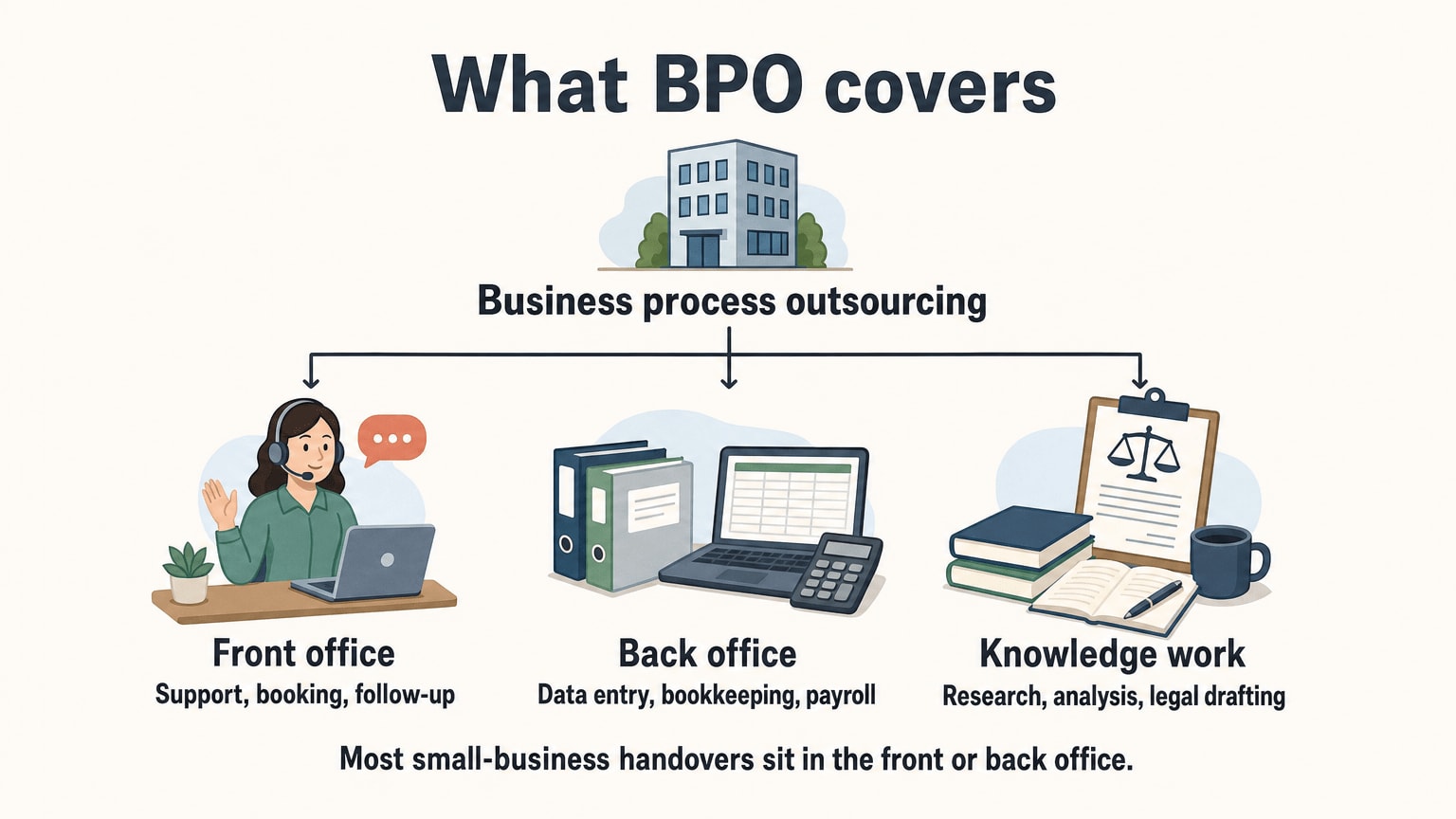
BPO providers sort their work into a few families. The names vary from firm to firm, but the split below is the one you’ll meet most.
Front office is work where your customer is on the other end. Customer support, order status, appointment booking, sales follow-up. Mistakes here are visible, and the customer remembers them.
Back office is work your customer never sees. Data entry, bookkeeping, payroll, invoicing, HR paperwork, CRM upkeep. Mistakes here are quiet, and often turn up weeks later as a wrong payment or a missing record.
Knowledge work sits above both: research, analysis, legal drafting, anything that needs trained judgement. Some firms sell it as a separate service. It costs more because the person needs real expertise, and it’s the part least suited to a generic handover.
We’ve written about three of these in detail. Customer support outsourcing is the front-office case. Data entry outsourcing and bookkeeping services are the back-office ones. Each guide ends in the same place: write down the rules, hand over the easy part first, and check a sample yourself.
What should a business hand over at all? The GAO notes that services that can be performed at a distance are the ones most likely to be moved abroad. It lists call centres, accounting and payroll among its examples. It also says work that needs face-to-face contact with customers is less exposed. That is a fair test for any owner, abroad or not. If the work can be done from a laptop with your written rules and a login, it can probably be outsourced. If it needs someone in the room, it can’t.
Onshore, nearshore, offshore
The other way to split BPO is by where the provider sits. It changes price, time zones and how easy it is to call someone on the same afternoon.
Three ways to place the provider
| Type | Where the provider is | What tends to be easier | What tends to be harder |
|---|---|---|---|
| Onshore | Same country as you | Time zones, shared holidays, local law | Usually the highest hourly cost |
| Nearshore | A neighbouring country | Overlapping hours, short travel | Fewer providers to choose from |
| Offshore | A distant country | Lower hourly cost, wide choice, long coverage | Time-zone gaps, handoffs, distance from you |
Source: our own summary of the standard split; no outside figure is behind it.
Be careful with anyone who tells you one type is simply better. Onshore is not safer by default, and offshore is not cheaper by default once you count the management time. What matters is whether the work needs your hours or can run in the gaps between them.
An example. Say your customers write in overnight, US time. A provider on the other side of the world starts work as your inbox fills, and your morning begins with answered tickets. That’s the offshore pattern working in your favour. If instead your customers expect a live answer at 3 p.m. your time, the gap is a problem and you should say so before signing anything.
We are headquartered in Kolkata, India, so you can weigh what we say here accordingly. Time zones are the first thing to settle with any offshore provider, ours included. We’ve also written about the advantages of Indian virtual assistants. Our FAQ covers whether an assistant can work during your hours, and it’s worth reading if that matters to you.
Why businesses do it, and what goes wrong
The case for BPO is usually five arguments in a trench coat: lower cost, more flexibility, faster turnaround, access to skills, and time to focus on your own trade. They’re real. They’re also the ones every provider’s brochure repeats, so test each one against your own business instead of taking it on trust.
Cost. The honest statement is narrow. An hour of work in one place can cost less than an hour in another, and a provider can spread a person’s day across several clients. Whether you save depends on your volume and how much of your own time the handover eats. I couldn’t find a neutral, current benchmark for BPO savings that I’d trust enough to quote, and I’d doubt any page that offered one without showing how it was counted.
For a rough US reference point on the other side, the BLS lists a median wage of $21.53 an hour for customer service representatives in May 2025. That’s a wage on a payroll. It leaves out benefits, desks, software and the time you spend managing, so it can’t be set straight against any outsourced rate.
Flexibility. This one holds up. A hire is a commitment. A provider’s plan can often be turned up or down. Ours are monthly with no long-term commitment, and the hour blocks last one month. Other providers differ, so ask.
Skills and speed. Partly true. A trained team can do routine work faster than you will on a tired evening. But a provider’s skills are the ones it sells, not the ones you need. Ask what exactly is included.
Focus. The best argument and the hardest to measure. If handing over the inbox gives you back the evenings, you’ve got something no percentage describes.
The risks, plainly
Every guide lists risks. Here are the ones that actually bite a small business, in the order I’d worry about them.
- You hand over a mess. Outsourcing a process nobody understands gives you the same process, run by someone else, with less visibility. Fix the confusing parts first, or ask for a cleanup as a bounded job.
- Quality drifts and nobody notices. If you never read what goes out in your name, nobody does. A weekly sample of 20 items out of 200 takes about half an hour.
- Security. Sharing data with a provider means trusting practices you can’t see. The FTC’s guide for business says that before you outsource, you should investigate the company’s data security practices and compare their standards to yours. It adds that you should put your security expectations in writing in contracts, and insist that providers tell you about any security incident, even one that may not have compromised your data.
- Lock-in. A contract that is easy to sign and hard to leave gives the provider the leverage. Ask about notice, minimums and what happens to your files on the way out.
- Language and communication. If your customers write in a language the provider doesn’t handle, the work stops at the first message. Our assistants handle tasks in English only, so if you need anything else we’re not the right fit.
- Hidden costs. Setup, extra channels, overage on hours, reporting. Ask what happens if you go over.
And a seventh: the provider going quiet. We read 375 public reviews and forum posts of virtual assistant services on the App Store, Google Maps, Hacker News, Google Play and Trustpilot (2023–2026). Of the 151 one-star reviews we read, 18% (27) are about unresponsive support. We read more one-star and five-star reviews than their real share, on purpose, so that isn’t a rate for all customers. It does show what angry people mention. Before you choose anyone, ask how you reach a person and how long a question usually waits.

Not sure what to hand over first?
Tell us about the job and we will reply with a quote. Or try a dedicated assistant on a small task with the free trial: 3 hours, valid for 2 days.
BPO firm or a dedicated assistant: how to decide
Here’s where small businesses usually get stuck. The word “BPO” suggests one kind of provider, but there are really several ways to get a process done by someone else.
Five ways to get a process handled
| Option | Best when | Watch out for |
|---|---|---|
| Do it yourself, with software | Low volume, simple steps | It slips whenever you get busy |
| Freelancer from a marketplace | A one-off batch or a spike | You hire, brief and check every time |
| BPO or call-centre firm | Large, continuous volume across many channels | Contracts, minimums and scope built for bigger buyers |
| Dedicated virtual assistant | Steady, mixed admin on a small scale | You write the rules and check a sample |
| In-house hire | Steady work and a budget for salary and training | A slow hire, sick days, holidays |
The deciding question is volume and variety. A BPO firm earns its fee when the work is big, constant and needs formal reporting: thousands of tickets, several channels, someone to answer for the numbers. A dedicated assistant earns it when the work is a few hours a day, spread across support, data entry, research and admin, and you’d like one person to learn how you work.
Be fair to both. A large BPO has depth a single person can’t match: coverage across shifts, managers, backups and formal service levels. If you run a call centre’s worth of volume, a virtual assistant is the wrong tool and I’d tell you so. On the other side, if you have 20 or so hours of work a month, a big firm’s minimums are probably bigger than your problem.
Task Virtual is a virtual assistant company, not a large BPO. Clients pay a monthly subscription or buy blocks of hours, then send tasks to remote assistants. Customer support, data entry, research, admin, bookkeeping upkeep and more all sit in the same place. The pricing page puts it plainly: the point isn’t just a cheaper hire, it’s a different staffing model.
What the hours cost, in the plans we list
You can’t compare a quote you haven’t got, but you can put our published plans next to your own estimate. Here are a few from the pricing page.
Task Virtual plans by hours and hourly rate
| Plan | Hours | Price | Hourly rate |
|---|---|---|---|
| BA 20 (monthly block) | 20 | $200 | $10/hr |
| Part Time (dedicated assistant) | 100 | $699 a month | $6.99 |
| Full Time (dedicated assistant) | 160 | $999 a month | $6.24 |
Source: Task Virtual, plans and pricing page.
To use this, list your repeating jobs, guess the time each takes, add them up and add a margin. If it comes to about 20 hours a month, a block fits. If it’s a daily job, think about a dedicated assistant. The pricing page lists the other blocks and the quarterly ones. Our pricing page also shows a comparison with a US hire and calls its monthly difference illustrative. Treat that, and every cost comparison, as a way to think rather than a promise.
How to choose a provider
Whatever you pick, the same questions sort the clear from the vague.
What exactly is in the service? “Customer support” or “back-office processing” is a loose label. Ask for the list: which channels, which hours, which tools, which reports. If they can’t say what is out, you’ll find out on a bad day.
Who will do my work? A named person who learns your business is a different thing from a pool of agents who see your account fresh each shift. Both are legitimate. Know which you are buying.
What happens when it isn’t working? Ask about replacing the person, ending the plan and getting money back. Ours is 85% of the subscription minus used hours, claimed within 2 days. Read the equivalent terms from anyone else you consider. Our FAQ explains how assistant changes, refunds and NDAs work if you want the details before trying anyone.
How is data handled? Use the FTC’s list above as your script. Ask them to put it in writing. We don’t claim any compliance certification, and you shouldn’t assume one from a friendly website.
How do they tell me about a problem? Good answers sound like “we flag it to you with a short summary”. Bad ones sound like “we’ll do our best”.
Can I test it first? Start small whichever way you go.
Starting small
The cheapest way to learn whether outsourcing a process works for you is to try one process, small, and look at the result with your own eyes. Here’s a sequence.
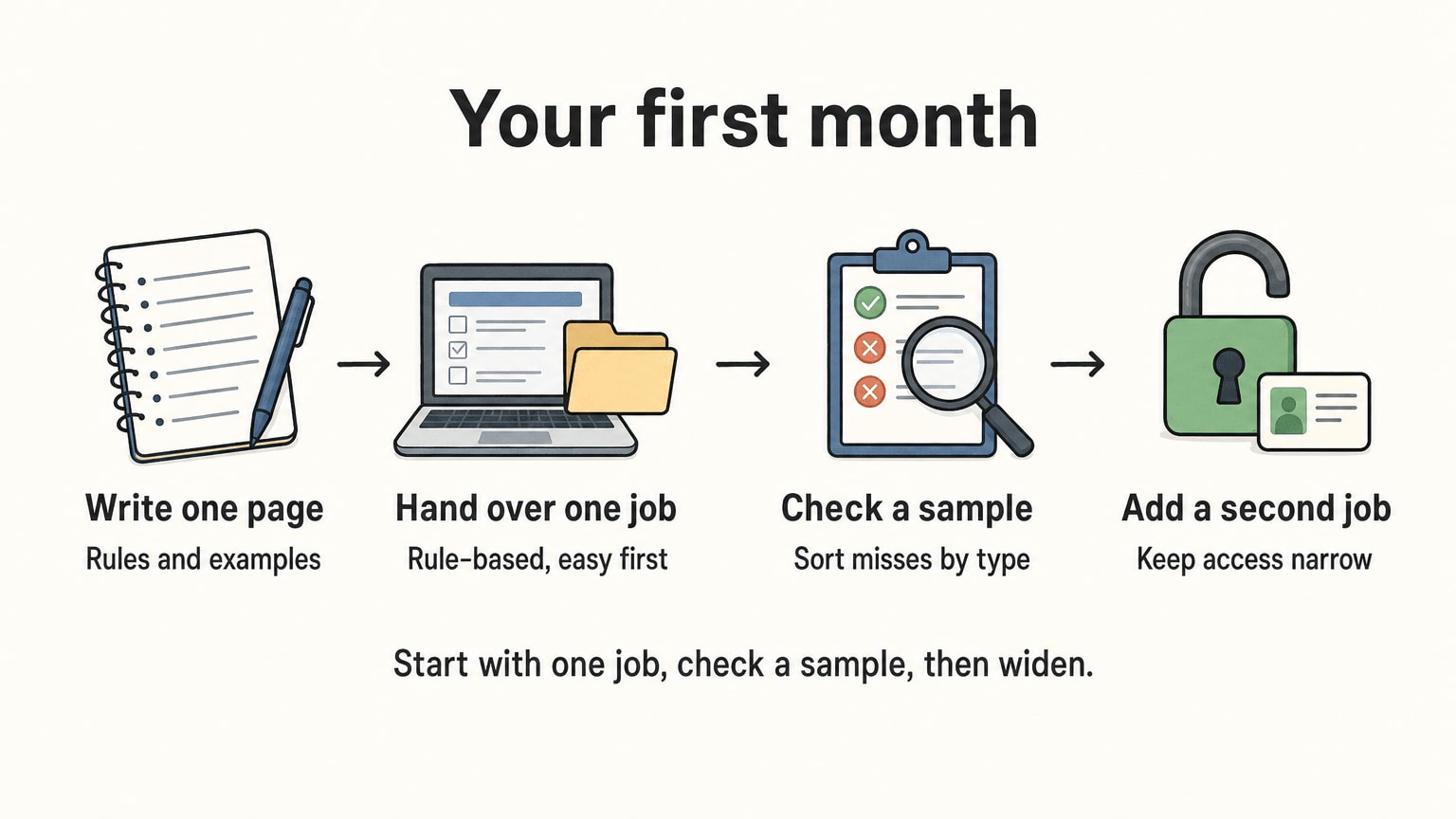
Week one. Pick one rule-based job, such as order-status replies or entering invoices. Write one page: where the work comes from, where it goes, what counts as done, what to do when unsure. Add a few real examples, including an ugly one. Ask for the first batch back in a form you can check in full.
Week two. Pull a random sample, say 20 from 200. Read each as your customer would, or compare each field to its source. Sort the misses by type. Fix the page, not the person.
Weeks three and four. If the misses are falling, add a second job. Keep access narrow (our note on sharing credentials with virtual assistants covers how): a separate login, passwords in a password manager, only the files the job needs. Keep approval of anything involving money with you. If misses aren’t falling, you’ve lost little, and you know before the process depends on it.
One habit pays for itself. Ask for a short note at the end of each day listing anything the assistant wasn’t sure about. Questions are a good sign. (Why the first month with a VA is crucial says more on this.) Silence on a messy inbox usually means guessing.
And a last test before you commit to anything bigger. Ask yourself whether a better help page, a template or a small piece of software would remove the job entirely. The BLS projects that customer service representative jobs will decline 5 percent from 2025 to 2035, pointing to tasks being automated. The simplest work is the first to disappear into software. What’s left for people is the messier part, where your instructions matter most.
Frequently asked questions
What is business process outsourcing?
It is the practice of paying an outside company to run a repeating business process for you, such as customer support, payroll or data entry. You set the rules and judge the results. The provider owns the day-to-day work.
What are the main types of BPO?
By work, there is front office (customer-facing), back office (internal) and knowledge work. By location, there is onshore (same country), nearshore (neighbouring country) and offshore (a distant country). Most providers mix these.
Is BPO only for big companies?
No, but the formal version often suits bigger buyers, with minimums, contracts and service levels. A small business with a few hours of repeating work a month is often better served by a dedicated virtual assistant or a block of hours.
What is the difference between BPO and a virtual assistant?
A BPO firm usually takes on a whole process at volume, with managers and formal reporting. A virtual assistant is one person, or a small team, taking a mixed set of tasks you define. Task Virtual is a virtual assistant company, not a large BPO.
What are the risks of business process outsourcing?
Handing over a messy process, unnoticed quality drift, data security, being locked into a hard-to-leave contract, language gaps and hidden costs. The FTC advises investigating a provider’s data security practices and putting your expectations in writing.
How do I know a provider is any good?
Test with one small process. Pull a random sample of finished work each week and check it yourself. Ask how you reach a person, and what happens if you want out.
How much does business process outsourcing cost?
It depends on volume, location and scope, and I couldn’t find a neutral benchmark worth quoting. For a reference point, the BLS lists a median of $21.53 an hour for US customer service representatives in May 2025, before benefits. Task Virtual’s plans run from $10/hr on the BA 20 block to $6.24/hr on Full Time.