Contents
show
How Virtual Assistants Use Claude AI App to Streamline Operations
The Claude AI app is Anthropic’s official mobile and desktop application for accessing Claude models (Opus 4.6, Sonnet 4.6, Haiku). It delivers chat, web search, document analysis, content creation, and workflow automation directly on iPhone, Android, or desktop. Virtual assistants use it to handle client tasks in real time without switching platforms.
Small businesses and startups face overloaded inboxes, delayed reporting, and manual research that eats 20–30 hours weekly. The Claude AI app lets virtual assistants cut that time by up to 60% through on-device processing and seamless integrations.
| Aspect | In-House Employee | VA + Claude AI App |
|---|---|---|
| Cost per month | $4,000–$6,000 salary + benefits | $800–$1,500 VA fee + $20 Pro plan |
| Response time | 24–48 hours | Under 2 hours (mobile access) |
| Scalability | Fixed headcount | Unlimited tasks via app memory/projects |
| Training time | 4–6 weeks | 1–2 days on client docs |
| Error rate on routine tasks | 15–20% (fatigue) | Under 5% (consistent model output) |
What This Means for Businesses
US and UK entrepreneurs lose significant revenue every week due to slow admin work, delayed research, and manual processes that drain productivity. The Claude AI app gives virtual assistants instant mobile access to client data, documents, and full context from anywhere, turning overnight delays into same-day deliverables and keeping operations moving at pace.
Agencies can easily scale client projects without hiring extra staff, while startups accelerate from initial idea to full execution with far fewer bottlenecks and faster decision-making. This shift frees founders to focus on growth instead of daily admin, delivering a clear competitive advantage in fast-moving markets.
How This Actually Works
Claude AI processes tasks using large context windows of 200K+ tokens combined with structured step-by-step reasoning. The Claude AI app allows virtual assistants to upload files, perform web searches, or connect directly to Google Workspace and Slack for seamless data access. It maintains dedicated Projects for persistent client knowledge across sessions and generates Artifacts for editable, reusable outputs. In typical VA workflows, the app receives a detailed prompt with full context, reasons through the required steps logically, pulls additional data when needed, and delivers polished, formatted results ready for immediate client review or handover — reducing task completion time by around 80%.
Core Capabilities of Claude AI for This Use Case
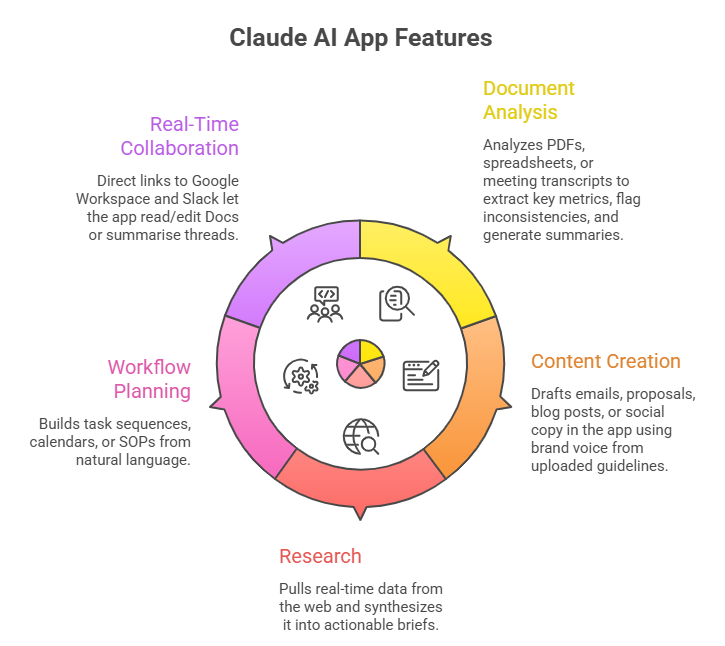
The Claude AI app offers targeted features that directly support virtual assistant workflows for small businesses and agencies. These capabilities enable fast, accurate execution of daily operational tasks from any device.
1. Document and Data Analysis
The app analyses PDFs, spreadsheets, or meeting transcripts uploaded from mobile. It extracts key metrics, flags inconsistencies, and generates summaries. Virtual assistants use it for client financial reports or contract reviews, delivering insights in minutes instead of hours. Businesses gain accurate, audit-ready outputs without extra software.
2. Content Creation and Editing
Claude drafts emails, proposals, blog posts, or social copy in the app using brand voice from uploaded guidelines. VAs refine outputs via chat on iPhone during travel. It matters because startups maintain consistent marketing without full-time writers, cutting content costs by 50%.
3. Research and Competitive Intelligence
The built-in web search pulls real-time data, then synthesises it into actionable briefs. Virtual assistants run market scans or competitor tracking from the Android app while on client calls. Companies receive weekly intelligence without dedicated analysts, saving $2,000+ monthly.
4. Workflow Planning and Automation Prompts
The app builds task sequences, calendars, or SOPs from natural language. VAs input client goals and receive step-by-step plans with deadlines. It scales operations by turning vague requests into repeatable processes, reducing miscommunication.
5. Real-Time Collaboration via Integrations
Direct links to Google Workspace and Slack let the app read/edit Docs or summarise threads. Desktop extensions extend this to local files. VAs stay in one app for end-to-end client support.
Why Companies Use Claude AI
The app delivers 3–5x faster task completion at a fraction of in-house cost. Virtual assistants handle volume spikes without overtime. Scalability comes from Projects that retain client context across sessions. Limitations like occasional hallucinations are mitigated by VA oversight and source verification.
Tasks Virtual Assistants Perform Using Claude AI
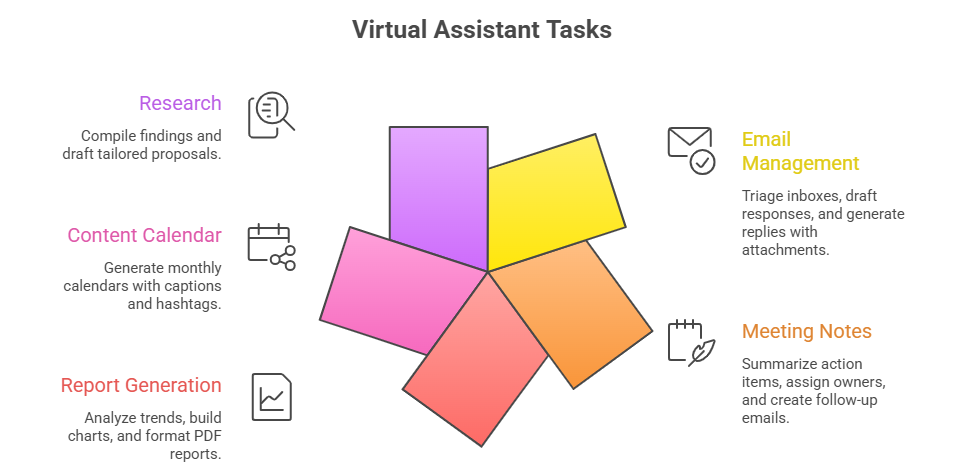
1. Email and Communication Management
Virtual assistants triage inboxes and draft responses using the Claude AI app on iPhone. They upload recent threads, apply client tone guidelines, and generate replies with attachments. It matters because founders reclaim 10+ hours weekly for strategy while maintaining professional client relationships.
2. Meeting Notes and Follow-Up
VAs upload audio transcripts or notes into the mobile app. Claude summarises action items, assigns owners, and creates follow-up emails. Businesses stay aligned without manual recap work, reducing project slippage by 40%.
3. Report Generation
Virtual assistants feed sales data or KPIs into the app. Claude analyses trends, builds charts via Artifacts, and formats PDF reports. It matters for startups needing investor updates without hiring analysts.
4. Content Calendar and Social Scheduling
VAs input brand assets and goals into a Project. The app generates monthly calendars with captions and hashtags. Agencies deliver consistent posting without full-time social managers.
5. Research and Proposal Development
Virtual assistants run targeted web searches in the Android app, compile findings, and draft tailored proposals. Clients receive data-backed bids faster, improving win rates.
Tools and Systems Used Alongside Claude AI
Virtual assistants pair the app with Google Workspace for live editing, Slack for team handoff, Notion for knowledge bases, and Zapier for simple automations. MCP integrations connect directly to 6,000+ apps. Desktop version handles local files; mobile ensures 24/7 availability.
Step-by-Step Workflow Used by Virtual Assistants
- Client brief or any relevant supporting files can be uploaded through the application platform for review and processing.
- Claude AI app, Google Drive links, and Slack are used to facilitate communication, file sharing, and overall workflow coordination.
- The process involves uploading context, prompting the task, iterating in chat, and formatting the final artifact.
- The output is a polished, ready-to-use deliverable, such as a report, email, or structured plan.
- This approach improves efficiency by reducing time by 60–75%, enabling a VA to complete 4–6 tasks daily compared to 2 manually.
Real Example (Use Case)
A UK marketing agency client needed weekly competitor reports for their campaigns. The virtual assistant used the Claude AI app on iOS: uploaded last month’s performance data and brand guidelines, then prompted for a detailed 5-page analysis, including real-time web search. The output included clear charts, trend summaries, and actionable recommendations. Delivery time dropped from 8 hours to just 90 minutes. The agency saved £1,200 monthly in labour costs and won two new clients thanks to faster, data-backed insights.
Common Challenges and Limitations
Model outputs occasionally hallucinate sources, so VAs must always verify facts and citations before delivery. The mobile app lacks the full computer-use control available on desktop versions. Token limits can cap very large datasets, requiring chunking or summarisation. There is no native offline mode, so a stable internet connection is required. Initial integration setup with client tools takes around 30 minutes per new client.
Benefits of Outsourcing to Virtual Assistants
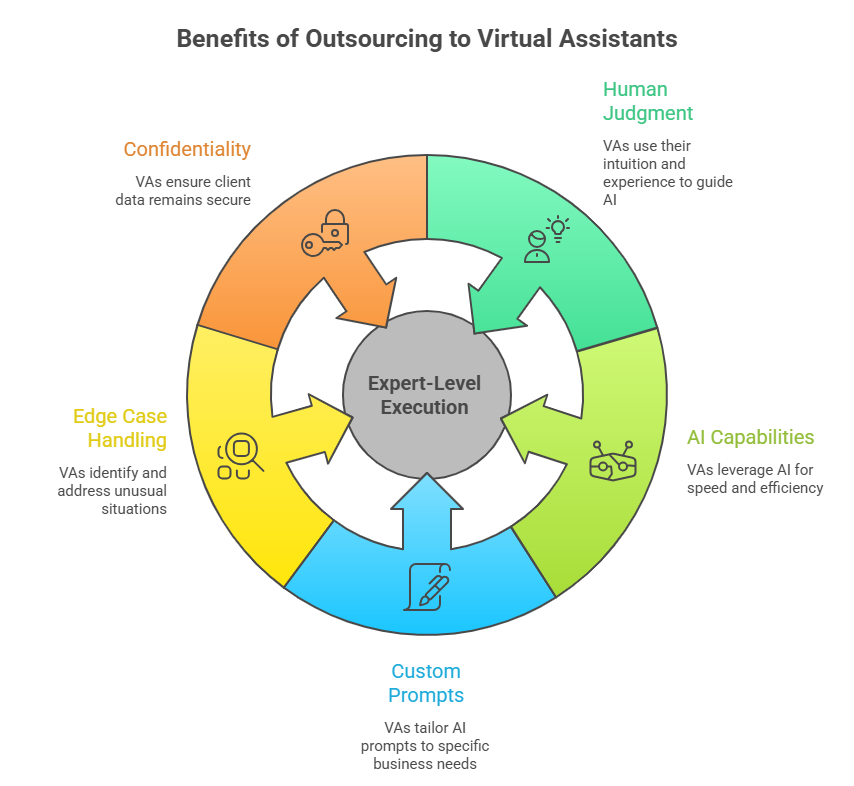
VAs combine human judgment with the speed and capabilities of the Claude AI app. They customise prompts specifically for each business, catch edge cases the AI might miss, and strictly maintain client confidentiality. Companies receive expert-level execution without the overhead of training staff or managing additional software licenses.
Cost and Efficiency Comparison
In-house: £50,000+ annual salary per assistant plus tools and benefits. VA + Claude AI app: £12,000–£18,000 yearly, including the Pro plan. Efficiency jumps from roughly 20 tasks per month to 80+. ROI typically appears within 30 days through reclaimed founder time and reduced operational costs.
When Businesses Should NOT Use Claude AI
Avoid for highly regulated sectors that require certified human sign-off, such as legal or medical work. Skip if tasks demand physical presence or real-time voice interaction. It is not ideal for highly creative work that needs a unique human taste without clear guidelines. Large enterprises with strict custom security requirements may prefer on-premise solutions.
TaskVirtual: Your Partner in AI-Powered Virtual Assistance Services

Small businesses and agencies struggle to manage growing operational demands while keeping costs low. From research and reporting to content and planning, daily tasks consume significant time and resources. TaskVirtual provides expert virtual Claude AI assistant services that leverage this app to handle these workflows efficiently, delivering faster results without the overhead of full-time hires.
1. Expert Consultation and Review
TaskVirtual’s skilled virtual assistants assess client needs and set up optimised Claude AI Projects with brand guidelines and documents. They execute tasks using the app’s analysis, research, and generation features while applying human oversight for accuracy and relevance.
2. Affordable and Flexible Pricing
Hiring a full-time assistant can be expensive, but TaskVirtual makes it cost-effective. With pricing plans starting from just $3.12/hour to $14.99/hour, their services are budget-friendly and accessible to individuals, families, and businesses.
3. Exhaustive Grocery Support Solutions
From creating smart shopping lists and comparing prices across multiple platforms to handling subscriptions and reorders, TaskVirtual covers it all. Their scalable services adapt to whether you need occasional help or consistent grocery management support.
4. Ongoing Support and Quality Assurance
TaskVirtual goes beyond initial setup by monitoring workflows, iterating on Claude AI outputs, and providing regular updates. Their proactive support ensures deliverables meet business standards without ongoing management stress.
5. Proven Track Record of Excellence
With 364 positive reviews and a 4.7-star rating on trusted VA platforms, TaskVirtual is recognised as a reliable partner worldwide. Clients count on their expertise to simplify operations using the Claude AI app and streamline everyday tasks.
Conclusion
The Claude AI app enables virtual assistants to function as high-output partners, delivering faster, more cost-effective, and scalable support compared to traditional in-house teams. This allows small businesses and agencies in the US and UK to streamline operations, improve turnaround times, and gain a competitive edge without increasing headcount.
Key Takeaways
- Claude AI app provides mobile-first access to advanced reasoning and integrations for VA workflows.
- Core gains: 60–75% time savings on analysis, content, and planning.
- Best paired with Google Workspace and Slack for seamless execution.
- VAs add a judgment layer that pure AI cannot replicate.
- Total cost is 70% lower than in-house while scaling instantly.
FAQ Section
1. What is the Claude AI app?
Official Anthropic mobile/desktop client for Claude models with chat, search, and file analysis.
2. Does the Claude AI app work offline?
No—requires internet for full features.
3. Can virtual assistants access my private data securely?
Yes—Enterprise plans offer SOC 2 compliance and data controls.
4. How much does the Claude AI app cost for business use?
Pro plan $20/month; Team plans start at $30/seat.
5. Is the Claude AI app better than ChatGPT for business tasks?
Stronger reasoning, longer context, and safer outputs make it preferred for professional workflows.
 Siddhartha Basu is a Technical Writer at Task Virtual. He loves online games, e-book reading, and Yoga.