Contents
show
Can ChatGPT Edit a PDF?
Digital documents remain central to how people study, work, and share information, and PDF files are still the most widely used format across industries. Many users now look to artificial intelligence for faster and smarter ways to refine their documents, which naturally raises the question of whether ChatGPT can be used to edit a PDF. While traditional PDF editors focus on changing layouts and file structure, ChatGPT focuses on improving the language and quality of the content itself. Understanding what ChatGPT can and cannot do with PDFs helps users combine the right tools for professional results. This guide explains the practical ways ChatGPT supports PDF editing and how to use it effectively in 2026.
ChatGPT cannot directly open and modify a PDF file like a traditional editor, but it can help you edit PDF content indirectly. You can upload or paste text from a PDF, and ChatGPT can rewrite, summarize, format, proofread, or reorganize it. Actual changes to the PDF file must be made using a PDF editor after applying ChatGPT’s suggestions.
Can ChatGPT Edit a PDF Directly?
ChatGPT approaches PDFs from a content-first perspective rather than as a file-manipulation tool. It does not function like Adobe Acrobat or similar software that can open a PDF and immediately change fonts, margins, or embedded images. The platform focuses on understanding and improving the text — for example, 72% of PDF edits are still done in desktop environments where full editing workflows (including conversion to editable text) are required. Once the material is available in text form, ChatGPT becomes a powerful assistant for rewriting, restructuring, and enhancing the information. This distinction is important because many people expect AI to replace full PDF editors, when in reality it complements them.
No — ChatGPT cannot directly alter the structure of a PDF file.
It does not function like Adobe Acrobat or other PDF editing software that can change fonts, images, or layout inside the document.
However, ChatGPT is extremely useful for editing the content inside a PDF once the text is extracted or provided.
What ChatGPT Can Do With a PDF
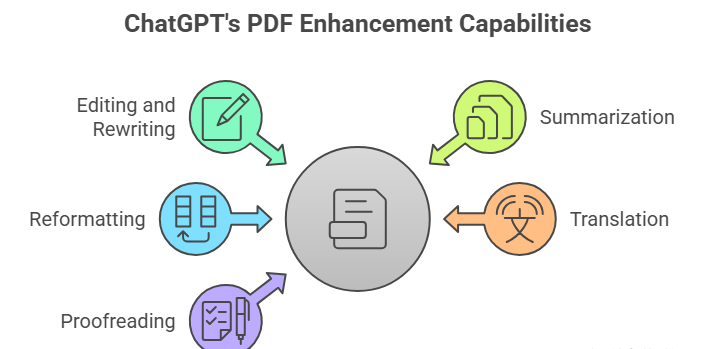
Working with PDFs through ChatGPT becomes practical once the text is accessible, and at that stage, the AI can perform a wide range of language-based improvements. It can analyze long passages, detect tone, and reorganize ideas so that the document communicates more clearly. Many professionals use it as a virtual editor that reviews their PDF content before the final file is updated in a dedicated application. The following capabilities show how flexible ChatGPT can be when handling material taken from a PDF.
1. Edit and Rewrite PDF Text
After text is copied from a PDF, ChatGPT can correct grammar and spelling while also refining the overall flow of sentences. It improves clarity and tone so that the writing matches its intended audience, whether academic, corporate, or casual. The tool can rewrite sentences to remove repetition, simplify complex language, and convert formal text into a more conversational or engaging style when required.
2. Summarize Long PDF Documents
Large PDFs often contain more information than a reader needs, and ChatGPT can quickly condense them into practical overviews. It creates executive summaries that highlight the main ideas without losing context or meaning. The AI can extract key points and present them as concise briefs that are easier to review and share with colleagues or clients.
3. Reformat PDF Content
Content taken from a PDF can be reshaped into entirely new formats with ChatGPT’s help. The AI can transform dense paragraphs into structured tables, numbered processes, or organized sections suitable for presentations. This makes it easier to repurpose the same information for emails, blog articles, training material, or reports.
4. Translate PDF Text
When a PDF needs to be used across different languages, ChatGPT can translate the pasted content while preserving its original meaning. It adapts idioms and technical terms so the result sounds natural to native readers. This is especially valuable for international businesses and academic collaboration.
5. Proofread and Improve Professional Documents
Many PDFs contain important professional writing, such as proposals, contracts, and resumes. ChatGPT can refine these documents by improving readability, adjusting tone, and ensuring consistent terminology. The result is text that feels polished and credible without changing the core message.
What ChatGPT Cannot Do With PDFs
Despite its strengths with language, ChatGPT is not designed to manipulate the technical structure of a PDF file. It cannot open password-protected documents or bypass security restrictions that protect sensitive information. The AI also cannot change images inside PDFs, edit fonts or layout directly, or add digital signatures that meet legal standards. Tasks such as merging multiple PDFs, splitting pages, or compressing file sizes require specialized software. Recognizing these limits ensures that users combine ChatGPT with the correct external tools.
How to Use ChatGPT to Edit a PDF (Step-by-Step)
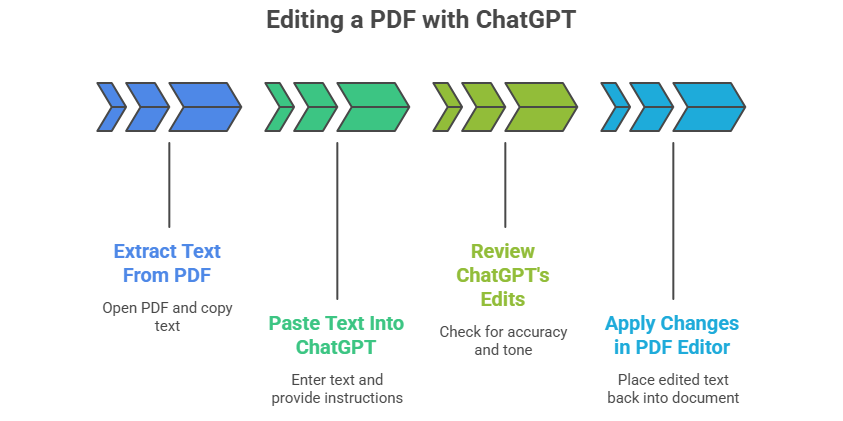
Editing a PDF with ChatGPT follows a practical workflow that separates content improvement from file modification. The process begins by converting the document into editable text, continues with AI-driven refinement, and ends with applying those changes in a PDF editor. This method keeps full control in the user’s hands while benefiting from AI intelligence. Anyone can follow these steps without technical expertise.
Step 1: Extract Text From the PDF
The first stage is to open the PDF using a reader or converter and copy the relevant text. Many applications, such as Adobe Reader, Google Docs, or online converters, allow quick extraction without altering the original file. Accurate copying ensures that ChatGPT receives clean input for analysis.
Step 2: Paste the Text Into ChatGPT
Next, the user pastes the extracted material into ChatGPT and provides clear instructions. Commands like “proofread this text,” “make it more professional,” or “summarize in five points” guide the AI toward the desired outcome. The more specific the instruction, the better the result.
Step 3: Review ChatGPT’s Edits
ChatGPT returns an improved version of the content that should be reviewed for accuracy and tone. Users can request additional revisions, ask for shorter or longer versions, or change the writing style. This collaborative step ensures the final wording matches personal or organizational standards.
Step 4: Apply Changes in a PDF Editor
Finally, the edited text is placed back into the original document using a PDF editor such as Adobe Acrobat, Word, or Google Docs. Formatting, images, and layout adjustments are handled at this stage. The combination of AI editing and traditional software produces a complete, professional file.
Best Tools to Combine With ChatGPT for PDF Editing
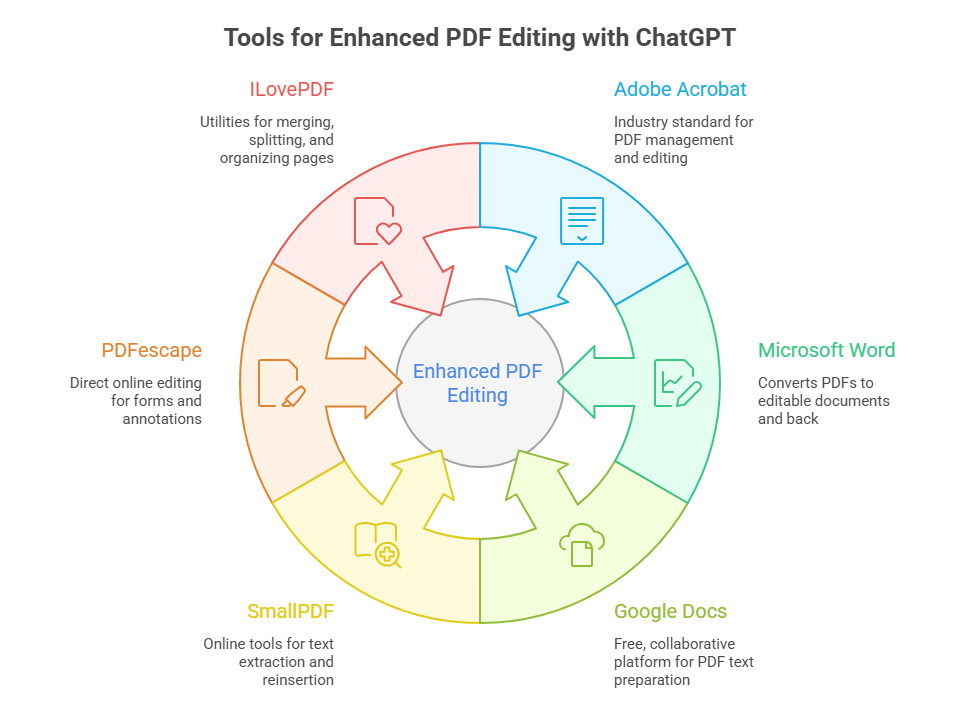
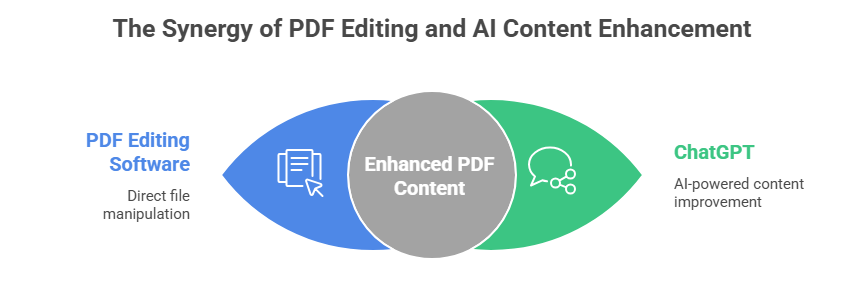
Using ChatGPT alongside dedicated applications creates a balanced workflow where each tool performs what it does best. ChatGPT manages language quality while external programs control the document structure. This hybrid approach is now common in offices, schools, and remote work environments. The following tools integrate smoothly with AI-generated edits.
1. Adobe Acrobat
Adobe Acrobat remains the industry standard for managing PDF files and is ideal for applying ChatGPT’s text revisions. It allows users to replace paragraphs, adjust fonts, and maintain the exact layout of the original document. Acrobat also supports advanced features such as digital signatures and secure sharing.
2. Microsoft Word
Microsoft Word is useful for converting PDFs into editable documents before sending the text to ChatGPT. After the AI improves the content, Word can export it back into a clean PDF format. This round-trip process is simple and familiar to most professionals.
3. Google Docs
Google Docs offers a free and collaborative environment for preparing PDF text for ChatGPT. Users can paste content, run basic formatting, and then download the final version as a PDF. Its cloud-based nature makes teamwork and revision tracking convenient.
4. SmallPDF
SmallPDF provides quick online tools for extracting and reinserting text around ChatGPT’s edits. It handles conversions, compression, and page management without complicated installation. The platform is useful for occasional users who need lightweight solutions.
5. PDFescape
PDFescape enables direct online editing after ChatGPT has refined the wording. Users can modify forms, add annotations, and adjust simple layouts. It serves as a practical bridge between AI content work and final file preparation.
6. ILovePDF
ILovePDF offers a suite of utilities for merging, splitting, and organizing pages once ChatGPT has completed the language improvements. It helps finalize the document structure before sharing or publishing. The service complements AI editing with reliable file management.
Benefits of Using ChatGPT for PDF Editing
AI assistance brings measurable advantages to anyone who works regularly with PDF documents. The technology reduces the manual effort involved in rewriting and reviewing long files. It also raises the overall quality of communication by suggesting clearer phrasing and better organization. These benefits apply across education, business, and personal projects.
1. Saves Time
ChatGPT eliminates hours of manual rewriting by generating polished versions within seconds. It quickly handles repetitive corrections that would otherwise slow down productivity — across common work tasks, using generative AI reduced the average time taken to complete them by more than 60%. Users can focus on ideas instead of sentence-level details.
2. Improves Writing Quality
The AI analyzes structure and tone to produce more professional language. It strengthens arguments, removes ambiguity, and ensures consistent terminology. Even experienced writers benefit from this additional layer of review.
3. Helps Non-Native English Users
ChatGPT is particularly valuable for people writing in a second language. It converts awkward phrasing into natural expressions and adapts vocabulary to the correct context. This support increases confidence when preparing formal PDFs.
4. Supports Multiple Formats
Content from a single PDF can be reused for emails, blogs, or presentations through ChatGPT. The AI adapts the same information to different audiences without starting from scratch. This flexibility extends the value of every document.
Who Can Benefit From ChatGPT PDF Editing?
Students and researchers use it to simplify academic articles and prepare assignments. Business professionals rely on it to refine proposals and internal reports. Writers and editors treat it as an intelligent assistant for first drafts. Legal and medical staff improve clarity in complex documentation. Marketers and agencies repurpose white papers into promotional content. Virtual assistants speed up daily document tasks. Anyone working with document content can benefit.
TaskVirtual: Your Partner in Smart Document Assistance

Handling PDFs, reports, contracts, and digital paperwork can quickly become time-consuming, especially when edits, formatting, and revisions are required regularly. Many professionals struggle to balance core responsibilities with document preparation, version control, and online file management. TaskVirtual provides reliable Virtual AI Assistance services that simplify document workflows and help users manage PDF-related tasks efficiently and without stress.
1. Expert Consultation and Review
TaskVirtual’s trained virtual assistants help organize, proofread, and prepare PDF content before it is processed through tools like ChatGPT or professional editors. They assist with extracting text, structuring documents, and ensuring that formatting remains consistent across platforms. Their guidance makes the entire editing process smoother and more accurate.
2. Affordable and Flexible Pricing
Hiring in-house administrative support for document handling can be costly and inflexible. TaskVirtual offers budget-friendly plans starting from just $3.12/hour to $14.99/hour, allowing individuals and businesses to access professional help only when needed. This flexible model suits students, entrepreneurs, and growing companies alike.
3. Comprehensive Document Support Solutions
From converting PDFs to editable formats and organizing large reports to coordinating revisions with AI tools, TaskVirtual manages every stage of the process. Their services adapt to one-time projects or long-term document management needs. Users receive structured, ready-to-use files without the usual technical hassle.
4. Ongoing Support and Quality Assurance
TaskVirtual provides continuous updates during editing projects and ensures that all documents meet the required standards before final delivery. Their assistants track revisions, maintain file versions, and follow specific client instructions carefully. This proactive approach reduces errors and last-minute confusion.
5. Proven Track Record of Excellence
With 364 positive reviews and a 4.7-star rating on trusted VA platforms, TaskVirtual is recognized as a dependable global partner. Clients rely on their professionalism to manage PDFs, reports, and everyday digital tasks with confidence. Their reputation reflects consistent quality and customer satisfaction.
Final Answer: Can ChatGPT Edit a PDF?
ChatGPT cannot directly modify a PDF file in the way a dedicated editor changes layouts or embedded objects. Its strength lies in understanding and improving the language that a PDF contains once that text is provided to the AI. By acting as a smart writing assistant, ChatGPT rewrites, summarizes, translates, and restructures content so that the final document communicates more effectively. The actual file adjustments—such as replacing text boxes, fixing design elements, or adding signatures—must still be completed in specialized PDF software.
When used together with traditional editors, ChatGPT becomes an essential part of a modern document workflow. It shortens revision cycles, raises the standard of writing, and makes complex PDFs easier to manage. Rather than replacing PDF tools, ChatGPT enhances them by focusing on what matters most: clear and accurate content. For anyone who regularly handles digital documents in 2025, this combination offers a practical and powerful solution.
ChatGPT is a content editor for PDFs, not a file-editing tool.
FAQ: Can ChatGPT Edit a PDF?
1. Can ChatGPT open a PDF file directly?
No, you must copy or extract the text first.
2. Can ChatGPT summarize a PDF?
Yes, after you paste the content.
3. Can ChatGPT translate a PDF?
Yes, it can translate pasted text accurately.
4. Can ChatGPT change PDF layout?
No, layout editing requires PDF software.
5. Is ChatGPT good for proofreading PDFs?
Yes, it is excellent for grammar and style improvements.
 Siddhartha Basu is a Technical Writer at Task Virtual. He loves online games, e-book reading, and Yoga.