Contents
show
How to Use Google Gemini: A Simple, Step-by-Step Guide
Google Gemini is Google’s multimodal AI assistant designed to help users write content, analyze data, summarize information, generate images, assist with coding, and improve productivity across personal and professional workflows. It works inside the Gemini website, mobile app, and Google Workspace tools such as Docs, Gmail, Sheets, and Slides. By enabling conversational interaction and automation, Gemini enhances efficiency, creativity, and decision-making for students, professionals, creators, and businesses.
What Is Google Gemini?
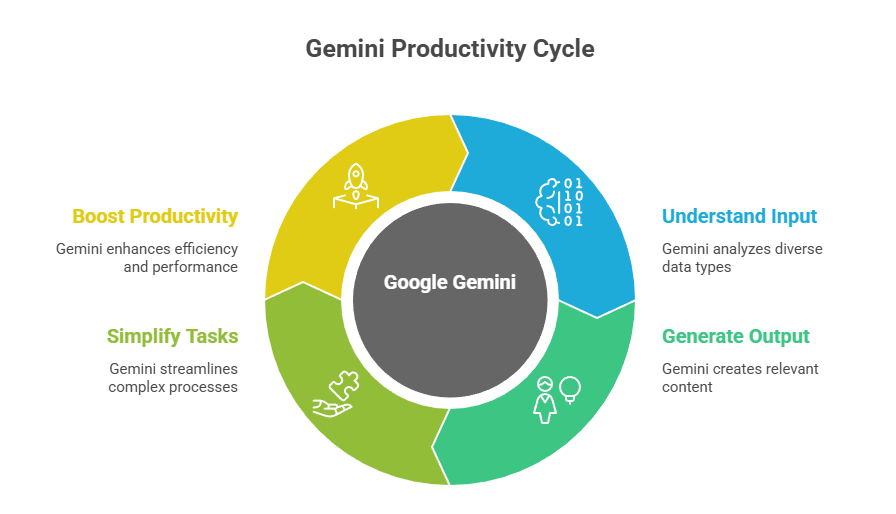
Google Gemini is an advanced AI system developed by Google that can understand and generate text, images, code, structured data, and contextual insights through a single conversational interface. It supports a wide range of use cases including writing, research, brainstorming, workflow automation, problem-solving, and learning assistance, and users of AI tools often report measurable productivity benefits compared with traditional methods (employees using AI report up to a 40% productivity boost). With integration across web, mobile, and Workspace applications, Gemini acts as a powerful digital assistant for everyday and professional activities.
Whether you are drafting emails, conducting research, managing projects, learning technical concepts, developing software, or creating digital content, Gemini helps simplify complex tasks and streamline productivity. Without an intelligent AI assistant, work processes may become slower, more repetitive, or less organized, which affects performance and efficiency. Using Gemini allows individuals and teams to work smarter, respond faster, and maintain consistency in demanding digital environments.
How Does Google Gemini Work?
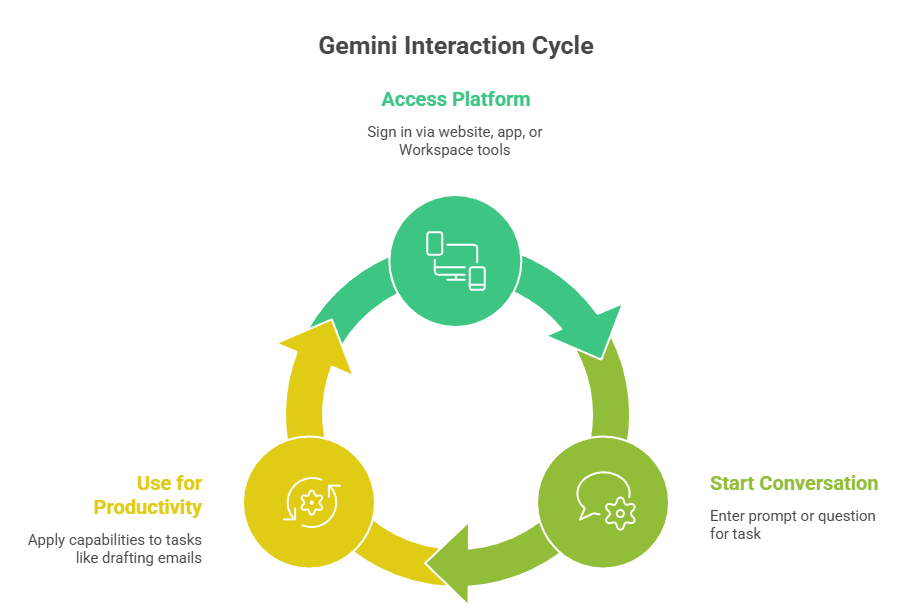
Before understanding how Gemini improves productivity and creativity, it is important to see how the platform functions step-by-step. Each stage of the interaction process helps refine responses, enhance task execution, and ensure relevance based on user intent. This structured workflow allows Gemini to deliver accurate, contextual, and actionable results across multiple use scenarios.
1. Accessing the Gemini Platform
Accessing the Gemini Platform begins with signing in through the Gemini website, mobile app, or supported Google Workspace tools, allowing users to connect seamlessly across devices. Once logged in, Gemini provides an intuitive interface where users can view past conversations, start new tasks, and interact with AI-driven features in real time. This flexible access environment ensures that beginners and professionals can use Gemini for work, learning, or productivity without switching between multiple applications.
2. Starting a Conversation
Starting a Conversation involves entering a prompt, question, or instruction that tells Gemini what task you want to complete, whether writing, analysing, or exploring information. Conversational AI tools like Gemini are increasingly adopted because nearly 35% of customers prefer interacting with AI agents to avoid repeating information or for faster response times compared to traditional support interfaces, demonstrating the practical value of conversational workflows. The system interprets the context of your request, generates a structured response, and allows you to continue refining the output through follow-up questions, creating an interactive loop where users can adjust tone, expand details, or redirect results without restarting the session
3. Using Gemini for Productivity and Workflows
Using Gemini for Productivity and Workflows means applying its capabilities to tasks such as drafting emails, organizing documents, creating presentations, analyzing data, or supporting research activities. Gemini reduces manual effort by automating repetitive steps while maintaining clarity, accuracy, and professional structure in generated outputs. This enables users to work faster, stay organized, and improve overall efficiency across academic, creative, and business environments.
Key Features of Google Gemini
Google Gemini includes a wide range of AI-powered features designed to support creativity, learning, problem-solving, automation, and technical analysis. These capabilities help users generate meaningful results faster while improving structure, precision, and output quality. Gemini’s multimodal design allows seamless interaction across multiple task categories.
1. Content Writing and Editing
Gemini assists with drafting articles, reports, marketing copy, emails, and creative writing while maintaining tone consistency and grammatical accuracy. It can refine language, rewrite content, or adapt text for professional and academic standards. This ensures documents remain polished and publication-ready.
2. Research and Summarization
The platform can summarize long documents, extract key insights, compare topics, and structure study notes for learning and analysis. In fact, many businesses report that AI summarization tools improve workflow efficiency by 20–30% and cut documentation time by up to 40%, making it easier to digest large volumes of information quickly. It simplifies complex subjects into organized explanations for easier understanding and supports students, analysts, and professionals researching detailed topics.
3. Coding and Technical Assistance
Gemini helps developers generate scripts, explain code logic, debug errors, and interpret functions across multiple programming languages. It supports prototyping, learning, and troubleshooting workflows. While human review remains essential, Gemini accelerates development efficiency and problem-solving.
4. Data and Spreadsheet Assistance
Users can request help analyzing data, organizing spreadsheet categories, generating formulas, or interpreting results in Sheets. Gemini improves clarity within operational, financial, or analytical tasks. This allows businesses to streamline information-driven decision-making.
5. Image Generation (Where Available)
Gemini can generate images from descriptive prompts, enabling users to create conceptual graphics, design elements, and visual assets. This feature supports branding, creative ideation, and presentation development. Generated visuals can be refined or adapted to match project requirements.
Benefits of Using Google Gemini

Using Google Gemini delivers multiple performance and productivity advantages across personal, academic, and professional environments. The platform supports efficiency, creativity, and informed decision-making while reducing manual workload. These benefits contribute directly to improved output quality and operational effectiveness.
1. Faster Work Execution
Gemini helps users complete writing, research, planning, and technical tasks more quickly by automating repetitive steps and generating structured results. Reduced manual workload improves turnaround time and supports higher productivity across projects. Faster execution strengthens operational efficiency in both individual and team workflows.
2. Improved Content Quality
AI-enhanced editing ensures communication remains accurate, coherent, and professionally structured. Polished content enhances brand credibility, academic precision, and business presentation standards. Higher quality outputs create stronger engagement and trust with audiences.
3. Support for Learning and Skill Development
Gemini simplifies complex topics and provides step-by-step explanations that help users understand concepts more clearly. This supports education, training, technical learning, and professional development. Context-based responses encourage continuous knowledge growth.
4. Enhanced Creativity and Idea Generation
The platform helps generate outlines, narratives, design prompts, scripts, and brainstorming concepts for creative projects. Structured ideation improves innovation and project exploration. Users gain new perspectives and inspiration through AI-assisted refinement.
5. Cross-Platform Integration
With direct integration into Docs, Gmail, Sheets, and Slides, Gemini fits naturally into existing digital workflows. This reduces friction and allows seamless task execution within familiar tools. Consistent access across environments strengthens productivity continuity.
Google Gemini vs Other AI Assistants
| Feature | Google Gemini | Other AI Tools |
|---|---|---|
| Deep integration with Google apps | Yes | Limited |
| Multimodal understanding | Strong | Varies |
| Research & productivity features | Advanced | Mixed |
| Code & reasoning capabilities | Robust | Varies |
Gemini is especially powerful for users already in the Google ecosystem.
How to Use Google Gemini Step-by-Step
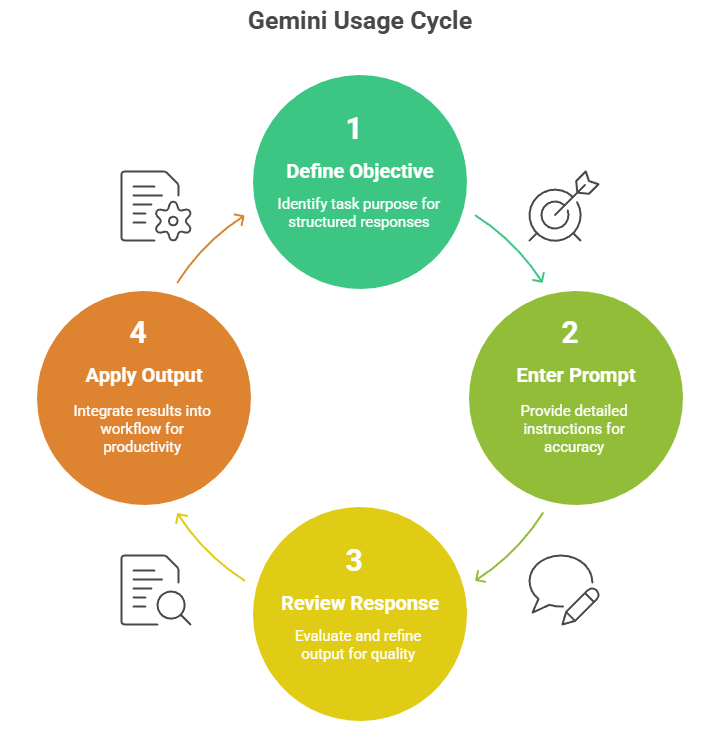
Understanding how to work with Gemini effectively ensures better results and smoother task execution. Providing context, defining objectives, and structuring prompts help the AI deliver precise outputs aligned with expectations. Following a systematic approach ensures accuracy, clarity, and productive outcomes.
Step 1: Define Your Objective
Identify the purpose of your task, whether writing, research, analysis, planning, or creative work. Clear objectives help Gemini generate structured and relevant responses. Well-defined intent results in higher-quality outputs.
Step 2: Enter a Detailed Prompt
Provide descriptive instructions, including tone, context, audience, and desired format. Rich context improves accuracy and alignment with expected results. Precise prompting strengthens outcome relevance.
Step 3: Review and Refine Responses
Evaluate the generated content to ensure it meets structural, contextual, and quality expectations. Request adjustments or ask follow-up questions to refine output. Iterative refinement ensures optimal results.
Step 4: Apply Outputs to Your Workflow
Use the final response in documents, projects, reports, presentations, or learning materials. Integrating AI-assisted results improves productivity and execution quality. Refined outputs enhance real-world performance.
Limitations of Google Gemini

Although Gemini is powerful, users should recognize certain practical limitations. AI-generated content requires review, validation, and responsible use. Understanding these constraints ensures accurate and ethical outcomes.
Gemini should not replace professional judgment for sensitive legal, financial, or medical decisions. It may not always provide fully verified real-time information, and outputs should be cross-checked when accuracy is critical. Human oversight remains essential in high-importance scenarios.
TaskVirtual: Your Partner in Virtual AI Assistance Services

Managing daily tasks like online grocery shopping, scheduling deliveries, and staying on top of household essentials can often be overwhelming. From navigating multiple apps to ensuring timely orders, the process can take valuable time away from personal or professional responsibilities. TaskVirtual provides Virtual AI support, which helps further streamline planning, reminders, and task organisation for an even more efficient experience.
1. Expert Consultation and Review
TaskVirtual’s experienced virtual assistants help users plan, prioritise, and execute tasks more effectively. They assist with scheduling, coordination, documentation, inbox and calendar management, online research, and operational support—ensuring activities remain structured, timely, and aligned with objectives.
2. Affordable and Flexible Pricing
Instead of the high costs associated with hiring a full-time in-house assistant, TaskVirtual offers a cost-efficient alternative. With pricing plans ranging from $3.12/hour to $14.99/hour, the service remains accessible for individuals, professionals, entrepreneurs, and businesses seeking dependable and scalable support.
3. Comprehensive Support Solutions
Whether managing recurring administrative activities, supporting business operations, organizing information, or assisting with digital productivity tasks, TaskVirtual provides end-to-end assistance. Services adapt seamlessly to user requirements, from occasional help to continuous workflow management.
4. Ongoing Support and Quality Assurance
TaskVirtual’s support extends beyond task completion. Assistants provide proactive updates, reminders, progress tracking, and follow-through to ensure accuracy, consistency, and reliable execution—reducing manual effort and improving day-to-day efficiency.
5. Proven Track Record of Excellence
With 364 positive reviews and a 4.7-star rating on trusted virtual assistant platforms, TaskVirtual is recognized as a reliable global partner. Clients rely on their professionalism, responsiveness, and structured approach to simplify workloads, enhance productivity, and support smarter task execution.
Final Thoughts on Using Google Gemini
Google Gemini serves as a comprehensive AI assistant that enhances productivity, creativity, learning, and technical execution across diverse user needs. By combining conversational intelligence with multimodal functionality, it empowers individuals and organizations to work more efficiently and strategically. When used thoughtfully, Gemini becomes a powerful partner for both beginners and professionals seeking smarter ways to operate in a digital environment.
FAQ: How to Use Google Gemini
1. Is Google Gemini free to use?
Yes, Google Gemini offers a free version that provides access to core features for basic use. Some advanced capabilities and higher-tier tools may require a paid subscription.
2. Can Gemini browse the internet?
Yes, Gemini can browse the internet when browsing or web-access mode is enabled. However, users should still verify important or time-sensitive information.
3. Is Gemini better than Google Assistant?
Gemini is generally more advanced for reasoning, creativity, content generation, and productivity tasks. Google Assistant remains better suited for device control and quick utility actions.
4. Can I use Gemini on my phone?
Yes, you can use Gemini through the mobile app or supported Android integration. This allows you to access the assistant on the go using text or voice.
5. Does Gemini replace human work?
No, Gemini does not replace human work; it acts as a support tool that enhances productivity and efficiency. Human review and judgment are still essential for accuracy and decision-making.
 Siddhartha Basu is a Technical Writer at Task Virtual. He loves online games, e-book reading, and Yoga.